Showing posts with label NetflixOSS. Show all posts

Saturday, April 1, 2017

Hystrix Command - Java 8 helpers

Let me start by acknowledging that what I am posting here is far from original, it is inspired by the post here by Demian Neidetcher which was further adapted by two of my former colleagues - Alexey Dmitrovsky1(T-Mobile) and Pavel Orda(Altoros).


Motivation

So the motivation is fairly simple, consider two remote calls the result of which is aggregated in some way:

String  r1 = remoteCall1();
Integer r2 = remoteCall2();

String aggregated = r1 + r2;
assertThat(aggregated).isEqualTo("result1");

Ideally you would want the remote calls to be protected by the excellent Hystrix library, what if I could do it along these lines:

String  r1 = execute("remote1", "remote1", () -> remoteCall1());
Integer r2 = execute("remote2", "remote2", () -> remoteCall2());

String aggregated = r1 + r2;
assertThat(aggregated).isEqualTo("result1");

I have avoided all the boiler plate around needing to define an explicit HystrixCommand around each of my remote calls this way, and instead wrapped the remote calls using a Java 8 lambda expression which resolves to a Supplier functional interface

Even better, a variation of this allows me to aggregate the results in a reactive way by returning an Rx-java Observable instead:

Observable<String>  r1Obs = executeObservable("remote1", "remote1", () -> remoteCall1());
Observable<Integer> r2Obs = executeObservable("remote2", "remote2", () -> remoteCall2());

String aggregated = Observable.zip(r1Obs, r2Obs, (r1, r2) -> (r1 + r2)).toBlocking().single();

assertThat(aggregated).isEqualTo("result1");

What about fallbacks, I can support it by taking in another lambda expression which transforms an exception to a reasonable fallback(and logs the exception in the process):


Observable<String> r1Obs = executeObservable("remote1", "remote1",
        () -> {
            throw new RuntimeException("!!");
        },
        (t) -> {
            logger.error(t.getMessage(), t);
            return "fallback";
        });
Observable<Integer> r2Obs = executeObservable("remote2", "remote2",
        () -> {
            throw new RuntimeException("!!");
        },
        (t) -> {
            logger.error(t.getMessage(), t);
            return 0;
        });

String aggregated = Observable.zip(r1Obs, r2Obs, (r1, r2) -> (r1 + r2)).toBlocking().single();

assertThat(aggregated).isEqualTo("fallback0");


Implementation


The implementation is fairly simple and in its entirety is the following:

import com.netflix.hystrix.HystrixCommand;
import com.netflix.hystrix.HystrixCommandGroupKey;
import com.netflix.hystrix.HystrixCommandKey;
import rx.Observable;

import java.util.function.Function;
import java.util.function.Supplier;

public class GenericHystrixCommand<T> extends HystrixCommand<T> {

    private Supplier<T> toRun;

    private Function<Throwable, T> fallback;


    public static <T> T execute(String groupKey, String commandkey, Supplier<T> toRun) {
        return execute(groupKey, commandkey, toRun, null);
    }

    public static <T> T execute(String groupKey, String commandkey, 
               Supplier<T> toRun, Function<Throwable, T> fallback) {
        return new GenericHystrixCommand<>(groupKey, commandkey, toRun, fallback).execute();
    }

    public static <T> Observable<T> executeObservable(String groupKey, String commandkey, 
               Supplier<T> toRun) {
        return executeObservable(groupKey, commandkey, toRun, null);
    }

    public static <T> Observable<T> executeObservable(String groupKey, String commandkey, 
               Supplier<T> toRun, Function<Throwable, T> fallback) {
        return new GenericHystrixCommand<>(groupKey, commandkey, toRun, fallback)
                .toObservable();
    }

    public GenericHystrixCommand(String groupKey, String commandkey, 
               Supplier<T> toRun, Function<Throwable, T> fallback) {
        super(Setter
                .withGroupKey(HystrixCommandGroupKey.Factory.asKey(groupKey))
                .andCommandKey(HystrixCommandKey.Factory.asKey(commandkey)));
        this.toRun = toRun;
        this.fallback = fallback;
    }

    protected T run() throws Exception {
        return this.toRun.get();
    }

    @Override
    protected T getFallback() {
        return (this.fallback != null)
                ? this.fallback.apply(getExecutionException())
                : super.getFallback();
    }
}


All it does is to take in the code that needs to be wrapped as a Java8 Supplier and the fallback as a Java 8 Function


If you are interested in playing with this pattern, I have a little more fleshed out sample here in my github repo.

Saturday, November 5, 2016

Parallelizing Hystrix calls

This is more common sense than anything else. If you make calls to multiple remote systems and aggregate the results in some way, represented as a marble diagram here:


And you protect each of the remote calls using the awesome Hystrix libraries, then the best way to aggregate the results is using native rx-java operators.

So consider a Hystrix command, assume that such a command in reality would wrap around a remote call:

public class SampleRemoteCallCommand1 extends HystrixCommand<String> {

    public SampleRemoteCallCommand1() {
        super(Setter.withGroupKey(
                HystrixCommandGroupKey.Factory.asKey("sample1"))
                .andCommandKey(HystrixCommandKey.Factory.asKey("sample1")
                )
        );
    }

    @Override
    protected String run() throws Exception {
        DelayUtil.delay(700);
        return "something";
    }

    @Override
    protected String getFallback() {
        return "error";
    }
}


a service which would aggregate responses from multiple such remote calls together would look like this:

SampleRemoteCallCommand1 command1 = new SampleRemoteCallCommand1();
SampleRemoteCallCommand2 command2 = new SampleRemoteCallCommand2();

Observable<String> result1Obs = command1.toObservable();
Observable<Integer> result2Obs = command2.toObservable();

Observable<String> result =
        Observable.zip(result1Obs, result2Obs, (result1, result2) -> result1 + result2);
        

Essentially instead of synchronously executing the Hystrix command, we just use the "toObservable()" method to return a Rx-Java Observable representation of the result and use the different ways that Observable provides to aggregate the results together, in this specific instance the zip operator.

The main advantage of this approach is that we re-use the hystrix threadpool that each command uses to run the tasks in parallel. Here is a sample project which demonstrates this - https://github.com/bijukunjummen/sample-hystrix-parallel

Just a note of caution - if your Hystrix command does not have a fallback and if you use this approach with one of the remote calls failing, you may see a memory leak in your app - I had opened an issue regarding this leak, which the excellent Netflix Team has already addressed.

Tuesday, July 5, 2016

Spring Cloud Zuul - Writing a Filter

Netflix OSS project Zuul serves as a gateway to backend services and provides support for adding in edge features like security, routing. In the Zuul world specific edge features are provided by components called the Zuul Filter and writing such a filter for a Spring Cloud based project is very simple. A good reference to adding a filter is here. Here I wanted to demonstrate two small features - deciding whether a filter should act on a request and secondly to add a header before forwarding the request.

Writing a Zuul Filter


Writing a Zuul Filter is very easy for Spring Cloud, all we need to do is to add a Spring bean which implements the ZuulFilter, so for this example it would look something like this:

import com.netflix.zuul.ZuulFilter;
import com.netflix.zuul.context.RequestContext;
import org.springframework.stereotype.Service;


@Service
public class PayloadTraceFilter extends ZuulFilter {

    private static final String HEADER="payload.trace";

    @Override
    public String filterType() {
        return "pre";
    }

    @Override
    public int filterOrder() {
        return 999;
    }

    @Override
    public boolean shouldFilter() {
      ....   
    }

    @Override
    public Object run() {
     ....
    }
}

Some high level details of this implementation, this has been marked as a "Filter type" of "pre" which means that this filter would be called before the request is dispatched to the backend service, filterOrder determines when this specific filter is called in the chain of filters, should Filter determines if this filter is invoked at all for this request and run contains the logic for the filter.

So to my first consideration, whether this filter should act on the flow at all - this can be done on a request by request basis, my logic is very simple - if the request uri starts with /samplesvc then this filter should act on the request.

@Override
public boolean shouldFilter() {
    RequestContext ctx = RequestContext.getCurrentContext();
    String requestUri = ctx.getRequest().getRequestURI();
    return requestUri.startsWith("/samplesvc");
}

and the second consideration on modifying the request headers to the backend service:

@Override
public Object run() {
    RequestContext ctx = RequestContext.getCurrentContext();
    ctx.addZuulRequestHeader("payload.trace", "true");
    return null;
}

A backing service getting such a request can look for the header and act accordingly, say in this specific case looking at the "payload.trace" header and deciding to log the incoming message:

@RequestMapping(value = "/message", method = RequestMethod.POST)
public Resource<MessageAcknowledgement> pongMessage(@RequestBody Message input, @RequestHeader("payload.trace") boolean tracePayload) {
    if (tracePayload) {
        LOGGER.info("Received Payload: {}", input.getPayload());
    }
....

Conclusion

As demonstrated here, Spring Cloud really makes it simple to add in Zuul filters for any edge needs. If you want to explore this sample a little further I have sample projects available in my github repo.

Wednesday, June 22, 2016

Spring Cloud Zuul Support - Configuring Timeouts

Spring Cloud provides support for Netflix Zuul - a toolkit for creating edge services with routing and filtering capabilities.

Zuul Proxy support is very comprehensively documented at the Spring Cloud site. My objective here is to focus on a small set of attributes relating to handling timeouts when dealing with the proxied services.

Target Service and Gateway


To study timeouts better I have created a sample service(code available here) which takes in a configurable "delay" parameter as part of the request body and a sample request/response looks something like this:

A sample request with a 5 second delay:

{
  "id": "1",
  "payload": "Hello",
  "delay_by": 5000,
  "throw_exception": false
}


and an expected response:

{
  "id": "1",
  "received": "Hello",
  "payload": "Hello!"
}


This service is registered with an id of "sample-svc" in Eureka, a Spring Cloud Zuul proxy on top of this service has the following configuration:

zuul:
  ignoredServices: '*'
  routes:
    samplesvc:
      path: /samplesvc/**
      stripPrefix: true
      serviceId: sample-svc

Essentially forward all requests to /samplesvc/ uri to a service disambiguated with the name "sample-svc" via Eureka.

I also have a UI on top of the gateway to make testing with different delay's easier:


Service Delay Tests


The Gateway behaves without any timeout related issues when a low "delay" parameter is added to the service call, however if the delay parameter is changed as low as say 1 to 1.5 seconds the gateway would time out.

The reason is that if the Gateway is set up to use Eureka, then the Gateway uses Netflix Ribbon component to make the actual call. Further, the ribbon call is wrapped within Hystrix to ensure that the call remains fault tolerant. The first timeout that we are hitting is because Hystrix has a very low delay tolerance threshold and tweaking the hystrix settings should get us past the first timeout.

hystrix:
  command:
    sample-svc:
      execution:
        isolation:
          thread:
            timeoutInMilliseconds: 15000

Note that the Hystrix "Command Key" used for configuration is the name of the service as registered in Eureka.

This may be a little too fine grained for this specific Zuul call, if you are okay about tweaking it across the board then configuration along these lines should do the job:

hystrix:
  command:
    default:
      execution:
        isolation:
          thread:
            timeoutInMilliseconds: 15000

With this change the request to the service via the gateway with a delay of upto 5 seconds will now go through without any issues. If we were to go above 5 seconds though we would get another timeout. We are now hitting Ribbons timeout setting which again can be configured in a fine grained way for the specific service call by tweaking configuration which looks like this:

sample-svc:
  ribbon:
    ReadTimeout: 15000


With both these timeout tweaks in place the gateway based call should now go through

Conclusion


The purpose was not to show ways of setting arbitrarily high timeout values but just to show how to set values that may be more appropriate for your applications. Sensible timeouts are very important to ensure that bad service behaviors don't cascade upto the users. One thing to note is that if the gateway is configured without Ribbon and Eureka by specifying a direct url to a service then these timeout settings are not relevant at all.

If you are interested in exploring this further, the samples are available here.

Tuesday, June 7, 2016

Spring-Reactive samples

Spring-Reactive aims to bring reactive programming support to Spring based projects and this is expected to be available for the timelines of Spring 5. My intention here is to exercise some of the very basic signatures for REST endpoints with this model.

Before I go ahead let me acknowledge that this entire sample is completely based on the samples which Sébastien Deleuze has put together here - https://github.com/sdeleuze/spring-reactive-playground

I wanted to consider three examples, first a case where existing Java 8 CompletableFuture is returned as a type, second where RxJava's Observable is returned as a type and third with Spring Reactor Core's Flux type.

Expected Protocol

The structure of the request and response message handled by each of the three service is along these lines, all of them will take in a request which looks like this:

{
 "id":1,
  "delay_by": 2000,
  "payload": "Hello",
  "throw_exception": false
}


The delay_by will make the response to be delayed and throw_exception will make the response to error out. A sane response will be the following:

{
  "id": "1",
  "received": "Hello",
  "payload": "Response Message"
}

I will be ignoring the exceptions for this post.

CompletableFuture as a return type


Consider a service which returns a java 8 CompletableFuture as a return type:

public CompletableFuture<MessageAcknowledgement> handleMessage(Message message) {
 return CompletableFuture.supplyAsync(() -> {
  Util.delay(message.getDelayBy());
  return new MessageAcknowledgement(message.getId(), message.getPayload(), "data from CompletableFutureService");
 }, futureExecutor);
}

The method signature of a Controller which calls this service looks like this now:

@RestController
public class CompletableFutureController {

 private final CompletableFutureService aService;

 @Autowired
 public CompletableFutureController(CompletableFutureService aService) {
  this.aService = aService;
 }

 @RequestMapping(path = "/handleMessageFuture", method = RequestMethod.POST)
 public CompletableFuture<MessageAcknowledgement> handleMessage(@RequestBody Message message) {
  return this.aService.handleMessage(message);
 }

}

When the CompletableFuture completes the framework will ensure that the response is marshalled back appropriately.

Rx Java Observable as a return type

Consider a service which returns a Rx Java Observable as a return type:

public Observable<MessageAcknowledgement> handleMessage(Message message) {
 logger.info("About to Acknowledge");
 return Observable.just(message)
   .delay(message.getDelayBy(), TimeUnit.MILLISECONDS)
   .flatMap(msg -> {
    if (msg.isThrowException()) {
     return Observable.error(new IllegalStateException("Throwing a deliberate exception!"));
    }
    return Observable.just(new MessageAcknowledgement(message.getId(), message.getPayload(), "From RxJavaService"));
   });
}

The controller invoking such a service can directly return the Observable as a type now and the framework will ensure that once all the items have been emitted the response is marshalled correctly.
@RestController
public class RxJavaController {

 private final RxJavaService aService;

 @Autowired
 public RxJavaController(RxJavaService aService) {
  this.aService = aService;
 }

 @RequestMapping(path = "/handleMessageRxJava", method = RequestMethod.POST)
 public Observable<MessageAcknowledgement> handleMessage(@RequestBody Message message) {
  System.out.println("Got Message..");
  return this.aService.handleMessage(message);
 }

}

Note that since Observable represents a stream of 0 to many items, this time around the response is a json array.


Spring Reactor Core Flux as a return type


Finally, if the response type is a Flux type, the framework ensures that the response is handled cleanly. The service is along these lines:

public Flux<messageacknowledgement> handleMessage(Message message) {
 return Flux.just(message)
   .delay(Duration.ofMillis(message.getDelayBy()))
   .map(msg -> Tuple.of(msg, msg.isThrowException()))
   .flatMap(tup -> {
    if (tup.getT2()) {
     return Flux.error(new IllegalStateException("Throwing a deliberate Exception!"));
    }
    Message msg = tup.getT1();
    return Flux.just(new MessageAcknowledgement(msg.getId(), msg.getPayload(), "Response from ReactorService"));
   });
}

and a controller making use of such a service:

@RestController
public class ReactorController {

 private final ReactorService aService;

 @Autowired
 public ReactorController(ReactorService aService) {
  this.aService = aService;
 }

 @RequestMapping(path = "/handleMessageReactor", method = RequestMethod.POST)
 public Flux<MessageAcknowledgement> handleMessage(@RequestBody Message message) {
  return this.aService.handleMessage(message);
 }

}

Conclusion

This is just a sampling of the kind of return types that the Spring Reactive project supports, the possible return types is way more than this - here is a far more comprehensive example.

I look forward to when the reactive programming model becomes available in the core Spring framework.

The samples presented in this blog post is available at my github repository

Tuesday, May 17, 2016

Spring Cloud with Turbine AMQP

I have previously blogged about using Spring Cloud with Turbine, a Netflix OSS library which provides a way to aggregate the information from Hystrix streams across a cluster.

The default aggregation flow is however pull-based, where Turbine requests the hystrix stream from each instance in the cluster and aggregates it together - this tends to be way more configuration heavy.


Spring Cloud Turbine AMQP offers a different model, where each application instance pushes the metrics from Hystrix commands to Turbine through a central RabbitMQ broker.


This blog post recreates the sample that I had configured previously using Spring Cloud support for AMQP - the entire sample is available at my github repo if you just want the code.

The changes are very minor for such a powerful feature, all the application which wants to feed the hystrix stream to an AMQP broker is to add these dependencies expressed in maven the following way:

<dependency>
    <groupId>org.springframework.cloud</groupId>
    <artifactId>spring-cloud-starter-hystrix</artifactId>
</dependency>
<dependency>
    <groupId>org.springframework.cloud</groupId>
    <artifactId>spring-cloud-netflix-hystrix-stream</artifactId>
</dependency>
<dependency>
    <groupId>org.springframework.cloud</groupId>
    <artifactId>spring-cloud-starter-stream-rabbit</artifactId>
</dependency>


These dependencies would now auto-configure all the connectivity details with RabbitMQ sample topic exchange and would start feeding in the hystrix stream data into this RabbitMQ topic.

Similarly on the Turbine end all that needs to be done is to specify the appropriate dependencies:

<dependency>
    <groupId>org.springframework.cloud</groupId>
    <artifactId>spring-cloud-starter-turbine-stream</artifactId>
</dependency>
<dependency>
    <groupId>org.springframework.cloud</groupId>
    <artifactId>spring-cloud-starter-stream-rabbit</artifactId>
</dependency>

This would consume the hystrix messages from RabbitMQ and would in turn expose an aggregated stream over an http endpoint.

Using this aggregated stream a hystrix dashboard can be displayed along these lines:


The best way to try out the sample is using docker-compose and the README with the sample explains how to build the relevant docker containers and start it up using docker-compose.

Saturday, February 6, 2016

Marble Diagrams - Rxjava operators

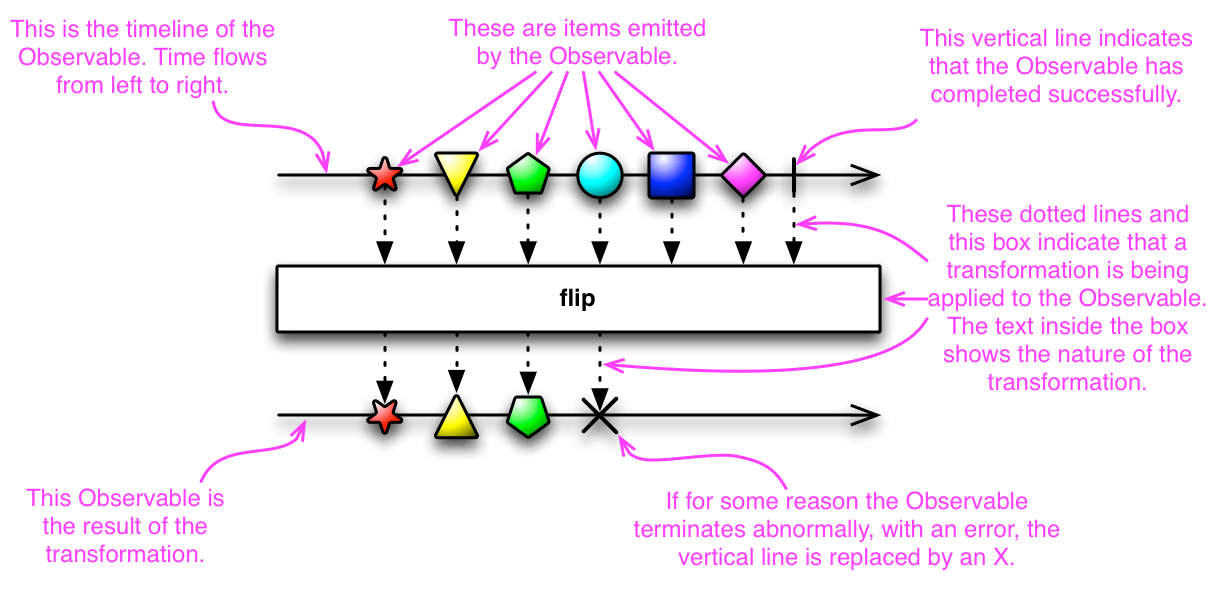
I love the use of Marble Diagrams for representing the different ReactiveX operations. It really clarifies the behavior of some complex operations. RxJava uses these diagrams in its Javadocs and provides the following legend to explain Marble diagrams:


Keeping the marble diagrams in mind, here is a sample test for flatMap operation, written using the Rx-Scala library:

val colors = Observable.just("Red", "Green", "Blue")

val f: String => Observable[String]  = (x: String) => Observable.interval(x.length() seconds).map(_ => x).take(2)

val obs: Observable[String] = colors.flatMap(f)

assert(obs.toBlocking.toList == List("Red", "Blue", "Green", "Red", "Blue", "Green"))

and the marble diagram for the operation:


Given this, the flow in the test should become very clear - we start with an Observable which emits three values "Red", "Green", "Blue", the function transforms an element to another Observable, calling the flatMap now makes this mapping and flattens the result to an Observable.

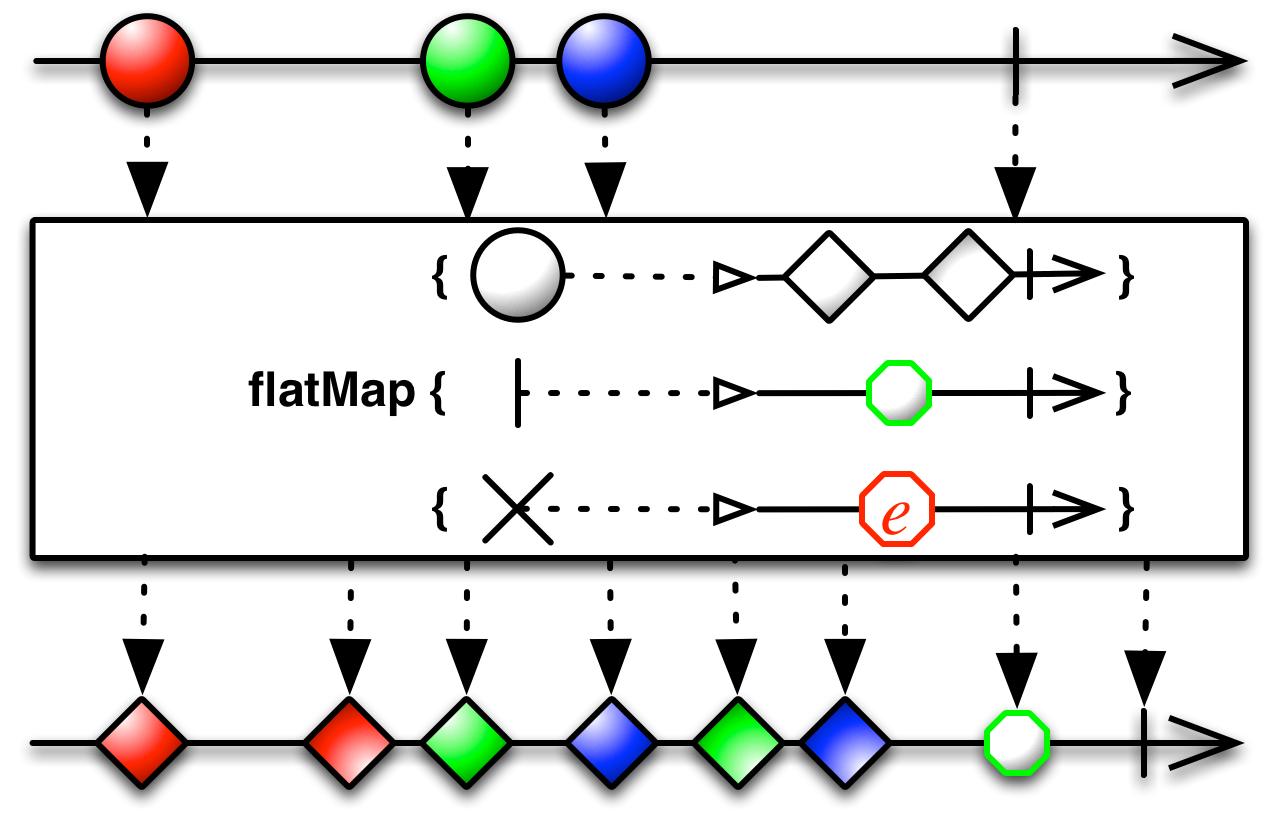
Another a little more complex variation of the flatMap operation has the following signature in scala:

def flatMap[R](onNext: (T) ⇒ Observable[R], onError: (Throwable) ⇒ Observable[R], onCompleted: () ⇒ Observable[R]): Observable[R]

or the following in Java:
public final <R> Observable<R> flatMap(Func1<? super T,? extends Observable<? extends R>> onNext,
                        Func1<? super java.lang.Throwable,? extends Observable<? extends R>> onError,
                        Func0<? extends Observable<? extends R>> onCompleted)


again best explained using its Marble diagram:


Here is a test for this variation of flatMap:

val colors = Observable.just("Red", "Green", "Blue")

val f: String => Observable[String]  = (x: String) => Observable.just(x, x)

val d = () => Observable.just("done")

val e: Throwable => Observable[String] = e => Observable.just(e.getMessage)

val obs: Observable[String] = colors.flatMap(f, e, d)

assert(obs.toBlocking.toList == List("Red", "Red", "Green", "Green", "Blue", "Blue", "done"))


In conclusion, I really appreciate the effort that goes behind creating these marble diagrams by the authors of ReactiveX and feel that they clarify the purpose of the operations neatly.

Saturday, January 16, 2016

Spring Cloud with Turbine

Netflix Hystrix has a neat feature called the Hystrix stream that provides real-time metrics on the state of the Hystrix commands in an application. This data tends to be very raw though, a very cool interface called the Hystrix Dashboard consumes this raw data and presents a graphical information based on the underlying raw data:


Integrating Hystrix Support and Dashboard

In a Spring-Cloud project it is very trivial to expose the Hystrix stream, all it requires is a starter application for Hystrix to be added in as a dependency and the stream functionality is available to the web application.

Step 1: Add the Spring-Cloud-Starter-hystrix:

<dependency>
    <groupId>org.springframework.cloud</groupId>
    <artifactId>spring-cloud-starter-hystrix</artifactId>
</dependency>

Step 2: Enable Hystrix support for the Application, this will expose the hystrix stream at a "/hystrix.stream" uri:

@SpringBootApplication
@EnableHystrix
public class SpringCloudApp {

    public static void main(String[] args) {
        SpringApplication.run(SpringCloudApp.class, args);
    }
}

Now for the Hystrix Dashboard application to graphically view the Hystrix stream, the following annotation will enable that and the application should be available at "/hystrix" uri:

@SpringBootApplication
@EnableHystrixDashboard
public class AggregateApp {

    public static void main(String[] args) {
        SpringApplication.run(AggregateApp.class, args);
    }
}


Spring Cloud with Turbine

Hystrix stream provides information on a single application, Turbine provides a way to aggregate this information across all installations of an application in a cluster. Integrating turbine into a Spring-Cloud based application is straightforward, all it requires is information on which clusters to expose information on and how to aggregate information about the specific clusters. As before to pull in the dependencies of Turbine:

<dependency>
    <groupId>org.springframework.cloud</groupId>
    <artifactId>spring-cloud-starter-turbine</artifactId>
    <exclusions>
        <exclusion>
            <groupId>javax.servlet</groupId>
            <artifactId>servlet-api</artifactId>
        </exclusion>
    </exclusions>
</dependency>

And to enable Turbine support in a Spring Boot based application:

@SpringBootApplication
@EnableHystrixDashboard
@EnableTurbine
public class MonitorApplication {

    public static void main(String[] args) {
        SpringApplication.run(MonitorApplication.class, args);
    }

}

This application is playing the role of both showing the Hystrix Dashboard and exposing turbine stream. Finally the configuration for turbine:

turbine:
  aggregator:
    clusterConfig: SAMPLE-HYSTRIX-AGGREGATE
  appConfig: SAMPLE-HYSTRIX-AGGREGATE

Given this configuration a turbine stream for SAMPLE-HYSTRIX-AGGREGATE cluster is available at "/turbine.stream?cluster=SAMPLE-HYSTRIX-AGGREGATE" uri, it would figure out the instances of the cluster using Eureka, source the hystrix stream from each instance and aggregate it into the turbine stream. If we were to view the Hystrix dashboard against this stream:


If you look at the counts against the host now, it indicates the 2 hosts for which the stream is being aggregated.

I have brushed over a lot of details here, an easier way to check the details may be to check my github project here

Thursday, December 24, 2015

Spring Cloud Rest Client with Netflix Ribbon - Customizations

In an earlier blog post I had covered the basic configuration involved in making a REST call using Spring Cloud which utilizes Netflix Ribbon libraries internally to load balance calls, with basic configurations like setting read timeout, number of retries etc . Here I will go over some more customizations that can be done that will require going beyond the configuration files.

Use Case

My use case is very simple - I want to specify the URL(s) that a rest call is invoked against. This may appear straightforward to start with however there are a few catches to consider. By default if Spring Cloud sees Eureka related libraries in the classpath the behavior is to use Eureka to discover the instances of a service and loadbalance across the instances.

Approach 1 - Use a non-loadbalanced Rest Template

An approach that will work is to use an instance of RestTemplate that does not use Ribbon at all:

@Bean
public RestOperations nonLoadbalancedRestTemplate() {
    return new RestTemplate();
}

Now, where you need the Rest Template, you can inject this instance in, knowing that Spring Cloud also would have instantiated another instance that supports Eureka, so this injection will have to be done by name this way:

@Service("restTemplateDirectPongClient")
public class RestTemplateDirectPongClient implements PongClient {

    private final RestOperations restTemplate;

    @Autowired
    public RestTemplateDirectPongClient(@Qualifier("nonLoadbalancedRestTemplate") RestOperations restTemplate) {
        this.restTemplate = restTemplate;
    }

    ...
}

The big catch with the approach however is now that we have bypassed Ribbon all the features that Ribbon provides are lost - we would not have features like automatic retry, read and connect timeouts, loadbalancing in case we had multiple urls. So a better approach may be the following.

Approach 2 - Customize Ribbon based Rest Template

In the earlier blog post I had shown some basic customization of Ribbon which can be made using a configuration file:

samplepong:
  ribbon:
    DeploymentContextBasedVipAddresses: sample-pong
    ReadTimeout: 5000
    MaxAutoRetries: 2

All the customizations that you would normally do through a configuration file for Ribbon however do not carry over, in this specific instance I want to use a list of server instances that I specify instead of letting Ribbon figure out via a Eureka call. Using raw ribbon it is specified the following way:

samplepong.ribbon.NIWSServerListClassName=com.netflix.loadbalancer.ConfigurationBasedServerList
samplepong.ribbon.listOfServers=127.0.0.1:8082

This specific configuration will not work with Spring Cloud however, the way to specify a list of servers is by specifying a configuration file along these lines:

package org.bk.noscan.consumer.ribbon;

import com.netflix.client.config.IClientConfig;
import com.netflix.loadbalancer.ConfigurationBasedServerList;
import com.netflix.loadbalancer.Server;
import com.netflix.loadbalancer.ServerList;
import org.springframework.cloud.netflix.ribbon.RibbonClientConfiguration;
import org.springframework.context.annotation.Bean;
import org.springframework.context.annotation.Configuration;

@Configuration
public class PongDirectCallRibbonConfiguration extends RibbonClientConfiguration {

    @Bean
    @Override
    public ServerList<Server> ribbonServerList(IClientConfig clientConfig) {
        ConfigurationBasedServerList serverList = new ConfigurationBasedServerList();
        serverList.initWithNiwsConfig(clientConfig);
        return serverList;
    }

}

and telling Ribbon to use this configuration for the specific "named client" that we are concerned about:

@RibbonClients({
        @RibbonClient(name = "samplepongdirect", configuration = PongDirectCallRibbonConfiguration.class),
})

With this configuration in place, the list of servers can now be specified using configuration this way:

samplepongdirect:
  ribbon:
    DeploymentContextBasedVipAddresses: sample-pong
    listOfServers: localhost:8082
    ReadTimeout: 5000
    MaxAutoRetries: 2

One thing to note is that since the Ribbon Configuration is a normal Spring configuration it will likely get picked up as part of the @ComponentScan annotation, since this is very specific for Ribbon we would not want this configuration to be picked up this way. I have avoided that by specifying a package not in the normal classpath scan "org.bk.noscan.*" package!, I am not sure if there is another clean way to do this but this approach has worked well for me.

This approach is little more extensive than the first approach, however the advantage is that once this is in place all the features of Ribbon carry over.

Conclusion

This concludes the customizations involved in using Spring Cloud with Ribbon. If you are interested in exploring the code a little further I have this integrated in my github repo here.

References

Spring Cloud reference documentation has been an awesome source of information for all the details presented here. I had mistakenly opened a github issue thinking that it is a Spring Cloud issue and got some very useful information through the discussion here

Sunday, December 6, 2015

Spring Cloud Rest Client with Netflix Ribbon - Basics

In an earlier blog post I had covered the different options for a REST client in the Spring Cloud world. All the options wrap around a Netflix OSS based component called Ribbon which handles the aspects related to loadbalancing the calls across different instances hosting a service, handling failovers, timeouts etc. Here I will cover a few ways to customize the behavior of underlying Ribbon components when used with Spring Cloud and follow it up with more comprehensive customizations.

Creating a Rest Client


To recap, first consider a case where a simple service needs to be called:


A typical way to make this call using Spring is to inject in a RestTemplate and use it make this call, the following way:


public class RestTemplateBasedPongClient implements PongClient {

    @Autowired
    private RestTemplate restTemplate;

    @Override
    public MessageAcknowledgement sendMessage(Message message) {
        String pongServiceUrl = "http://serviceurl/message";
        HttpEntity<Message> requestEntity = new HttpEntity<>(message);
        ResponseEntity<MessageAcknowledgement> response =  this.restTemplate.exchange(pongServiceUrl, HttpMethod.POST, requestEntity, MessageAcknowledgement.class, Maps.newHashMap());
        return response.getBody();
    }

}

There is nothing special here. When using Spring Cloud however the same code behaves differently, now the RestTemplate internally uses Netflix OSS Ribbon libraries to make the call. This helps as the typical call flow is to first find the instances running the service and then to loadbalance the calls across the instances and to maintain this state.

Rest Client With Ribbon


Let me digress a little to touch on Ribbon, Ribbon uses an abstraction called a "Named client" to control the behavior of a remote service call - the name by which the service has registered with Eureka, timeout for service calls, how many retries in case of failures etc. These are specified through configuration files, and the entries are typically along these lines, note that the "Named client" here is "samplepong" and the properties have this as a prefix:

samplepong.ribbon.MaxAutoRetries=2
samplepong.ribbon.MaxAutoRetriesNextServer=2
samplepong.ribbon.OkToRetryOnAllOperations=true
samplepong.ribbon.ServerListRefreshInterval=2000
samplepong.ribbon.ConnectTimeout=5000
samplepong.ribbon.ReadTimeout=90000
samplepong.ribbon.EnableZoneAffinity=false
samplepong.ribbon.DeploymentContextBasedVipAddresses=sample-pong
samplepong.ribbon.NIWSServerListClassName=com.netflix.niws.loadbalancer.DiscoveryEnabledNIWSServerList


Coming back to Spring Cloud, it supports the concept of a "Named Client" in a very clever way through the Url hostname, so the RestTemplate call would now look like this:

ResponseEntity<MessageAcknowledgement> response =  this.restTemplate.exchange("http://samplepong/message", HttpMethod.POST, requestEntity, MessageAcknowledgement.class, Maps.newHashMap());

The "samplepong" in the url is the "Named client" and any customization for the behavior of the underlying Ribbon can be made by specifying the properties using this prefix. Since this is a Spring Cloud applications the properties can be specified cleanly in a yaml format along these lines:

samplepong:
  ribbon:
    DeploymentContextBasedVipAddresses: sample-pong
    ReadTimeout: 5000
    MaxAutoRetries: 2


Conclusion

This covers the basics of how Spring Cloud abstracts out the underlying the Ribbon libraries to provide a very intuitive facade to make remote service calls in the Cloud environment. There are some details that I have skimmed over on some of the customizations, I will cover these in a newer post. Here is my github repo with the code that I have used for the article.

Sunday, November 22, 2015

Spring Cloud support for Hystrix

Spring Cloud project provides comprehensive support for Netflix OSS Hystrix library. I have previously written about how to use the raw Hystrix library to wrap remote calls. Here I will be going over how Hystrix can be used with Spring Cloud

Basics

There is actually nothing much to it, the raw Hystrix concepts just carry over with certain Spring boot specific enhancements. Consider a simple Hystrix command, that wraps around a call to a Remote service:


import agg.samples.domain.Message;
import agg.samples.domain.MessageAcknowledgement;
import agg.samples.feign.RemoteServiceClient;
import com.netflix.hystrix.HystrixCommand;
import com.netflix.hystrix.HystrixCommandGroupKey;
import org.slf4j.Logger;
import org.slf4j.LoggerFactory;

public class RemoteMessageClientCommand extends HystrixCommand<MessageAcknowledgement> {
    private static final String COMMAND_GROUP = "demo";
    private static final Logger logger = LoggerFactory.getLogger(RemoteMessageClientCommand.class);

    private final RemoteServiceClient remoteServiceClient;
    private final Message message;

    public RemoteMessageClientCommand(RemoteServiceClient remoteServiceClient, Message message) {
        super(HystrixCommandGroupKey.Factory.asKey(COMMAND_GROUP));
        this.remoteServiceClient = remoteServiceClient;
        this.message = message;
    }

    @Override
    protected MessageAcknowledgement run() throws Exception {
        logger.info("About to make Remote Call");
        return this.remoteServiceClient.sendMessage(this.message);
    }

    @Override
    protected MessageAcknowledgement getFallback() {
        return new MessageAcknowledgement(message.getId(), message.getPayload(), "Fallback message");
    }
}

There are no Spring related classes here and this command can be used directly in a Spring based project, say in a controller the following way:


@RestController
public class RemoteCallDirectCommandController {

    @Autowired
    private RemoteServiceClient remoteServiceClient;

    @RequestMapping("/messageDirectCommand")
    public MessageAcknowledgement sendMessage(Message message) {
        RemoteMessageClientCommand remoteCallCommand = new RemoteMessageClientCommand(remoteServiceClient, message);
        return remoteCallCommand.execute();
    }
}

The customization of behavior of a Hystrix command is normally performed through NetflixOSS Archaius properties, however Spring Cloud provides a bridge to make the Spring defined properties visible as Archaius properties, this in short means that I can define my properties using Spring specific configuration files and they would be visible when customizing the command behavior.

So if were earlier customizing say a HelloWorldCommand's behavior using Archaius properties which look like this:

hystrix.command.HelloWorldCommand.metrics.rollingStats.timeInMilliseconds=10000
hystrix.command.HelloWorldCommand.execution.isolation.strategy=THREAD
hystrix.command.HelloWorldCommand.execution.isolation.thread.timeoutInMilliseconds=1000
hystrix.command.HelloWorldCommand.circuitBreaker.errorThresholdPercentage=50
hystrix.command.HelloWorldCommand.circuitBreaker.requestVolumeThreshold=20
hystrix.command.HelloWorldCommand.circuitBreaker.sleepWindowInMilliseconds=5000

this can be done in the Spring Cloud world the exact same way in a application.properties file or in a application.yml file the following way:

hystrix:
  command:
    HelloWorldCommand:
      metrics:
        rollingStats:
          timeInMilliseconds: 10000
      execution:
        isolation:
          strategy: THREAD
          thread:
            timeoutInMilliseconds: 5000
      circuitBreaker:
        errorThresholdPercentage: 50
        requestVolumeThreshold: 20
        sleepWindowInMilliseconds: 5000

Annotation based Approach

I personally prefer the direct command based approach, however a better approach for using Hystrix in the Spring world may be to use hystrix-javanica based annotations instead. The use of this annotation is best illustrated with an example. Here is the remote call wrapped in a Hystrix command with annotations:

import agg.samples.domain.Message;
import agg.samples.domain.MessageAcknowledgement;
import agg.samples.feign.RemoteServiceClient;
import com.netflix.hystrix.contrib.javanica.annotation.HystrixCommand;
import org.springframework.beans.factory.annotation.Autowired;
import org.springframework.stereotype.Service;

@Service
public class RemoteMessageAnnotationClient  {

    private final RemoteServiceClient remoteServiceClient;

    @Autowired
    public RemoteMessageAnnotationClient(RemoteServiceClient remoteServiceClient) {
        this.remoteServiceClient = remoteServiceClient;
    }

    @HystrixCommand(fallbackMethod = "defaultMessage", commandKey = "RemoteMessageAnnotationClient" )
    public MessageAcknowledgement sendMessage(Message message) {
        return this.remoteServiceClient.sendMessage(message);
    }

    public MessageAcknowledgement defaultMessage(Message message) {
        return new MessageAcknowledgement("-1", message.getPayload(), "Fallback Payload");
    }

}


These annotations are translated using an aspect into a regular Hystrix commands behind the scenes, the neat thing though is that there is no ceremony in using this in a Spring Cloud project, it just works. Like before if the behavior needs to be customized it can be done with the command specific properties. One small catch is that the command name by default is the method name, so in my example the command name would have been "sendMessage", which I have customized using the annotation to be a different name.

If you are interested in exploring this sample further, here is my github project.

Saturday, November 7, 2015

Gentle Introduction to Hystrix - Wrapup

This is a follow up to two other posts - Motivation for why something like Hystrix is needed in a distributed systems and a basic intro to Hystrix.

This will be a wrap of my Hystrix journey with details of various properties that can be tweaked to change the behavior of Hystrix and will touch on a few advanced concepts

Tweaking Hystrix Behavior

Hystrix configuration is explained in this wiki here, in brief two broad groups control the properties of Hystrix,

1. Command Properties
2. ThreadPool properties

The properties follow an order of precedence that is explained in the wiki, here I will concentrate on ones specified through a properties file.

For a sample Command defined the following way:

public class HelloWorldCommand extends HystrixCommand<String> {

    private static final Logger logger = LoggerFactory.getLogger(HelloWorldCommand.class);

    private final String name;

    public HelloWorldCommand(String name) {
        super(HystrixCommandGroupKey.Factory.asKey("default"));
        this.name = name;
    }

    @Override
    protected String run() throws Exception {
        logger.info("HelloWorld Command Invoked");
        return "Hello " + name;
    }
}

First behavior that can be tweaked is whether to execute the command in a thread pool or the same thread of execution as the caller(SEMAPHORE strategy type). If the execution is in a threadpool, then a timeout for the request can be set.

hystrix.command.HelloWorldCommand.execution.isolation.strategy=THREAD
hystrix.command.HelloWorldCommand.execution.isolation.thread.timeoutInMilliseconds=1000

The second behavior is the Circuit breaker which works based on information collected during a rolling window of time, configured this way, say for 10 seconds:

hystrix.command.HelloWorldCommand.metrics.rollingStats.timeInMilliseconds=10000

In this window if a certain percent of failures(say 50%) happen for a threshold of requests(say 20 in 10 seconds) then the circuit is broken, with a configuration which looks like this:

hystrix.command.HelloWorldCommand.circuitBreaker.requestVolumeThreshold=20
hystrix.command.HelloWorldCommand.circuitBreaker.errorThresholdPercentage=50

Once a circuit is broken, it stays that way for a time set the following way, 5 seconds in this instance:
hystrix.command.HelloWorldCommand.circuitBreaker.sleepWindowInMilliseconds=5000

The threadpool settings are controlled using the Group Key that was specified, called default in this sample. A specific "Threadpool Key" could also have been specified as part of the constructor though.

hystrix.threadpool.default.coreSize=10
hystrix.threadpool.default.queueSizeRejectionThreshold=5

Here 10 commands can potentially be run in parallel and another 5 held in a queue beyond which the requests will be rejected.

Request Collapsing

Tomaz Nurkiewicz in his blog site NoBlogDefFound has done an excellent job of explaining Request Collapsing . My example is a little simplistic, consider a case where a lot of requests are being made to retrieve a Person given an id, the following way:

public class PersonService {

    public Person findPerson(Integer id) {
        return new Person(id, "name : " + id);
    }

    public List<Person> findPeople(List<Integer> ids) {
        return ids
                .stream()
                .map(i -> new Person(i, "name : " + i))
                .collect(Collectors.toList());
    }
}

The service responds with a canned response but assume that the call was to a remote datastore. Also see that this service implements a batched method to retrieve a list of People given a list of id's.

Request Collapsing is a feature which would batch multiple user requests occurring over a time period into a single such remote call and then fan out the response back to the user.

A hystrix command which takes the set of id's and gets the response of people can be defined the following way:

public class PersonRequestCommand extends HystrixCommand<List<Person>>{

    private final List<Integer> ids;
    private final PersonService personService = new PersonService();
    private static final Logger logger = LoggerFactory.getLogger(PersonRequestCommand.class);

    public PersonRequestCommand(List<Integer> ids) {
        super(HystrixCommandGroupKey.Factory.asKey("default"));
        this.ids = ids;
    }

    @Override
    protected List<Person> run() throws Exception {
        logger.info("Retrieving details for : " + this.ids);
        return personService.findPeople(this.ids);
    }
}

Fairly straightforward up to this point, the complicated logic is now in the RequestCollapser which looks like this:

package aggregate.commands.collapsed;

import com.netflix.hystrix.HystrixCollapser;
import com.netflix.hystrix.HystrixCollapserKey;
import com.netflix.hystrix.HystrixCollapserProperties;
import com.netflix.hystrix.HystrixCommand;

import java.util.Collection;
import java.util.List;
import java.util.Map;
import java.util.function.Function;
import java.util.stream.Collectors;

public class PersonRequestCollapser extends HystrixCollapser<List<Person>, Person, Integer> {

    private final Integer id;
    public PersonRequestCollapser(Integer id) {
        super(Setter.
                withCollapserKey(HystrixCollapserKey.Factory.asKey("personRequestCollapser"))
                .andCollapserPropertiesDefaults(HystrixCollapserProperties.Setter().withTimerDelayInMilliseconds(2000)));
        this.id = id;
    }

    @Override
    public Integer getRequestArgument() {
        return this.id;
    }

    @Override
    protected HystrixCommand<List<Person>> createCommand(Collection<CollapsedRequest<Person, Integer>> collapsedRequests) {
        List<Integer> ids = collapsedRequests.stream().map(cr -> cr.getArgument()).collect(Collectors.toList());
        return new PersonRequestCommand(ids);
    }

    @Override
    protected void mapResponseToRequests(List<Person> batchResponse, Collection<CollapsedRequest<Person, Integer>> collapsedRequests) {
        Map<Integer, Person> personMap = batchResponse.stream().collect(Collectors.toMap(Person::getId, Function.identity()));

        for (CollapsedRequest<Person, Integer> cr: collapsedRequests) {
            cr.setResponse(personMap.get(cr.getArgument()));
        }
    }
}


There are a few things going on here, first the types in the parameterized type signature indicates the type of response(List<Person>), the response type expected by the caller (Person) and the request type of the request(id of the person). Then there are two methods one to create a batch command and the second to map the responses back to the original requests.

Now given this from a users perspective nothing much changes, the call is made as if to a single command and Request Collapsing handles batching, dispatching and mapping back the responses. This is how a sample test looks like:

@Test
public void testCollapse() throws Exception {
    HystrixRequestContext requestContext = HystrixRequestContext.initializeContext();

    logger.info("About to execute Collapsed command");
    List<Observable<Person>> result = new ArrayList<>();
    CountDownLatch cl = new CountDownLatch(1);
    for (int i = 1; i <= 100; i++) {
        result.add(new PersonRequestCollapser(i).observe());
    }

    Observable.merge(result).subscribe(p -> logger.info(p.toString())
            , t -> logger.error(t.getMessage(), t)
            , () -> cl.countDown());
    cl.await();
    logger.info("Completed executing Collapsed Command");
    requestContext.shutdown();
}

Conclusion

There is far more to Hystrix than what I have covered here. It is truly an awesome library, essential in creating a resilient system and I have come to appreciate the amount of thought process that has gone into designing this excellent library.


Reference


Here is my github repo with all the samples - https://github.com/bijukunjummen/hystrixdemo

Sunday, October 25, 2015

Gentle Introduction to Hystrix - Hello World

In a previous blog post I had covered the motivation for needing a library like Netflix Hystrix. Here I will jump into some of the very basic ways to start using Hystrix and follow it up with more complex use cases.


Hello World


A simple Hello World example of a "Hystrix Command" is the following:

import com.netflix.hystrix.HystrixCommand;
import com.netflix.hystrix.HystrixCommandGroupKey;
import org.slf4j.Logger;
import org.slf4j.LoggerFactory;

public class HelloWorldCommand extends HystrixCommand<String> {

    private static final Logger logger = LoggerFactory.getLogger(HelloWorldCommand.class);

    private final String name;

    public HelloWorldCommand(String name) {
        super(HystrixCommandGroupKey.Factory.asKey("default"));
        this.name = name;
    }

    @Override
    protected String run() throws Exception {
        logger.info("HelloWorld Command Invoked");
        return "Hello " + name;
    }
}


The run method holds any dependent activity that we want to be protected against, which ultimately returns the parameterized type - String in this specific instance. If you are fan of Netflix Rx-java library , then another way to create the Hystrix command is the following:

import com.netflix.hystrix.HystrixCommandGroupKey;
import com.netflix.hystrix.HystrixObservableCommand;
import rx.Observable;

public class HelloWorldObservableCommand extends HystrixObservableCommand<String> {

    private String name;

    public HelloWorldObservableCommand(String name) {
        super(HystrixCommandGroupKey.Factory.asKey("default"));
        this.name = name;
    }

    @Override
    protected Observable<String> resumeWithFallback() {
        return Observable.just("Returning a Fallback");
    }

    @Override
    protected Observable<String> construct() {
        return Observable.just("Hello " + this.name);
    }
}

Here "construct" method returns the Rx-java Observable.


Using a Hystrix Command

Now that we have a Hystrix command to wrap around our call, it can be used in whole lot of different ways, let us start with the simplest, in a synchronous call -

HelloWorldCommand helloWorldCommand = new HelloWorldCommand("World");
assertEquals("Hello World", helloWorldCommand.execute());

Or, it can be made to return a Future :

HelloWorldCommand helloWorldCommand = new HelloWorldCommand("World");
Future future = helloWorldCommand.queue();
assertEquals("Hello World", future.get());

Or, even better it can be made to return a Rx-Java observable:

HelloWorldCommand helloWorldCommand = new HelloWorldCommand("World");

CountDownLatch l = new CountDownLatch(1);

Observable<String> obs = helloWorldCommand.observe();
obs.subscribe(
        s -> logger.info("Received : " + s),
        t -> logger.error(t.getMessage(), t),
        () -> l.countDown()
);
l.await(5, TimeUnit.SECONDS);


The Observable variation of the command also works along the same lines, however we should contrast a small behavior difference:

HelloWorldObservableCommand helloWorldCommand = new HelloWorldObservableCommand("World");
logger.info("Completed executing HelloWorld Command");
Observable<String> obs = helloWorldCommand.observe();

There are two ways to obtain an Observable here, one is like the above by making an ".observe()" call, another is the following way:

HelloWorldObservableCommand helloWorldCommand = new HelloWorldObservableCommand("World");
Observable<String> obs = helloWorldCommand.toObservable();

another is the following using ".toObservable()" call :

HelloWorldObservableCommand helloWorldCommand = new HelloWorldObservableCommand("World");
Observable<String> obs = helloWorldCommand.toObservable();

The difference is that the ".observe()" method returns a Hot Observable which starts executing the "construct" method immediately, whereas the ".toObservable" variation returns a Cold Observable and would not call "construct" method unless it is subscribed to, say the following way:

CountDownLatch l = new CountDownLatch(1);
obs.subscribe(System.out::println, t -> l.countDown(), () -> l.countDown());
l.await();

I have more information here.

Note though that Hystrix Command is not a Singleton, the typical way to use Hystrix Command is to construct it where it is required and dispose it once done.

Fallback and Command Group Key

In the constructor of the HelloWorldCommand, I had called a super class constructor method with the following signature:

public HelloWorldCommand(String name) {
    super(HystrixCommandGroupKey.Factory.asKey(&quot;default&quot;));
    this.name = name;
}

This parameter specifies a Hystrix "Command group" Key, along with Command Key which by default is the simple name of the class, it controls a lot of the bells and whistles of Hystrix behavior, a sample of the properties is the following and I will come back to the specifics of these later:

hystrix.command.HelloWorldCommand.metrics.rollingStats.timeInMilliseconds=10000
hystrix.command.HelloWorldCommand.execution.isolation.strategy=THREAD
hystrix.command.HelloWorldCommand.execution.isolation.thread.timeoutInMilliseconds=1000
hystrix.command.HelloWorldCommand.execution.isolation.semaphore.maxConcurrentRequests=10
hystrix.command.HelloWorldCommand.circuitBreaker.errorThresholdPercentage=50
hystrix.command.HelloWorldCommand.circuitBreaker.requestVolumeThreshold=20
hystrix.command.HelloWorldCommand.circuitBreaker.sleepWindowInMilliseconds=5000

hystrix.threadpool.default.coreSize=10
hystrix.threadpool.default.queueSizeRejectionThreshold=5

Another behavior we may want to control is the response in case the call to the dependent service fails, a fallback method provides this behavior, so consider a case where the dependent service always fails:

import com.netflix.hystrix.HystrixCommand;
import com.netflix.hystrix.HystrixCommandGroupKey;
import org.slf4j.Logger;
import org.slf4j.LoggerFactory;

public class FallbackCommand extends HystrixCommand<String> {

    private static final String COMMAND_GROUP="default";
    private static final Logger logger = LoggerFactory.getLogger(FallbackCommand.class);


    public FallbackCommand() {
        super(HystrixCommandGroupKey.Factory.asKey(COMMAND_GROUP));
    }

    @Override
    protected String run() throws Exception {
        throw new RuntimeException("Always fail");
    }

    @Override
    protected String getFallback() {
        logger.info("About to fallback");
        return "Falling back";
    }
}

Here the dependent service call always fails and the response as shown in the following test will always be the response from the fallback method:

FallbackCommand fallbackCommand = new FallbackCommand();
assertEquals("Falling back", fallbackCommand.execute());


Monitoring

Before I wrap up the basics it is good to demonstrate an awesome feature that Hystrix packs in terms of Hystrix stream and Hystrix dashboard. Let us start with Hystrix streams, if enabled typically as a servlet in Java based webapplications, it provides a SSE stream of realtime statistics about the behavior of the Hystrix commands present in the web application.

Since my demo is based on a Karyon2 Rx-Netty based application, my configuration can be seen here. The information from the Hystrix stream is a little too raw though, this is where the awesome Hystrix dashboard fits in - It consumes the Hystrix stream and shows real-time aggregated information about how each of the Hystrix command and different underlying threadpools are performing. I have here a sample Hystrix dashboard project based on the awesome Spring-Cloud project. A sample dashboard is here:


Conclusion

This covers the Hystrix basics, there is a lot more to go, I will wrap this up in the next blog post with details on some of the advanced Hystrix features.

Sunday, October 11, 2015

Gentle Introduction to Hystrix - Motivation

In the last few days I have been exploring the Netflix Hystrix library and have come to appreciate the features provided by this excellent library.

To quote from the Hystrix site:

Hystrix is a latency and fault tolerance library designed to isolate points of access to remote systems, services and 3rd party libraries, stop cascading failure and enable resilience in complex distributed systems where failure is inevitable.

There are a whole lot of keywords to parse here, however the best way to experience Hystrix in my mind is to try out a sample use case.


An unpredictable Service

Consider a service, an odd one, which takes a json message of the following structure and returns an acknowledgement:


{
    "id":"1",
    "payload": "Sample Payload",
    "throw_exception":false,
    "delay_by": 0
}

The service takes in a payload, but additionally takes in two fields - delay_by which makes the service acknowledge a response after the delay in milliseconds and a "throw_exceptions" field which will result in an exception after the specified delay!

Here is a sample response:

{
 "id":"1",
 "received":"Sample Payload",
 "payload":"Reply Message"
}


If you are following along, here is my github repo with this sample, I have used Netflix Karyon 2 for this sample and the code which handles the request can be expressed very concisely the following way - see how the rx-java library is being put to good use here:

import com.netflix.governator.annotations.Configuration;
import rx.Observable;
import service1.domain.Message;
import service1.domain.MessageAcknowledgement;

import java.util.concurrent.TimeUnit;

public class MessageHandlerServiceImpl implements MessageHandlerService {

    @Configuration("reply.message")
    private String replyMessage;

    public Observable<MessageAcknowledgement> handleMessage(Message message) {
        logger.info("About to Acknowledge");
        return Observable.timer(message.getDelayBy(), TimeUnit.MILLISECONDS)
                .map(l -> message.isThrowException())
                .map(throwException -> {
                    if (throwException) {
                        throw new RuntimeException("Throwing an exception!");
                    }
                    return new MessageAcknowledgement(message.getId(), message.getPayload(), replyMessage);
                });
    }


}


At this point we have a good candidate service which can be made to respond with an arbitrary delay and failure.


A client to the Service

Now onto a client to this service. I am using Netflix Feign to make this call, yet another awesome library, all it requires is a java interface annotated the following way:

package aggregate.service;

import aggregate.domain.Message;
import aggregate.domain.MessageAcknowledgement;
import feign.RequestLine;

public interface RemoteCallService {
    @RequestLine("POST /message")
    MessageAcknowledgement handleMessage(Message message);
}

It creates the necessary proxy implementing this interface using configuration along these lines:

RemoteCallService remoteCallService = Feign.builder()
        .encoder(new JacksonEncoder())
        .decoder(new JacksonDecoder())
        .target(RemoteCallService.class, "http://127.0.0.1:8889");


I have multiple endpoints which delegate calls to this remote client, all of them expose a url pattern along these lines - http://localhost:8888/noHystrix?message=Hello&delay_by=0&throw_exception=false, this first one is an example where the endpoint does not use Hystrix.


No Hystrix Case


As a first example, consider calls to the Remote service without Hystrix, if I were to try a call to http://localhost:8888/noHystrix?message=Hello&delay_by=5000&throw_exception=false or say to http://localhost:8888/noHystrix?message=Hello&delay_by=5000&throw_exception=true, in both instances the user request to the endpoints will simply hang for 5 seconds before responding.


There should be a few things immediately apparent here:

1. If the service responds slowly, then the client requests to the service will be forced to wait for the response to come back.

2. Under heavy load it is very likely that all threads handling user traffic will be exhausted, thus failing further user requests.

2. If the service were to throw an exception, the client does not handle it gracefully.

Clearly there is a need for something like Hystrix which handles all these issues.

Hystrix command wrapping Remote calls


I conducted a small load test using a 50 user load on the previous case and got a result along these lines:

================================================================================
---- Global Information --------------------------------------------------------
> request count                                         50 (OK=50     KO=0     )
> min response time                                   5007 (OK=5007   KO=-     )
> max response time                                  34088 (OK=34088  KO=-     )
> mean response time                                 17797 (OK=17797  KO=-     )
> std deviation                                       8760 (OK=8760   KO=-     )
> response time 50th percentile                      19532 (OK=19532  KO=-     )
> response time 75th percentile                      24386 (OK=24386  KO=-     )
> mean requests/sec                                  1.425 (OK=1.425  KO=-     )

Essentially a 5 second delay from the service results in a 75th percentile time of 25 seconds!, now consider the same test with Hystrix command wrapping the service calls:

================================================================================
---- Global Information --------------------------------------------------------
> request count                                         50 (OK=50     KO=0     )
> min response time                                      1 (OK=1      KO=-     )
> max response time                                   1014 (OK=1014   KO=-     )
> mean response time                                    22 (OK=22     KO=-     )
> std deviation                                        141 (OK=141    KO=-     )
> response time 50th percentile                          2 (OK=2      KO=-     )
> response time 75th percentile                          2 (OK=2      KO=-     )
> mean requests/sec                                 48.123 (OK=48.123 KO=-     )

Strangely the 75th percentile time now is 2 millseconds!, how is this possible, and the answer becomes obvious using the excellent tools that Hystrix provides, here is a Hystrix dashboard view for this test:


What happened here is that the first 10 requests timed out, anything more than a second by default times out with Hystrix command in place, once the first ten transactions failed Hystrix short circuited the command thus blocking anymore requests to the remote service and hence the low response time. On why these transactions were not showing up as failed, this is because there is a fallback in place here which responds to the user request gracefully on failure.

Conclusion

The purpose here was to set the motivation for why a library like Hystrix is required, I will follow this up with the specifics of what is needed to integrate Hystrix into an application and the breadth of features that this excellent library provides.

Saturday, September 26, 2015

Spring Cloud Sidecar - Initialization of Nodes

In the last blog post I had described how the Sidecar application can be used for registering the Cassandra nodes with Eureka and more generally can be used for registering any non-JVM application with Eureka.

In this post I will cover how an application can go about querying the Sidecar registered nodes.

Discovering Registered Nodes - Post Initialization

If the registered nodes are not required during the bean initialization phase then discovering the nodes is fairly straightforward along these lines:

@Component
public class SampleCommandLineRunner implements CommandLineRunner {

    @Autowired
    private DiscoveryClient discoveryClient;

    @PostConstruct
    public void postConstruct() {
//        System.out.println("Printing from postConstruct");
//        printDiscoveredNodes();
    }

    @Override
    public void run(String... strings) throws Exception {
        System.out.println("Printing from run method");
        printDiscoveredNodes();
    }

    public void printDiscoveredNodes() {
        System.out.println(" Printing Discovered Nodes ");

        for (ServiceInstance instance: discoveryClient.getInstances("samplecassandra.vip")) {
            System.out.println("Host: Port = " + instance.getHost() + ":" + instance.getPort());
        }
    }
}

These would print the nodes registered with a name of "samplecasssandra.vip" VIP.

Note that the nodes are being printed from the run method which gets called past the initialization of Spring container. If however the nodes were attempted to be listed from one of the lifecycle stages say the postConstruct method then very likely an exception will be thrown (this behavior is seen with "Angel.SR3" release of Spring Cloud, but appears to work cleanly with "Brixton.*" versions)

Discovering Registered Nodes - During Initialization

Now if an application needs to discover the nodes during initialization the flow is a little more complicated, for a potential issue look at this ticket.

The DiscoveryClient is initialized very late in the Spring Lifecycle and if DiscoveryClient is used in any post-processing activity of a bean it is likely to give an exception.

As an example, say the Cassandra nodes registered using Sidecar is now used by an application to initialize Cassandra connectivity, a way to do it would be to create a wrapper around Cassandra connectivity this way:

import org.springframework.data.cassandra.core.CassandraTemplate;


public class CassandraTemplateWrapper extends CassandraTemplate {

    @Override
    public void afterPropertiesSet() {
        
    }
}

Here CassandraTemplate is being overridden to prevent the check in afterPropertiesSet method that a Cassandra session exists, as a session will be established much later in the start-up cycle.

A Cassandra session can be injected into this custom CassandraTemplate lazily in a bean that implements SmartLifecyle along these lines:

package mvctest.cassandra;

import com.datastax.driver.core.Cluster;
import com.datastax.driver.core.Session;
import org.slf4j.Logger;
import org.slf4j.LoggerFactory;
import org.springframework.beans.factory.FactoryBean;
import org.springframework.beans.factory.annotation.Autowired;
import org.springframework.context.SmartLifecycle;
import org.springframework.core.Ordered;
import org.springframework.data.cassandra.core.CassandraTemplate;
import org.springframework.stereotype.Component;

@Component("cassandraTemplate")
public class EurekaCassandraTemplateFactoryBean implements SmartLifecycle, FactoryBean<CassandraTemplate>, Ordered {

    ....


    @Override
    public boolean isAutoStartup() {
        return true;
    }

    @Override
    public void start() {
        LOGGER.info("About to start Discovery client lookup of Cassandra Cluster!!!");
        final Cluster cluster = this.eurekaClusterBuilder.build();
        Session session = cluster.connect(this.cassandraProperties.getKeyspace());
        this.cassandraTemplateWrapper.setSession(session);
        LOGGER.info("Completed Discovery client lookup of Cassandra Cluster!!!");
        running = true;
    }

    @Override
    public boolean isRunning() {
        return this.running;
    }

    @Override
    public int getPhase() {
        return Integer.MAX_VALUE;
    }

    @Override
    public int getOrder() {
        return 1;
    }
}

This way the Cassandra session can be created very late in the cycle. Somewhat rough, but the approach works.

If you are interested in exploring this sample further I have this code available in my github repo here.

Wednesday, September 16, 2015

Spring Cloud Sidecar

I have an application deployed to a NetflixOSS based cloud which has a structure along these lines:

Essentially a service which persists information to a Cassandra cluster. All the applications are registered to Eureka - so in this instance the service as well as the Cassandra nodes are registered with Eureka, further the service connects to the Cassandra cluster by looking up the nodes via Eureka. 

I will deal with this in two parts - 

  1. Registering Cassandra nodes with Eureka
  2. Service using Eureka to connect to the Cassandra Cluster


Registering Cassandra Nodes with Eureka

This is where a Sidecar application fits in - the purpose of  Sidecar is to facilitate some of things that make an application a good citizen in a Cloud environment, in this specific instance it enables Cassandra to register with Eureka, respond to health checks. Spring Cloud Netflix Sidecar project provides the necessary support to create a Sidecar application.

The amount of coding required to get a Sidecar application up and running is very minimal, Sidecar behaves like a typically Spring Cloud application except that instead of registering itself to Eureka it has to register another application, so the configuration is mostly the same. 

This is my entire code for the Sidecar application!:

import org.springframework.boot.SpringApplication;
import org.springframework.boot.autoconfigure.SpringBootApplication;
import org.springframework.cloud.netflix.sidecar.EnableSidecar;

@SpringBootApplication
@EnableSidecar
public class SampleSidecarApplication {

    public static void main(String[] args) {
        SpringApplication.run(SampleSidecarApplication.class, args);
    }
}


and the properties to go with this:

application.yml
eureka:
  instance:
    virtual-host-name: samplecassandra.vip

spring:
  application:
    name: samplecassandra

sidecar:
  port: 9042

Here the port is declared to be the port that is relevant to Cassandra.

There is one more aspect to handle, healthcheck, the Sidecar exposes an endpoint which can test the health of the supported application in whatever makes sense for the application. For Cassandra it could be connecting to the local node and firing a small CQL query.

Conclusion

Assuming that the Cassandra nodes are now registered with Eureka, there is a good level of complication in trying to create a Cassandra Session on the consuming service side, this is mainly because of the timing involved in instantiating the Eureka client and the point at which the code tries to find the list of nodes. I will cover this in a subsequent post. If you would like to explore this sample further, here is the github repo.

Friday, August 28, 2015

Couchbase Java SDK with Rx-Java

A neat thing about Couchbase Java SDK is that it is built on top of the excellent Rx-Java library, this enables a reactive way to interact with a Couchbase server instance which is very intuitive once you get the hang of it.

Consider a very simple json document that I intend to store in Couchbase:

{"key":"1","value":"one"}


and a Java class to hold this json:

public class KeyVal {
    private String key;
    private String value;

    ...
}

The following is the code to insert an instance of KeyVal to a Couchbase bucket:

JsonObject jsonObject = JsonObject.empty().put("key", keyVal.getKey()).put("value", keyVal.getValue());
JsonDocument doc = JsonDocument.create(keyVal.getKey(), jsonObject);
Observable<JsonDocument> obs = bucket
                .async()
                .insert(doc);

The return type of the insert is an Observable, so if I needed to map the return type back a KeyVal I can use the extensive mapping support provided by Observable class.

Observable<KeyVal> obs = bucket
                .async()
                .insert(doc)
                .map(jsonDoc -> 
                    new KeyVal(jsonDoc.id(), jsonDoc.content().getString("value"))
                );


Other API's follow a similar pattern, for eg. to retrieve the saved document:

bucket
                .async()
                .get(id)
                .map(doc ->
                        new KeyVal(doc.id(),
                                doc.content().getString("value")));

If you are interested in exploring this sample further, here is my github repo with a working example - https://github.com/bijukunjummen/sample-karyon2-couch


References:

Saturday, August 8, 2015

Working with Spring-Cloud and Netflix Archaius

Background

Spring Cloud provides all the tools that you require to create cloud ready microservices. One of the infrastructure components that Spring-Cloud provides is a Configuration server to centralize the properties of an application, however it is possible that you that you may be using other solutions to manage the properties. One such solution is Netflix Archaius and if you work with Netflix Archaius there is a neat way that Spring-Cloud provides to integrate with it.

Integration With Archaius

Spring Cloud provides a Spring Boot Auto-configuration for Archaius which gets triggered on finding the Archaius related libraries with the application. So first to pull in the Archaius libraries, which can be done through the following dependency entry in the POM file:
<dependency>
    <groupId>com.netflix.archaius</groupId>
    <artifactId>archaius-core</artifactId>
</dependency>
Not that the version of the dependency need not be specified, this information flows in from the dependency management information in the parent POM’s.
With this new library in place, Archaius Configuration, all that now needs to be done is to define Spring beans which extend Apache Commons Configuration AbstractConfiguration class and these would automatically get configured by Spring Cloud. As an example consider the following AbstractConfiguration which has one property in it:
@Bean
public AbstractConfiguration sampleArchaiusConfiguration() throws Exception {
    ConcurrentMapConfiguration concurrentMapConfiguration = new ConcurrentMapConfiguration();
    concurrentMapConfiguration.addProperty("testkey", "testvalue");
    return concurrentMapConfiguration;
}

That is essentially it, this property should now be visible as an Archaius property and can be accessed along these lines:

DynamicPropertyFactory.getInstance().getStringProperty("testkey", "").get()


Also there are a few more neat features provided through Archaius integration in Spring-Cloud:
  1. The Spring managed properties are visible as Archaius properties
  2. An endpoint(/archaius) is provided by Spring-Cloud where all the registered archaius properties can be viewed

Conclusion

Spring Cloud natively provides all the tools to write a Cloud Ready microservice, however it is possible that the way to configure the centralized properties may be via Netflix Archaius, if that is the case Spring Cloud enables this neat way to integrate with Archiaus.

Thursday, July 23, 2015

Scatter Gather - Using Java 8 CompletableFuture and Rx-Java Observable

I wanted to explore a simple scatter-gather scenario using Java 8 CompletableFuture and using Rx-Java Observable.


The scenario is simple - Spawn about 10 tasks, each returning a string, and ultimately collect the results into a list.

Sequential

A sequential version of this would be the following:

public void testSequentialScatterGather() throws Exception {
 List<String> list =
   IntStream.range(0, 10)
     .boxed()
     .map(this::generateTask)
     .collect(Collectors.toList());

 logger.info(list.toString());
}

private String generateTask(int i) {
 Util.delay(2000);
 return i + "-" + "test";
}

With CompletableFuture

A method can be made to return a CompletableFuture using a utility method called supplyAsync, I am using a variation of this method which accepts an explicit Executor to use, also I am deliberately throwing an exception for one of the inputs:

private CompletableFuture<String> generateTask(int i,
  ExecutorService executorService) {
 return CompletableFuture.supplyAsync(() -> {
  Util.delay(2000);
  if (i == 5) {
   throw new RuntimeException("Run, it is a 5!");
  }
  return i + "-" + "test";
 }, executorService);
}

Now to scatter the tasks:

List<CompletableFuture<String>> futures =
  IntStream.range(0, 10)
    .boxed()
    .map(i -> this.generateTask(i, executors).exceptionally(t -> t.getMessage()))
    .collect(Collectors.toList());

At the end of scattering the tasks the result is a list of CompletableFuture. Now, to obtain the list of String from this is a little tricky, here I am using one of the solutions suggested in Stackoverflow:

CompletableFuture<List<String>> result = CompletableFuture.allOf(futures.toArray(new CompletableFuture[futures.size()]))
  .thenApply(v -> futures.stream()
       .map(CompletableFuture::join)
       .collect(Collectors.toList()));

CompletableFuture.allOf method is being used here purely to compose the next action to take once all the scattered tasks are completed, once the tasks are completed the futures are again streamed and collected into a list of string.

The final result can then be presented asynchronously:
result.thenAccept(l -> {
 logger.info(l.toString());
});


With Rx-java Observable

Scatter gather with Rx-java is relatively cleaner than the CompletableFuture version as Rx-java provides better ways to compose the results together, again the method which performs the scattered task:

private Observable<String> generateTask(int i, ExecutorService executorService) {
    return Observable
            .<String>create(s -> {
                Util.delay(2000);
                if ( i == 5) {
                    throw new RuntimeException("Run, it is a 5!");
                }
                s.onNext( i + "-test");
                s.onCompleted();
            }).onErrorReturn(e -> e.getMessage()).subscribeOn(Schedulers.from(executorService));
}

and to scatter the tasks:

List<Observable<String>> obs =
        IntStream.range(0, 10)
            .boxed()
            .map(i -> generateTask(i, executors)).collect(Collectors.toList());

Once more I have a List of Observable's, and what I need is a List of results, Observable provides a merge method to do just that:

Observable<List<String>> merged = Observable.merge(obs).toList();

which can be subscribed to and the results printed when available:

merged.subscribe(
                l -> logger.info(l.toString()));