Showing posts with label knative. Show all posts

Saturday, September 22, 2018

Knative serving - using Ambassador gateway

This is a continuation of my experimentation with Knative serving, this time around building a gateway on top of a Knative serving applications. This builds on two of my previous posts - on using Knative to deploy a Spring Boot App and making a service to service call in Knative.

Why a Gateway on top of Knative application


To explain this let me touch on my previous blog post. Assuming that Knative serving is already available in a Kubernetes environment, the way to deploy an application is using a manifest which looks like this:

apiVersion: serving.knative.dev/v1alpha1
kind: Service
metadata:
  name: sample-boot-knative-service
  namespace: default
spec:
  runLatest:
    configuration:
      revisionTemplate:
        spec:
          container:
            image: bijukunjummen/sample-boot-knative-app:0.0.3-SNAPSHOT
            env:
            - name: ASAMPLE_ENV
              value: "sample-env-val"


Now to invoke this application, I have to make the call via an ingress created by Knative serving, which can be obtained the following way in a minikube environment:

export GATEWAY_URL=$(echo $(minikube ip):$(kubectl get svc knative-ingressgateway -n istio-system -o 'jsonpath={.spec.ports[?(@.port==80)].nodePort}'))

The request now has to go through the ingress and the ingress uses a Host http header to then route the request to the app. The host header for the deployed service can be obtained using the following bash script:

export APP_DOMAIN=$(kubectl get services.serving.knative.dev sample-boot-knative-service  -o="jsonpath={.status.domain}")

and then a call via the knative ingress gateway made the following way, using CURL:

curl -X "POST" "http://${GATEWAY_URL}/messages" \
     -H "Accept: application/json" \
     -H "Content-Type: application/json" \
     -H "Host: ${APP_DOMAIN}" \
     -d $'{
  "id": "1",
  "payload": "one",
  "delay": "300"
}'

or using httpie:

http http://${GATEWAY_URL}/messages Host:"${APP_DOMAIN}" id=1 payload=test delay=1

There are too many steps involved in making a call to the application via the knative ingress:


My objective in this post is to simplify the users experience in making a call to the app by using a Gateway like Ambassador.


Integrating Ambassador to Knative


There is nothing special about installing Ambassador into a Knative environment, the excellent instructions provided here worked cleanly in my minikube environment.

Now my objective with the gateway is summarized in this picture:


With Ambassador in place, all the user has to do is to send a request to Ambassador Gateway and it would take care of plugging in the Host header before making a request to the Knative Ingress.

So how does this work, fairly easily! assuming Ambassador is in place, all it needs is a configuration which piggybacks on a Kubernetes service the following way:

---
apiVersion: v1
kind: Service
metadata:
  name: sample-knative-app-gateway
  annotations:
    getambassador.io/config: |
      ---
      apiVersion: ambassador/v0
      kind:  Mapping
      name: sample-boot-knative-app
      prefix: /messages
      rewrite: /messages
      service: knative-ingressgateway.istio-system.svc.cluster.local 
      host_rewrite: sample-boot-knative-service.default.example.com
spec:
  type: LoadBalancer
  ports:
  - name: ambassador
    port: 80
    targetPort: 80
  selector:
    service: ambassador

Here I am providing configuration via a Service annotations, intercepting any calls to /messages uri and forwarding these request to the knative ingressgatway service (knative-ingressgateway.istio-system.svc.cluster.local) and adding the host header of "sample-boot-knative-service.default.example.com".


Now the interaction from a user perspective is far simpler, all I have to do is to get the url for this new service and to make the api call, in a minikube environment using the following bash script:

export AMB_URL=$(echo $(minikube ip):$(kubectl get svc sample-knative-app-gateway -n default -o 'jsonpath={.spec.ports[?(@.port==80)].nodePort}'))

http http://${AMB_URL}/messages id=1 payload=test delay=1


It may be easier to try this on a real code, which is available my github repo here.

Tuesday, September 4, 2018

Knative Serving - Service to Service call

In a previous post I had covered using Knative's Serving feature to run a sample Java Application. This post will be go into the steps to deploy two applications, with one application calling the other.


Details of the Sample

The entire sample is available at my github repository - https://github.com/bijukunjummen/sleuth-webflux-sample.

The applications are Spring Boot based. The backend application exposes an endpoint "/messages" when invoked with a payload which looks like this:

{
    "delay": "0",
    "id": "123",
    "payload": "test",
    "throw_exception": "true"
}

would respond after the specified delay. If the payload has the "throw_exception" flag set to true, then it would return a 5XX after the specified delay.

The client application exposes a "/passthrough/messages" endpoint, which takes in the exact same payload and simply forwards it to the backend application. The url to the backend app is passed to the client app as a "LOAD_TARGET_URL" environment property.


Deploying as a Knative Serving service

The subfolder to this project - knative, holds the manifest for deploying the Knative serving Service for the 2 applications. The backend application's knative service manifest looks like this:

apiVersion: serving.knative.dev/v1alpha1
kind: Service
metadata:
  name: sample-backend-app
  namespace: default
spec:
  runLatest:
    configuration:
      revisionTemplate:
        spec:
          container:
            image: bijukunjummen/sample-backend-app:0.0.1-SNAPSHOT
            env:
            - name: VERSION
              value: "0.0.2-SNAPSHOT"
            - name: SERVER_PORT
              value: "8080"

The client app has to point to the backend service and is specified in the specs:

apiVersion: serving.knative.dev/v1alpha1
kind: Service
metadata:
  name: sample-client-app
  namespace: default
spec:
  runLatest:
    configuration:
      revisionTemplate:
        spec:
          container:
            image: bijukunjummen/sample-client-app:0.0.2-SNAPSHOT
            env:
            - name: VERSION
              value: "0.0.1-SNAPSHOT"
            - name: LOAD_TARGET_URL
              value: http://sample-backend-app.default.svc.cluster.local
            - name: SERVER_PORT
              value: "8080"


The domain "sample-backend-app.default.svc.cluster.local", points to the dns name of the backend service created by the Knative serving service resource


Testing

It was easier for me to simply create a small video with how I tested this:


As in my previous post, the request to the application is via the knative ingress gateway, the url to which can be obtained the following way(for a minikube environment):

export GATEWAY_URL=$(echo $(minikube ip):$(kubectl get svc knative-ingressgateway -n istio-system -o 'jsonpath={.spec.ports[?(@.port==80)].nodePort}'))

And a sample request made the following way, note that the routing in the Gateway is via the host header, in this instance "sample-client-app.default.example.com":

export CLIENT_DOMAIN=$(kubectl get services.serving.knative.dev sample-client-app  -o="jsonpath={.status.domain}")

http http://${GATEWAY_URL}/passthrough/messages Host:"${CLIENT_DOMAIN}" id=1 payload=test delay=100 throw_exception=false


Sunday, July 29, 2018

"Knative Serving" for Spring Boot Applications

I got a chance to try Knative's Serving feature to deploy a Spring Boot application and this post is simply documenting a sample and the approach I took.

I don't understand the internals of Knative enough yet to have an opinion on whether this approach is better than the deployment + services + ingress based approach.

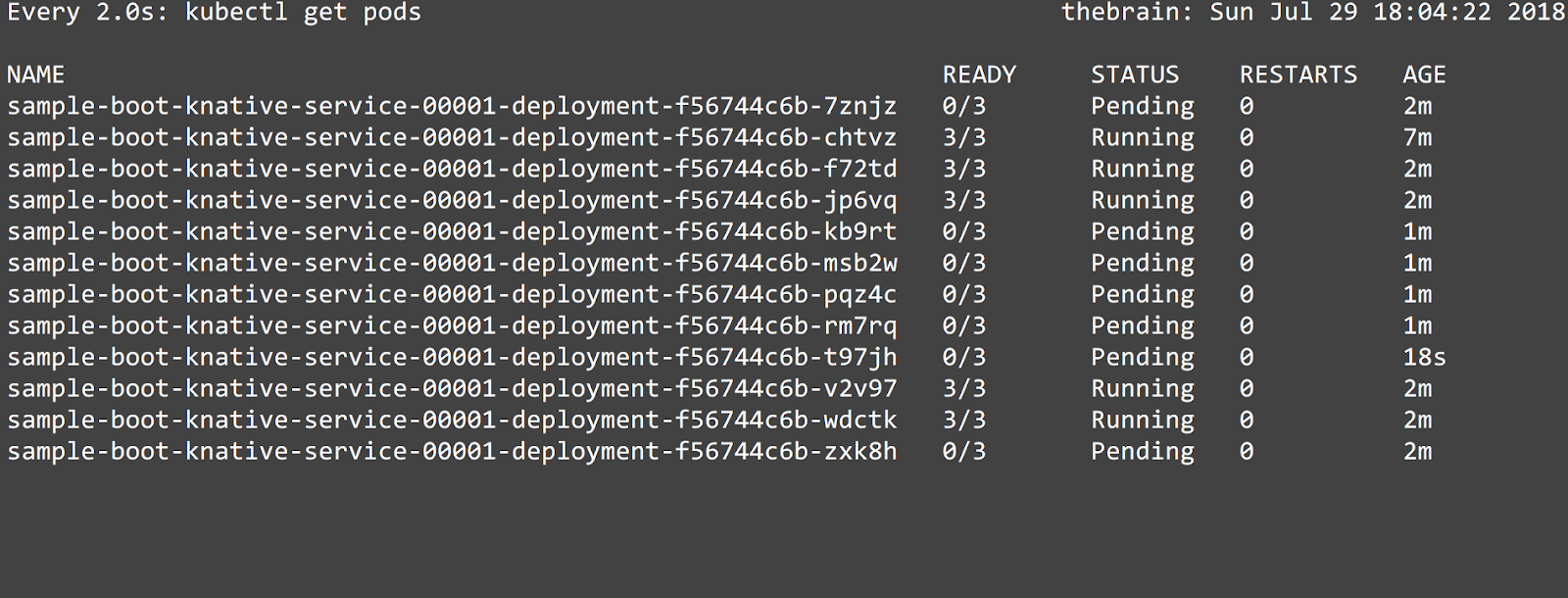
One feature that is awesome is the auto-scaling feature in Knative Serving, which based on the load, increases/decreases the number of pods as part of a "Deployment" handling the request.

Details of the Sample


My entire sample is available here and it is mostly developed based on the java sample available with Knative Serving documentation. I used Knative with a minikube environment to try the sample.


Deploying to Kubernetes/Knative

Assuming that a Kubernetes environment with Istio and Knative has been set-up, the way to run the application is to deploy a Kubernetes manifest this way:

apiVersion: serving.knative.dev/v1alpha1
kind: Service
metadata:
  name: sample-boot-knative-service
  namespace: default
spec:
  runLatest:
    configuration:
      revisionTemplate:
        spec:
          container:
            image: bijukunjummen/sample-boot-knative-app:0.0.1-SNAPSHOT

The image "bijukunjummen/sample-boot-knative-app:0.0.1-SNAPSHOT" is publicly available via Dockerhub, so this sample should work out of the box.

Applying this manifest:

kubectl apply -f service.yml

should register a Knative Serving Service resource with Kubernetes, the Knative serving services resource manages the lifecycle of other Knative resources (configuration, revision, route) the details of which can be viewed using the following commands, if anything goes wrong, the details should show up in the output:

kubectl get services.serving.knative.dev sample-boot-knative-service -o yaml

Testing

Assuming that the Knative serving service is deployed cleanly, the first oddity to see is that no pods show up for the application!


If I were to make a request to the app now, which is done via a routing layer managed by Knative - this can be retrieved for a minikube environment using the following bash script:

export GATEWAY_URL=$(echo $(minikube ip):$(kubectl get svc knative-ingressgateway -n istio-system -o 'jsonpath={.spec.ports[?(@.port==80)].nodePort}'))
export APP_DOMAIN=$(kubectl get services.serving.knative.dev sample-boot-knative-service  -o="jsonpath={.status.domain}")

and making a call to an endpoint of the app using CUrl:

curl -X "POST" "http://${GATEWAY_URL}/messages" \
     -H "Accept: application/json" \
     -H "Content-Type: application/json" \
     -H "Host: ${APP_DOMAIN}" \
     -d $'{
  "id": "1",
  "payload": "one",
  "delay": "300"
}'
OR httpie

http http://${GATEWAY_URL}/messages Host:"${APP_DOMAIN}" id=1 payload=test delay=100

should magically, using the auto-scaler component start spinning up the pods to handle the request:


The first request took almost 17 seconds to complete, the time it takes to spin up a pod, but subsequent requests are quick.

Now, to show the real power of auto-scaler I ran a small load test with a 50 user load and pods are scaled up and down as required.


Conclusion

I can see the promise of Knative in automatically managing the resources, once defined using a fairly simple manifest, in a Kubernetes environment and letting a developer focus on the code and logic.