Showing posts with label Scala. Show all posts

Tuesday, March 5, 2019

Water Pouring Problem with Kotlin and Vavr

The first time I saw the Water Pouring Problem being programmatically solved was the excellent lectures on functional Programming by Martin Odersky on Coursera. The solution demonstrates the power of lazy evaluation in Streams with Scala.

Solving Water Pouring Problem using Kotlin

I wanted to explore how I can rewrite the solution described by Martin Odersky using Kotlin and I realized two things - one is that the immutable data structures that Kotlin offers are simply wrappers over Java Collections library and are not truly immutable, secondly the solution using Streams feature in Java will be difficult. However, the Vavr offers a good alternative to both - a first-class Immutable collections library and a Streams library and I took a crack at replicating the solution with Kotlin and Vavr.

A Cup looks like this, represented as a Kotlin data class:

import io.vavr.collection.List


data class Cup(val level: Int, val capacity: Int) {
    override fun toString(): String {
        return "Cup($level/$capacity)"
    }
}

Since the water pouring problem repesents the "state" of a set of cups, this can be simply represented as a "typealias" the following way:
typealias State = List<Cup>


There are 3 different types of moves that can be performed with the water in the cup - Empty it, Fill it, or Pour from one cup to another, represented again as Kotlin Data classes:

interface Move {
    fun change(state: State): State
}

data class Empty(val glass: Int) : Move {
    override fun change(state: State): State {
        val cup = state[glass]
        return state.update(glass, cup.copy(level = 0))
    }

    override fun toString(): String {
        return "Empty($glass)"
    }
}

data class Fill(val glass: Int) : Move {
    override fun change(state: State): State {
        val cup = state[glass]
        return state.update(glass, cup.copy(level = cup.capacity))
    }

    override fun toString(): String {
        return "Fill($glass)"
    }
}

data class Pour(val from: Int, val to: Int) : Move {
    override fun change(state: State): State {
        val cupFrom = state[from]
        val cupTo = state[to]
        val amount = min(cupFrom.level, cupTo.capacity - cupTo.level)

        return state
                .update(from, cupFrom.copy(cupFrom.level - amount))
                .update(to, cupTo.copy(level = cupTo.level + amount))
    }

    override fun toString(): String {
        return "Pour($from,$to)"
    }
}

The implementation is making use of Vavr's List data structures "update" method to create a new list with just the relevant elements updated.


A "Path" represents a history of moves leading to the current state:

data class Path(val initialState: pour.State, val endState: State, val history: List<Move>) {
    fun extend(move: Move) = Path(initialState, move.change(endState), history.prepend(move))

    override fun toString(): String {
        return history.reverse().mkString(" ") + " ---> " + endState
    }
}

I am using the "prepend" method of the list to add elements to the beginning of history. Prepending to a list is an O(1) operation whereas appending is O(n), hence the choice.

Given a "state", a set of possible moves to change the "state" are the following -

1. Empty the glasses -

(0 until count).map { Empty(it) }

2. Fill the glasses -

(0 until count).map { Fill(it) }

3. Pour from one glass to another -

(0 until count).flatMap { from ->
    (0 until initialState.length()).filter { to -> from != to }.map { to ->
        Pour(from, to)
    }
}

Now, all these moves are used for advancing from one state to another. Consider say 2 cups with capacity of 4 and 9 litres, initially filled with 0 litres of water, represented as "List(Cup(0/4), Cup(0/9))", with all possible moves the next set of states of the cups are the following:


Similarly, advancing each of these states to a new set of states would like this(in a somewhat simplified form):


As each State advances to a next set of states based on all possible moves, it can be seen that there will be an explosion of possible paths, this is where laziness offered by the Stream data structure of Vavr comes in. The values in a stream are only computed on request.


Given a set of paths, new paths are created using Stream the following way:

fun from(paths: Set<Path>, explored: Set<State>): Stream<Set<Path>> {
    if (paths.isEmpty) {
        return Stream.empty()
    } else {
        val more = paths.flatMap { path ->
            moves.map { move ->
                val next: Path = path.extend(move)
                next
            }.filter { !explored.contains(it.endState) }
        }
        return Stream.cons(paths) { from(more, explored.addAll(more.map { it.endState })) }
    }
}


So, now given a stream of potential paths from the initial state to a new state, a solution to a "target" state becomes:

val pathSets = from(hashSet(initialPath), hashSet())

fun solution(target: State): Stream<Path> {
    return pathSets.flatMap { it }.filter { path -> path.endState == target }
}


That covers the solution, a test with this code looks like this - there are two cups of 4 litre and 9 litre capacity, initially filled with 0 litres of water. The final target state is to get the second cup filled with 6 litres of water:

val initialState = list(Cup(0, 4), Cup(0, 9))
val pouring = Pouring(initialState)

pouring.solution(list(Cup(0, 4), Cup(6, 9)))
    .take(1).forEach { path ->
        println(path)
    }

when run, this spits out the following solution:

Fill(1) Pour(1,0) Empty(0) Pour(1,0) Empty(0) Pour(1,0) Fill(1) Pour(1,0) Empty(0) ---> List(Cup(0/4), Cup(6/9))

Graphically represented, the solution looks like this:


It may be easier to simply follow a working version of the sample which is available in my github repo - https://github.com/bijukunjummen/algos/blob/master/src/test/kotlin/pour/Pouring.kt


Conclusion

Although Kotlin lacks first class support for native immutable datastructures, I feel that a combination of Vavr with Kotlin makes for a solution that is as elegant as the Scala one.

Sunday, October 22, 2017

Raw performance numbers - Spring Boot 2 Webflux vs Spring Boot 1

Summary

Spring Boot 2 with Spring Webflux based application outperforms a Spring Boot 1 based application by a huge margin for IO heavy workloads. The following is a summarized result of a load test - Response time for a IO heavy transaction with varying concurrent users:


When the number of concurrent users remains low (say less than 1000) both Spring Boot 1 and Spring Boot 2 handle the load well and the 95 percentile response time remains milliseconds above a expected value of 300 ms.

At higher concurrency levels, the Async Non-Blocking IO and reactive support in Spring Boot 2 starts showing its colors - the 95th percentile time even with a very heavy load of 5000 users remains at around 312ms! Spring Boot 1 records a lot of failures and high response times at these concurrency levels.

Details


My set-up for the performance test is the following:


The sample applications expose an endpoint(/passthrough/message) which in-turn calls a downstream service. The request message to the endpoint looks something like this:

{
  "id": "1",
  "payload": "sample payload",
  "delay": 3000
}

The downstream service would delay based on the "delay" attribute in the message (in milliseconds).


Spring Boot 1 Application

I have used Spring Boot 1.5.8.RELEASE for the Boot 1 version of the application. The endpoint is a simple Spring MVC controller which in turn uses Spring's RestTemplate to make the downstream call. Everything is synchronous and blocking and I have used the default embedded Tomcat container as the runtime. This is the raw code for the downstream call:

public MessageAck handlePassthrough(Message message) {
    ResponseEntity<MessageAck> responseEntity = this.restTemplate.postForEntity(targetHost 
                                                            + "/messages", message, MessageAck.class);
    return responseEntity.getBody();
}

Spring Boot 2 Application

Spring Boot 2 version of the application exposes a Spring Webflux based endpoint and uses WebClient, the new non-blocking, reactive alternate to RestTemplate to make the downstream call - I have also used Kotlin for the implementation, which has no bearing on the performance. The runtime server is Netty:

import org.springframework.http.HttpHeaders
import org.springframework.http.MediaType
import org.springframework.web.reactive.function.BodyInserters.fromObject
import org.springframework.web.reactive.function.client.ClientResponse
import org.springframework.web.reactive.function.client.WebClient
import org.springframework.web.reactive.function.client.bodyToMono
import org.springframework.web.reactive.function.server.ServerRequest
import org.springframework.web.reactive.function.server.ServerResponse
import org.springframework.web.reactive.function.server.bodyToMono
import reactor.core.publisher.Mono

class PassThroughHandler(private val webClient: WebClient) {

    fun handle(serverRequest: ServerRequest): Mono<ServerResponse> {
        val messageMono = serverRequest.bodyToMono<Message>()

        return messageMono.flatMap { message ->
            passThrough(message)
                    .flatMap { messageAck ->
                        ServerResponse.ok().body(fromObject(messageAck))
                    }
        }
    }

    fun passThrough(message: Message): Mono<MessageAck> {
        return webClient.post()
                .uri("/messages")
                .header(HttpHeaders.CONTENT_TYPE, MediaType.APPLICATION_JSON_VALUE)
                .header(HttpHeaders.ACCEPT, MediaType.APPLICATION_JSON_VALUE)
                .body(fromObject<Message>(message))
                .exchange()
                .flatMap { response: ClientResponse ->
                    response.bodyToMono<MessageAck>()
                }
    }
}


Details of the Perfomance Test


The test is simple, for different sets of concurrent users (300, 1000, 1500, 3000, 5000), I send a message with the delay attribute set to 300 ms, each user repeats the scenario 30 times with a delay between 1 to 2 seconds between requests. I am using the excellent Gatling tool to generate this load.

Results

These are the results as captured by Gatling:

300 concurrent users:
Boot 1 Boot 2


1000 concurrent users:
Boot 1 Boot 2


1500 concurrent users:
Boot 1 Boot 2


3000 concurrent users:
Boot 1 Boot 2


5000 concurrent users:
Boot 1 Boot 2


Reference

The sample application and the load scripts are available in my github repo - https://github.com/bijukunjummen/boot2-load-demo.

Thursday, October 5, 2017

Kata - implementing a functional List data structure in Kotlin

I saw an exercise in chapter 3 of the excellent Functional Programming in Scala book which deals with defining functional data structures and uses the linked list as an example on how to go about developing such a datastructure. I wanted to try this sample using Kotlin to see to what extent I can replicate the sample.

A scala skeleton of the sample is available in the companion code to the book here and my attempt in Kotlin is heavily inspired (copied!) by the answerkey in the repository.

Basic

This is what a basic List representation in Kotlin looks like:

sealed class List<out A> {

    abstract val head: A

    abstract val tail: List<A>
}

data class Cons<out T>(override val head: T, override val tail: List<T>) : List<T>()

object Nil : List<Nothing>() {
    override val head: Nothing
        get() {
            throw NoSuchElementException("head of an empty list")
        }

    override val tail: List<Nothing>
        get() {
            throw NoSuchElementException("tail of an empty list")
        }
}

the List has been defined as a sealed class, this means that all subclasses of the sealed class will be defined in the same file. This is useful for pattern matching on the type of an instance and will come up repeatedly in most of the functions.

There are two implementations of this List -
1. Cons a non-empty list consisting of a head element and a tail List,
2. Nil an empty List

This is already very useful in its current form, consider the following which constructs a List and retrieves elements from it:

val l1:List<Int> = Cons(1, Cons(2, Cons(3, Cons(4, Nil))))
assertThat(l1.head).isEqualTo(1)
assertThat(l1.tail).isEqualTo(Cons(2, Cons(3, Cons(4, Nil))))


val l2:List<String> = Nil


Pattern Matching with "when" expression

Now to jump onto implementing some methods of List. Since List is a sealed class it allows for some good pattern matching, say to get the sum of elements in the List:

fun sum(l: List<Int>): Int {
    return when(l) {
        is Cons -> l.head + sum(l.tail)
        is Nil -> 0
    }
}

The compiler understands that Cons and Nil are the only two paths to take for the match on a list instance.

A little more complex operation, "drop" some number of elements from the beginning of the list and "dropWhile" which takes in a predicate and drops elements from the beginning matching the predicate:

fun drop(n: Int): List<A> {
    return if (n <= 0)
        this
    else when (this) {
        is Cons -> tail.drop(n - 1)
        is Nil -> Nil
    }
}

val l = list(4, 3, 2, 1)
assertThat(l.drop(2)).isEqualTo(list(2, 1))

fun dropWhile(p: (A) -> Boolean): List<A> {
    return when(this) {
        is Cons -> if (p(this.head)) this.tail.dropWhile(p) else this
        is Nil -> Nil
    }
}

val l = list(1, 2, 3, 5, 8, 13, 21, 34, 55, 89)
assertThat(l.dropWhile({e -> e < 20})).isEqualTo(list(21, 34, 55, 89))

These show off the power of pattern matching with the "when" expression in Kotlin.


Unsafe Variance!

To touch on a wrinkle, see how the List is defined with a type parameter that is declared as "out T", this is called the "declaration site variance" which in this instance makes List co-variant on type T. Declaration site variance is explained beautifully with the Kotlin documentation. With the way List is declared, it allows me to do something like this:

val l:List<Int> = Cons(1, Cons(2, Nil))
val lAny: List<Any> = l

Now, consider an "append" function which appends another list:

fun append(l: List<@UnsafeVariance A>): List<A> {
    return when (this) {
        is Cons -> Cons(head, tail.append(l))
        is Nil -> l
    }
}

here a second list is taken as a parameter to the append function, however Kotlin would flag the parameter - this is because it is okay to return a co-variant type but not to take it as a parameter. However since we know the List in its current form is immutable, I can get past this by marking the type parameter with "@UnsafeVariance" annotation.

Folding

Folding operations allow the list to be "folded" into a result based on some aggregation on individual elemnents in it.

Consider foldLeft:

fun <B> foldLeft(z: B, f: (B, A) -> B): B {
    tailrec fun foldLeft(l: List<A>, z: B, f: (B, A) -> B): B {
        return when (l) {
            is Nil -> z
            is Cons -> foldLeft(l.tail, f(z, l.head), f)
        }
    }

    return foldLeft(this, z, f)
}

If a list were to consist of elements (2, 3, 5, 8) then foldLeft is equivalent to "f(f(f(f(z, 2), 3),5),8)"

With this higher order function in place, the sum function can expressed this way:

val l = Cons(1, Cons(2, Cons(3, Cons(4, Nil))))
assertThat(l.foldLeft(0, {r, e -> r + e})).isEqualTo(10)


foldRight looks like the following in Kotlin:

fun <B> foldRight(z: B, f: (A, B) -> B): B {
    return when(this) {
        is Cons -> f(this.head, tail.foldRight(z, f))
        is Nil -> z
    }
}
If a list were to consist of elements (2, 3, 5, 8) then foldRight is equivalent to "f(2, f(3, f(5, f(8, z))))"

This version of the foldRight, though cooler looking is not tail recursive, a more stack friendly version can be implemented using the previously defined tail recursive foldLeft by simply reversing the List and calling foldLeft internally the following way:

fun reverse(): List<A> {
    return foldLeft(Nil as List<A>, { b, a -> Cons(a, b) })
}

fun <B> foldRightViaFoldLeft(z: B, f: (A, B) -> B): B {
    return reverse().foldLeft(z, { b, a -> f(a, b) })
}

map and flatMap

map is a function which transforms the element of this list:

fun <B> map(f: (A) -> B): List<B> {
    return when (this) {
        is Cons -> Cons(f(head), tail.map(f))
        is Nil -> Nil
    }
}

An example of using this function is the following:
val l = Cons(1, Cons(2, Cons(3, Nil)))
val l2 = l.map { e -> e.toString() }
assertThat(l2).isEqualTo(Cons("1", Cons("2", Cons("3", Nil))))

A variation of map where the transforming function returns another list, and the final results flattens everything, best demoed using an example after the implementation:

fun <B> flatMap(f: (a: A) -> List<@UnsafeVariance B>): List<B> {
    return flatten(map { a -> f(a) })
}

companion object {
    fun <A> flatten(l: List<List<A>>): List<A> {
        return l.foldRight(Nil as List<A>, { a, b -> a.append(b) })
    }
}


val l = Cons(1, Cons(2, Cons(3, Nil)))

val l2 = l.flatMap { e -> list(e.toString(), e.toString()) }

assertThat(l2)
        .isEqualTo(
                Cons("1", Cons("1", Cons("2", Cons("2", Cons("3", Cons("3", Nil)))))))


This covers the basics involved in implementing a functional list datastructure using Kotlin, there were a few rough edges when compared to the scala version but I think it mostly works. Admittedly the sample can likely be improved drastically, if you have any observations on how to improve the code please do send me a PR at my github repo for this sample or as comment to this post.

Friday, July 28, 2017

Kotlintest and property based testing

I was very happy to see that Kotlintest, a port of the excellent scalatest in Kotlin, supports property based testing.

I was introduced to property based testing through the excellent "Functional programming in Scala" book.

The idea behind property based testing is simple - the behavior of a program is described as a property and the testing framework generates random data to validate the property. This is best illustrated with an example using the excellent scalacheck library:


import org.scalacheck.Prop.forAll
import org.scalacheck.Properties

object ListSpecification extends Properties("List") {
  property("reversing a list twice should return the list") = forAll { (a: List[Int]) =>
    a.reverse.reverse == a
  }
}

scalacheck would generate a random list(of integer) of varying sizes and would validate that this property holds for the lists. A similar specification expressed through Kotlintest looks like this:

import io.kotlintest.properties.forAll
import io.kotlintest.specs.StringSpec


class ListSpecification : StringSpec({
    "reversing a list twice should return the list" {
        forAll{ list: List<Int> ->
            list.reversed().reversed().toList() == list
        }
    }
})

If the generators have to be a little more constrained, say if we wanted to test this behavior on lists of integer in the range 1 to 1000 then an explicit generator can be passed in the following way, again starting with scalacheck:

import org.scalacheck.Prop.forAll
import org.scalacheck.{Gen, Properties}

object ListSpecification extends Properties("List") {
  val intList = Gen.listOf(Gen.choose(1, 1000))
  property("reversing a list twice should return the list") = forAll(intList) { (a: List[Int]) =>
    a.reverse.reverse == a
  }
}

and an equivalent kotlintest code:

import io.kotlintest.properties.Gen
import io.kotlintest.properties.forAll
import io.kotlintest.specs.StringSpec

class BehaviorOfListSpecs : StringSpec({
    "reversing a list twice should return the list" {
        val intList = Gen.list(Gen.choose(1, 1000))

        forAll(intList) { list ->
            list.reversed().reversed().toList() == list
        }
    }
})

Given this let me now jump onto another example from the scalacheck site, this time to illustrate a failure:

import org.scalacheck.Prop.forAll
import org.scalacheck.Properties

object StringSpecification extends Properties("String") {

  property("startsWith") = forAll { (a: String, b: String) =>
    (a + b).startsWith(a)
  }

  property("concatenate") = forAll { (a: String, b: String) =>
    (a + b).length > a.length && (a + b).length > b.length
  }

  property("substring") = forAll { (a: String, b: String, c: String) =>
    (a + b + c).substring(a.length, a.length + b.length) == b
  }
}

the second property described above is wrong - if two strings are concatenated together they are ALWAYS larger than each of the parts, this is not true if one of the strings is blank. If I were to run this test using scalacheck it correctly catches this wrongly specified behavior:

+ String.startsWith: OK, passed 100 tests.
! String.concatenate: Falsified after 0 passed tests.
> ARG_0: ""
> ARG_1: ""
+ String.substring: OK, passed 100 tests.
Found 1 failing properties.

An equivalent kotlintest is the following:

import io.kotlintest.properties.forAll
import io.kotlintest.specs.StringSpec

class StringSpecification : StringSpec({
    "startsWith" {
        forAll { a: String, b: String ->
            (a + b).startsWith(a)
        }
    }

    "concatenate" {
        forAll { a: String, b: String ->
            (a + b).length > a.length && (a + b).length > b.length
        }
    }

    "substring" {
        forAll { a: String, b: String, c: String ->
            (a + b + c).substring(a.length, a.length + b.length) == b
        }
    }
})

on running, it correctly catches the issue with concatenate and produces the following result:

java.lang.AssertionError: Property failed for

Y{_DZ<vGnzLQHf9|3$i|UE,;!%8^SRF;JX%EH+<5d:p`Y7dxAd;I+J5LB/:O)

 at io.kotlintest.properties.PropertyTestingKt.forAll(PropertyTesting.kt:27)

However there is an issue here, scalacheck found a simpler failure case, it does this by a process called "Test Case minimization" where in case of a failure it tries to find the smallest test case that can fail, something that the Kotlintest can learn from.


There are other features where Kotlintest lags with respect to scalacheck, a big one being able to combine generators:

case class Person(name: String, age: Int)

val genPerson = for {
  name <- Gen.alphaStr
  age <- Gen.choose(1, 50)
} yield Person(name, age)

genPerson.sample

However all in all, I have found the DSL of Kotlintest and its support for property based testing to be a good start so far and look forward to how this library evolves over time.

If you want to play with these samples a little more, it is available in my github repo here - https://github.com/bijukunjummen/kotlintest-scalacheck-sample

Tuesday, May 30, 2017

Ratio based routing to a legacy and a modern app - Netflix Zuul via Spring Cloud

A very common requirement when migrating from a legacy version of an application to a modernized version of the application is to be able to migrate the users slowly over to the new application. In this post I will be going over this kind of a routing layer written using support for Netflix Zuul through Spring Cloud . Before I go ahead I have to acknowledge that most of the code demonstrated here has been written in collaboration with the superlative Shaozhen Ding


Scenario

I have a legacy service which has been re-engineered to a more modern version(assumption is that as part of this migration the uri's of the endpoints have not changed). I want to migrate users slowly over from the legacy application over to the modern version.


Implementation using Spring Cloud Netflix - Zuul Support


This can be easily implemented using Netflix Zuul support in Spring Cloud project.

Zuul is driven by a set of filters which act on a request before(pre filters), during(route filters) and after(post filters) a request to a backend. Spring Cloud adds it custom set of filters to Zuul and drives the behavior of these filters by configuration that looks like this:

zuul:
  routes:
    ratio-route:
      path: /routes/**
      strip-prefix: false

This specifies that Zuul will be handling a request to Uri with prefix "/routes" and this prefix will not be stripped from the downstream call. This logic is encoded into a "PreDecorationFilter". My objective is to act on the request AFTER the PreDecorationFilter and specify the backend to be either the legacy version or the modern version. Given this a filter which acts on the request looks like this:

import com.netflix.zuul.ZuulFilter;
import com.netflix.zuul.context.RequestContext;
...

@Service
public class RatioBasedRoutingZuulFilter extends ZuulFilter {

    public static final String LEGACY_APP = "legacy";
    public static final String MODERN_APP = "modern";
    
    private Random random = new Random();
    
    @Autowired
    private RatioRoutingProperties ratioRoutingProperties;

    @Override
    public String filterType() {
        return "pre";
    }

    @Override
    public int filterOrder() {
        return FilterConstants.PRE_DECORATION_FILTER_ORDER + 1;
    }

    @Override
    public boolean shouldFilter() {
        RequestContext ctx = RequestContext.getCurrentContext();
        return ctx.containsKey(SERVICE_ID_KEY)
                && ctx.get(SERVICE_ID_KEY).equals("ratio-route");
    }

    @Override
    public Object run() {
        RequestContext ctx = RequestContext.getCurrentContext();

        if (isTargetedToLegacy()) {
            ctx.put(SERVICE_ID_KEY, LEGACY_APP);
        } else {
            ctx.put(SERVICE_ID_KEY, MODERN_APP);
        }
        return null;
    }

    boolean isTargetedToLegacy() {
        return random.nextInt(100) < ratioRoutingProperties.getOldPercent();
    }
}

The filter is set to act after the "PreDecorationFilter" by overriding the filterOrder() method. The routing logic is fairly naive but should work for most cases. The serviceId being set in the Zuul context has a value of "legacy" or "modern" and represents a "named" Ribbon client, a handle using which the details of the backend can be set. So with Spring Cloud, my named clients are mapped to the legacy and modern versions of the app the following way:


legacy:
  ribbon:
    listOfServers: http://localhost:8081

modern:
  ribbon:
    DeploymentContextBasedVipAddresses: modern-app

Here just for a little more variation I am making a direct call to an endpoint for the legacy app and making a call via Eureka for the modern version of the application.


If you are interested in exploring the entirety of the application it is available in my github repo


With the entire set-up in place, a small test with the legacy handling 20% of the traffic confirms that the filter works effectively:

Conclusion

Spring Cloud support for Netflix Zuul makes handling such routing scenarios a cinch and should be a good fit for any organization having these kinds of routing scenarios that they may want to implement.

Saturday, August 6, 2016

No downtime deployment using "Yet another" Cloud Foundry Gradle plugin

I have been trying my hand at writing a gradle plugin for deploying applications to Cloud Foundry and wrote about this plugin in my previous post. I have now enhanced this plugin with support for no-downtime deploys into Cloud Foundry using two approaches - an Autopilot style deployment and a more commonly used Blue-Green style deployment.

To jump into the meat of the plugin, once it is configured cleanly all you have to do is the following:

For an autopilot style

./gradlew cf-push-autopilot

and for a Blue-Green deployment:

./gradlew cf-push-blue-green

and the plugin tasks would take care of the rest.

What is being solved


If you use Cloud Foundry CLI to push an application to Cloud Foundry, then existing instances of the application is stopped, replaced and started up. This introduces a downtime for the application until the new instance of the application is up. Just to demonstrate this behavior, the following graph represents a steady traffic to a website while an application is pushed to Cloud Foundry - the 30 second blip is when the new app is being started up.


Autopilot and Blue-Green style deployments


Autopilot and Blue-Green styles of deployment fix the issue by carefully orchestrating the deployment of an application such that the external facing route always points to a working version of the application.

The plugin now natively performs all the steps needed for these two styles of no-downtime deployments.

Here is how the same graph looks with an Autopilot style type deployment using the plugin, note that there is a slightly higher response time around the time the new application switches in. Once primed though the response times smooth out:


and with a Blue-Green style deployment using this plugin


References:


1. The details about how to install and configure the plugin is available here - https://github.com/pivotalservices/ya-cf-app-gradle-plugin

2. A sample application configured with the plugin is here - https://github.com/bijukunjummen/cf-show-env

3. The load test using gatling is available here

Saturday, March 12, 2016

STEM project programming Language Choice - Scala

My daughter Sara who is in 3rd grade and I recently worked together on a school initiated STEM (Science, Technology, Engineering and Math) project and decided to do a programming challenge. I had recently got the excellent Elements book for her  and we wanted to connect the project to the Chemical Elements in some way. An idea that came to us was to try and combine the symbol of the elements and form words from them. So for eg. if you combine Phosphorus(P), Indium(In), Carbon(C), Hydrogen(H) you get PInCH. On an initial whim this sounded like an interesting and at the same time challenging enough problem for us to attempt.

Now our attention turned to the choice of programming language. I tried all the usual Educational programming environments and somehow programming pictorially or graphically did not appeal to me and I felt that it would be good to expose her to some basic programming skills. We together looked at Javascript as a possible choice, Python, Ruby, finally even Java and Scala. I am not used to programming in Python and Ruby, so that left Javascript, Java and Scala, after a little bit of more deliberation we decided to go with Scala, mainly because of the "Worksheet" support in IntelliJ which allows for small snippets of the program to be tried out without too much ceremony needing to be put in place. I would have been way more comfortable with Java as I use Java professionally, however I felt that it would be easier to explain the concepts with less verbosity to a third grader with Scala.


With the choice of language in place I was able to show her some basics of programming with Scala - declaring variables, simple functions, some basics of data types, basics of collections and simple ways to map collections.

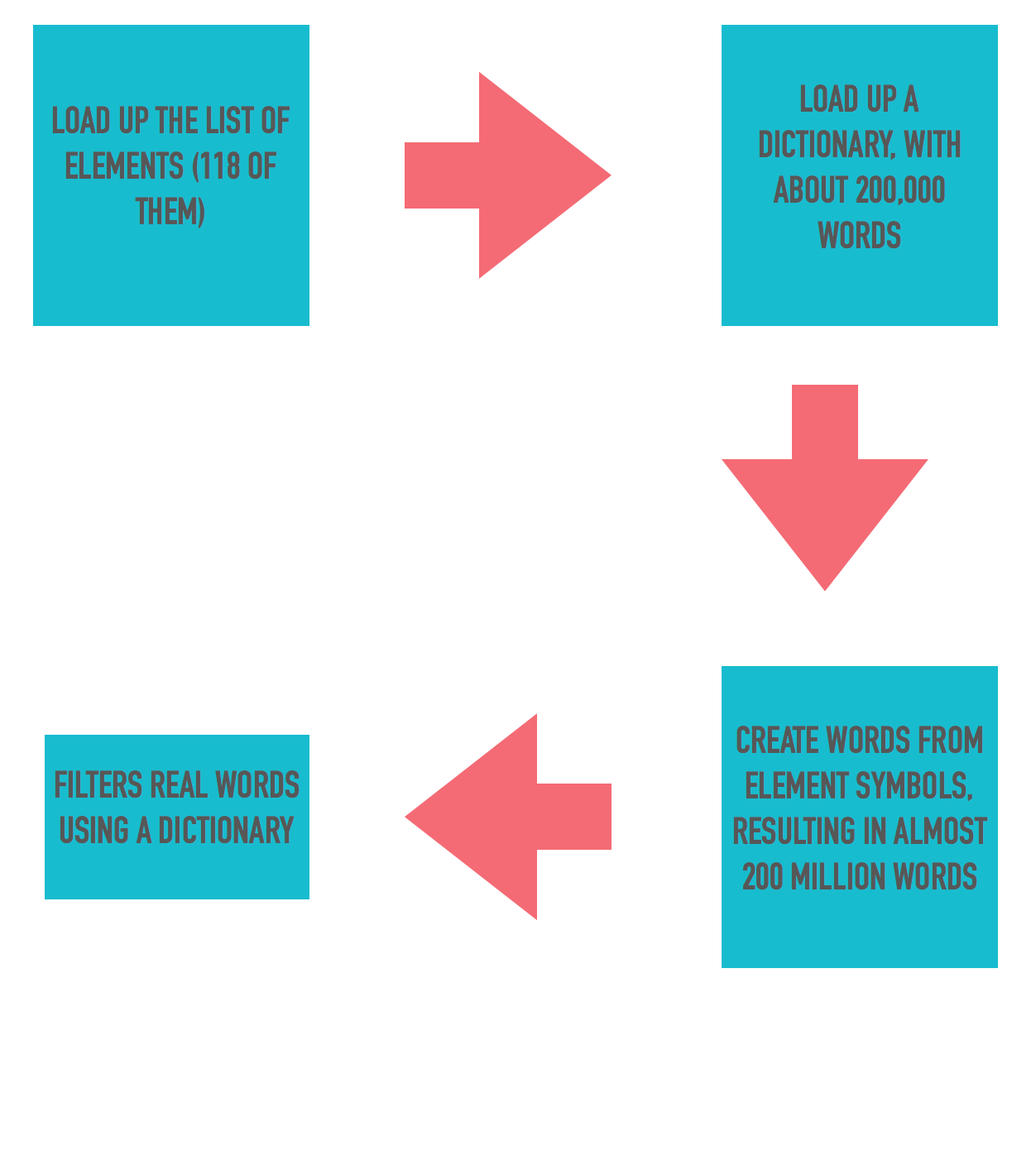
We then jumped into the program itself, the approach we outlined and wrote was simple enough - we needed a dictionary of words, we needed a list of elements and something to generate the words by combining elements and filter them using the dictionary. The final code is fairly easy to navigate. We have avoided concepts like recursion, any complicated data structures to validate words and stuck to simple iteration to generate the words.


We found about 12000 words altogether, these are some that caught our eye:


The revelation for me though has been in how easily my daughter picked up on the Programming language concepts with a seemingly difficult language like Scala. I know there are more difficult concepts along the way once we get past the basics, however my choice of Scala was to ensure that the foundation is strong enough. I will let her explore more esoteric features by herself when she works on her STEM project for next year !

Here is the code that we came up with.


Monday, February 22, 2016

Spring Boot with Scala

A while back I had tried out a small Spring Boot based sample with Scala as the language and found that the combination works out quite nicely - no big surprises there actually as Scala programs ultimately run in the JVM. I have now updated the sample with the latest version of Spring Boot and some of the supporting libraries.

To very quickly revisit the sample, it is a very simple web application with a UI to manage a "Hotel" domain object managed via JPA, represented in scala the following way:

import javax.persistence.Id
import javax.persistence.GeneratedValue
import java.lang.Long
import javax.persistence.Entity
import scala.beans.BeanProperty
import org.hibernate.validator.constraints.NotEmpty

@Entity
class Hotel {

  @Id
  @GeneratedValue
  @BeanProperty
  var id: Long = _

  @BeanProperty
  @NotEmpty
  var name: String = _

  @BeanProperty
  @NotEmpty
  var address: String = _

  @BeanProperty
  @NotEmpty
  var zip: String = _
}

JPA annotations carry over quite well, one wrinkle may be the additional @BeanProperty annotation though, this is required for JPA implementations as this makes the scala compiler generate the normal Java Beans type getters and setters instead of the scala default getters and setters which don't follow the Java Bean conventions.

Spring Data makes it ridiculously simple to manage this domain type, all it requires is a marker interface and it generates a runtime implementation:

import org.springframework.data.repository.CrudRepository
import mvctest.domain.Hotel
import java.lang.Long

trait HotelRepository extends CrudRepository[Hotel, Long]

Now I have a toolkit available for managing the Hotel domain:

//save or update a hotel
hotelRepository.save(hotel)

//find one hotel
hotelRepository.findOne(id)

//find all hotels
val hotels = hotelRepository.findAll()

//delete a hotel
hotelRepository.delete(id)


And finally a controller to manage the UI flow with this repository:

@Controller
@RequestMapping(Array("/hotels"))
class HotelController @Autowired()(private val hotelRepository: HotelRepository) {

  @RequestMapping(method = Array(RequestMethod.GET))
  def list(model: Model) = {
    val hotels = hotelRepository.findAll()
    model.addAttribute("hotels", hotels)
    "hotels/list"
  }

  @RequestMapping(Array("/edit/{id}"))
  def edit(@PathVariable("id") id: Long, model: Model) = {
    model.addAttribute("hotel", hotelRepository.findOne(id))
    "hotels/edit"
  }

  @RequestMapping(method = Array(RequestMethod.GET), params = Array("form"))
  def createForm(model: Model) = {
    model.addAttribute("hotel", new Hotel())
    "hotels/create"
  }

  @RequestMapping(method = Array(RequestMethod.POST))
  def create(@Valid hotel: Hotel, bindingResult: BindingResult) = {
    if (bindingResult.hasErrors()) {
      "hotels/create"
    } else {
      hotelRepository.save(hotel)
      "redirect:/hotels"
    }
  }

  @RequestMapping(value = Array("/update"), method = Array(RequestMethod.POST))
  def update(@Valid hotel: Hotel, bindingResult: BindingResult) = {
    if (bindingResult.hasErrors()) {
      "hotels/edit"
    } else {
      hotelRepository.save(hotel)
      "redirect:/hotels"
    }
  }

  @RequestMapping(value = Array("/delete/{id}"))
  def delete(@PathVariable("id") id: Long) = {
    hotelRepository.delete(id)
    "redirect:/hotels"
  }
}

There are some wrinkles here too but should mostly make sense, the way the repository is autowired is a little non-intuitive and the way an explicit Array type has to be provided for request mapping paths and methods may be confusing.

Beyond these small concerns the code just works, do play with it, I would love any feedback on ways to improve this sample. Here is the git location of this sample - https://github.com/bijukunjummen/spring-boot-scala-web

Saturday, February 6, 2016

Marble Diagrams - Rxjava operators

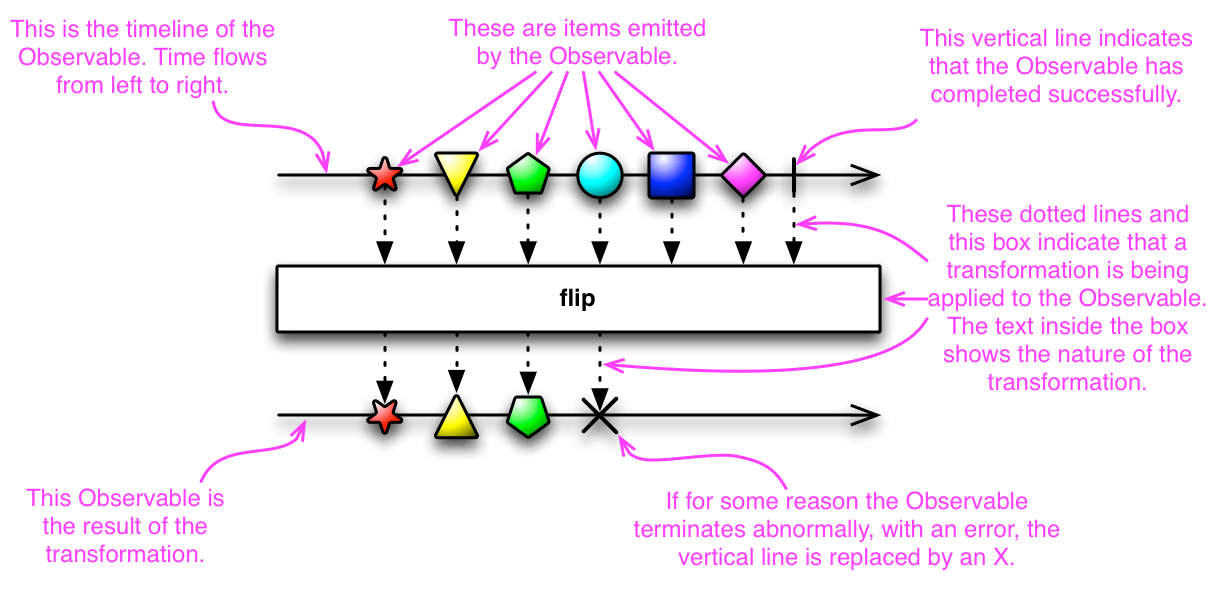
I love the use of Marble Diagrams for representing the different ReactiveX operations. It really clarifies the behavior of some complex operations. RxJava uses these diagrams in its Javadocs and provides the following legend to explain Marble diagrams:


Keeping the marble diagrams in mind, here is a sample test for flatMap operation, written using the Rx-Scala library:

val colors = Observable.just("Red", "Green", "Blue")

val f: String => Observable[String]  = (x: String) => Observable.interval(x.length() seconds).map(_ => x).take(2)

val obs: Observable[String] = colors.flatMap(f)

assert(obs.toBlocking.toList == List("Red", "Blue", "Green", "Red", "Blue", "Green"))

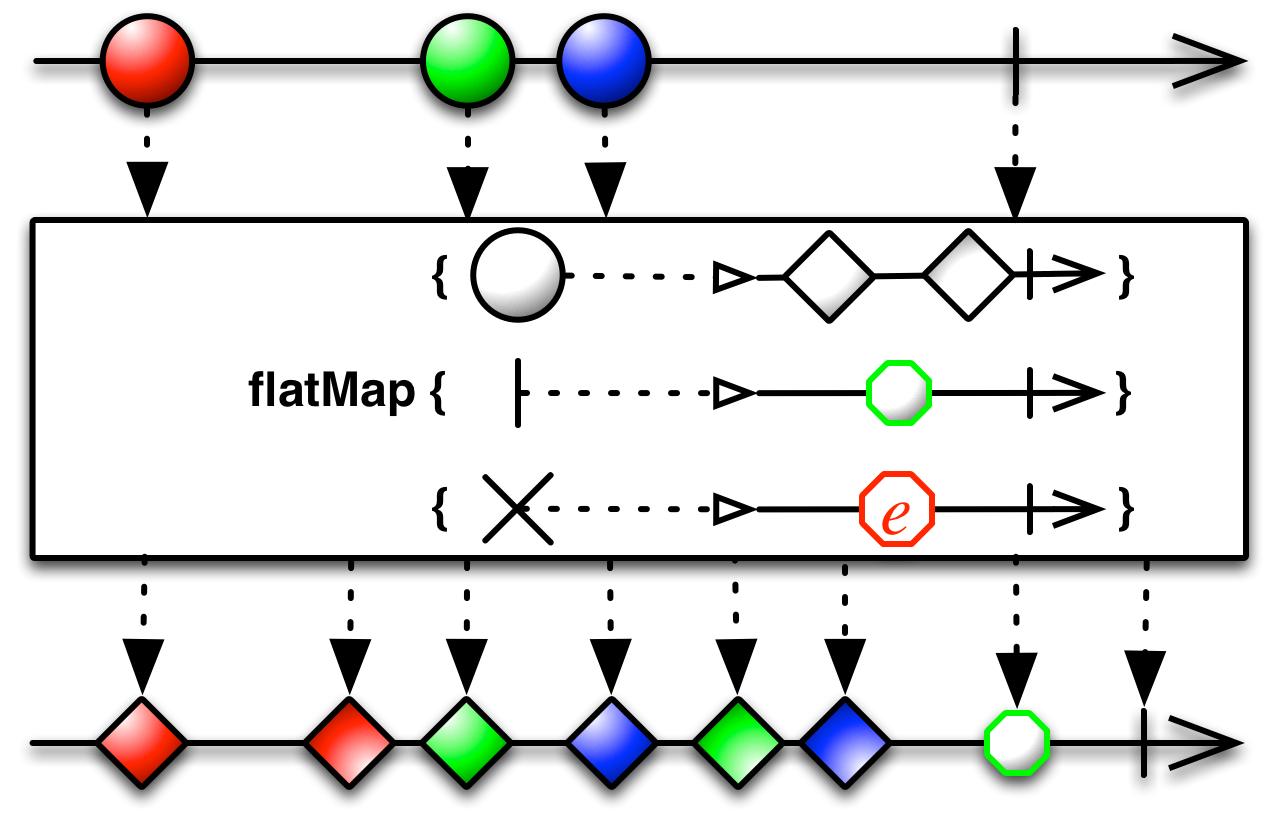
and the marble diagram for the operation:


Given this, the flow in the test should become very clear - we start with an Observable which emits three values "Red", "Green", "Blue", the function transforms an element to another Observable, calling the flatMap now makes this mapping and flattens the result to an Observable.

Another a little more complex variation of the flatMap operation has the following signature in scala:

def flatMap[R](onNext: (T) ⇒ Observable[R], onError: (Throwable) ⇒ Observable[R], onCompleted: () ⇒ Observable[R]): Observable[R]

or the following in Java:
public final <R> Observable<R> flatMap(Func1<? super T,? extends Observable<? extends R>> onNext,
                        Func1<? super java.lang.Throwable,? extends Observable<? extends R>> onError,
                        Func0<? extends Observable<? extends R>> onCompleted)


again best explained using its Marble diagram:


Here is a test for this variation of flatMap:

val colors = Observable.just("Red", "Green", "Blue")

val f: String => Observable[String]  = (x: String) => Observable.just(x, x)

val d = () => Observable.just("done")

val e: Throwable => Observable[String] = e => Observable.just(e.getMessage)

val obs: Observable[String] = colors.flatMap(f, e, d)

assert(obs.toBlocking.toList == List("Red", "Red", "Green", "Green", "Blue", "Blue", "done"))


In conclusion, I really appreciate the effort that goes behind creating these marble diagrams by the authors of ReactiveX and feel that they clarify the purpose of the operations neatly.

Tuesday, January 5, 2016

JWT - Generating and validating a token - Samples

JWT provides a very interesting way to represent claims between applications that can be verified and trusted. My objective here is to show a small sample to generate and validate a token using the excellent Nimbus JOSE + JWT library.

Overview

One of the best places to get an intro is here. In brief, to borrow from the material from the jwt.io site, claims are represented as an encoded json in three parts separated with a dot (.)


header.payload.signature


The header is a json that contains the type of algorithm used for signing the content(RSA in this instance) which is then url and Base64 encoded:

{
  "alg": "RS512"
}

The payload is a json containing all the claims, there are claims which are reserved but private claims are also allowed:

{
  "sub": "samplesubject",
  "name": "John Doe",
  "iss": "sampleissueer",
  "admin": true,
  "exp": 1451849539
}


here "sub"(subject), "iss"(issuer) and "exp"(expiry) are reserved claims but "name" and "admin" are private claims. The content is then Base64Url encoded.

Finally the header and payload together is signed using either a shared key or a private key and the signature is Base64 url encoded and appended to the token with a (.) separator.


Generating a Keypair

My sample is RSA based one, so the first step is to generate a Key pair. JWK is a neat way to store the Keys as a JSON representation and Nimbus library provides support for that:


import java.security.KeyPairGenerator
import java.security.interfaces.{RSAPrivateKey, RSAPublicKey}

import com.google.gson.{GsonBuilder, JsonElement, JsonParser}
import com.nimbusds.jose.Algorithm
import com.nimbusds.jose.jwk.{JWKSet, KeyUse, RSAKey}

object JWKGenerator {

  def make(keySize: Integer, keyUse: KeyUse, keyAlg: Algorithm, keyId: String) = {
    val generator = KeyPairGenerator.getInstance("RSA")
    generator.initialize(keySize)
    val kp = generator.generateKeyPair()
    val publicKey = kp.getPublic().asInstanceOf[RSAPublicKey]
    val privateKey = kp.getPrivate().asInstanceOf[RSAPrivateKey]
    new RSAKey.Builder(publicKey)
      .privateKey(privateKey)
      .keyUse(keyUse)
      .algorithm(keyAlg)
      .keyID(keyId)
      .build()
  }
 ...

}

Given this Key Pair, a JWK can be generated from this using Gson:

  def generateJWKKeypair(rsaKey: RSAKey): JsonElement = {
    val jwkSet = new JWKSet(rsaKey)
    new JsonParser().parse(jwkSet.toJSONObject(false).toJSONString)
  }

  def generateJWKJson(rsaKey: RSAKey): String = {
    val jsonElement  = generateJWKKeypair(rsaKey)
    val gson = new GsonBuilder().setPrettyPrinting().create()
    gson.toJson(jsonElement)
  }


A sample JWK based keypair looks like this:

{
  "keys": [
    {
      "p": "2_Fb6K50ayAsnnQl55pPegE_JNTeAjpDo9HThZPp6daX7Cm2s2fShtWuM8JBv42qelKIrypAAVOedLCM75VoRQ",
      "kty": "RSA",
      "q": "ye5BeGtkx_9z3V4ImX2Pfljhye7QT2rMhO8chMcCGI4JGMsaDBGUmGz56MHvWIlcqBcYbPXIWORidtMPdzp1wQ",
      "d": "gSjAIty6uDAm8ZjEHUU4wsJ8VVSJInk9iR2BSKVAAxJUQUrCVN---DKLr7tCKgWH0zlV0DjGtrfy7pO-5tcurKkK59489mOD4-1kYvnqSZmHC_zF9IrCyZWpOiHnI5VnJEeNwRz7EU8y47NjpUHWIaLl_Qsu6gOiku41Vpb14QE",
      "e": "AQAB",
      "use": "sig",
      "kid": "sample",
      "qi": "0bbcYShpGL4XNhBVrMI8fKUpUw1bWghgoyp4XeZe-EZ-wsc43REE6ZItCe1B3u14RKU2J2G57Mi9f_gGIP_FqQ",
      "dp": "O_qF5d4tQUl04YErFQ2vvsW4QoMKR_E7oOEHndXIZExxAaYefK5DayG6b8L5yxMG-nSncZ1D9ximjYvX4z4LQQ",
      "alg": "RS512",
      "dq": "jCy-eg9i-IrWLZc3NQW6dKTSqFEFffvPWYB7NZjIVa9TlUh4HmSd2Gnd2bu2oKlKDs1pgUnk-AAicgX1uHh2gQ",
      "n": "rX0zzOEJOTtv7h39VbRBoLPQ4dRutCiRn5wnd73Z1gF_QBXYkrafKIIvSUcJbMLAozRn6suVXCd8cVivYoq5hkAmcRiy0v7C4VuB1_Fou7HHoi2ISbwlv-kiZwTmXCn9YSHDBVivCwfMI87L2143ZfYUcNxNTxPt9nY6HJrtJQU"
    }
  ]
}

Generating a JWT

Now that we have a good sample keypair, load up the private and public keys:

import java.time.{LocalDateTime, ZoneOffset}
import java.util.Date

import com.nimbusds.jose._
import com.nimbusds.jose.crypto._
import com.nimbusds.jose.jwk.{JWKSet, RSAKey}
import com.nimbusds.jwt.JWTClaimsSet.Builder
import com.nimbusds.jwt._

object JwtSample {
  def main(args: Array[String]): Unit = {
    val jwkSet = JWKSet.load(JwtSample.getClass.getResource("/sample.json").toURI.toURL)
    val jwk = jwkSet.getKeyByKeyId("sample").asInstanceOf[RSAKey]

    val publicKey = jwk.toRSAPublicKey
    val privateKey = jwk.toRSAPrivateKey
 ...
}

Build a payload, sign it and generate the JWT:

    val claimsSetBuilder = new Builder()
      .subject("samplesubject")
      .claim("name", "John Doe")
      .claim("admin", true)
      .issuer("sampleissueer")
      .expirationTime(Date.from(LocalDateTime.now().plusHours(1).toInstant(ZoneOffset.UTC)))

    val signer = new RSASSASigner(privateKey)


    val signedJWT: SignedJWT = new SignedJWT(
      new JWSHeader(JWSAlgorithm.RS512),
      claimsSetBuilder.build())

    signedJWT.sign(signer)

    val s = signedJWT.serialize()


The consumer of this JWT can read the payload and validate it using the public key:

    val cSignedJWT = SignedJWT.parse(s)

    val verifier = new RSASSAVerifier(publicKey)

    println(cSignedJWT.verify(verifier))
    println(signedJWT.getJWTClaimsSet().getSubject())

Conclusion

This sample is entirely based on samples provided at the Nimbus JOSE + JWT site, you should definitely refer to the Nimbus site if you are interested in exploring this further. My samples are here

Sunday, October 18, 2015

Scala extractors infix sample with Rational numbers

I keep coming back to the awesome introductory material on Scala put together by Daniel Westheide. One of the examples that he provides for extractors using an infix operation pattern is the Streams API -

val xs = 58 #:: 43 #:: 93 #:: Stream.empty
xs match {
  case first #:: second #:: _ => first - second
  case _ => -1
}

where the extractor is defined this way:

object #:: {
  def unapply[A](xs: Stream[A]): Option[(A, Stream[A])] =
    if (xs.isEmpty) None
    else Some((xs.head, xs.tail))
}

Given this I wanted to try an extractor on the Rational number samples from the Scala by Example book, this is how the Rational number looks:

class Rational(n: Int, d: Int) {
private def gcd(x: Int, y: Int): Int = {
if (x == 0) y
else if (x < 0) gcd(-x,y)
else if (y < 0) -gcd(x, -y)
else gcd(y % x, x)
}
private val g = gcd(n, d)

val numer: Int = n/g
val denom: Int = d/g

def +(that: Rational) =
new Rational(numer * that.denom + that.numer * denom,
denom * that.denom)

def -(that: Rational) =
new Rational(numer * that.denom - that.numer * denom,
denom * that.denom)

def *(that: Rational) =
new Rational(numer * that.numer, denom * that.denom)

def /(that: Rational) =
new Rational(numer * that.denom, denom * that.numer)


override def toString = "" + numer + "/" + denom + ""

def square = new Rational(numer*numer, denom*denom)
}

and I wanted an extractor which would behave the following way:

val r = new Rational(2, 3)  

r match {
  case num / denom => num + "/" + denom
}   

This is absolutely feasible in Scala given the flexibility in the names of identifiers. Given this an extractor called "/" can be defined the following way:

object / {
 def unapply(r: Rational): Option[(Int, Int)] = Some(r.numer, r.denom)
}

and used for extracting the numerator and denominator of the rational number!

r match {
 case /(num, denom) => num + "/" + denom
} 

//using infix
r match {
 case num / denom => num + "/" + denom
}                             

Thursday, May 21, 2015

Akka samples with scala and Spring

I was looking around recently for Akka samples with Spring and found a starter project which appeared to fit the bill well. The project however utilizes Spring-Scala which is an excellent project, but is no longer maintained. So I wanted to update the sample to use core Spring java libraries instead. So here is an attempt on a fork of this starter project with core Spring instead of Spring-scala. The code is available here.

The project utilizes Akka extensions to hook in Spring based dependency injection into Akka.

Here is what the extension looks like:

package sample

import akka.actor.{ActorSystem, Props, Extension}
import org.springframework.context.ApplicationContext
/**
 * The Extension implementation.
 */
class SpringExtension extends Extension {
  var applicationContext: ApplicationContext = _

  /**
   * Used to initialize the Spring application context for the extension.
   * @param applicationContext
   */
  def initialize(applicationContext: ApplicationContext) = {
    this.applicationContext = applicationContext
    this
  }

  /**
   * Create a Props for the specified actorBeanName using the
   * SpringActorProducer class.
   *
   * @param actorBeanName  The name of the actor bean to create Props for
   * @return a Props that will create the named actor bean using Spring
   */
  def props(actorBeanName: String): Props =
    Props(classOf[SpringActorProducer], applicationContext, actorBeanName)

}

object SpringExtension {
  def apply(system : ActorSystem )(implicit ctx: ApplicationContext) :  SpringExtension =  SpringExt(system).initialize(ctx)
}

So the extension wraps around a Spring application context. The extensions provides a props method which returns an Akka Props configuration object which uses the application context and the name which the actor is registered with Spring to return an instance of the Actor. The following is the SpringActorProducer:

package sample

import akka.actor.{Actor, IndirectActorProducer}
import org.springframework.context.ApplicationContext


class SpringActorProducer(ctx: ApplicationContext, actorBeanName: String) extends IndirectActorProducer {

  override def produce: Actor = ctx.getBean(actorBeanName, classOf[Actor])

  override def actorClass: Class[_ <: Actor] =
    ctx.getType(actorBeanName).asInstanceOf[Class[Actor]]

}

Given this base code, how does Spring find the actors, I have used scanning annotations to annotate the actors this way:

package sample.actor

import akka.actor.Actor
import sample.service.CountingService
import sample.SpringExtension._
import org.springframework.stereotype.Component
import org.springframework.beans.factory.annotation.Autowired
import org.springframework.context.annotation.Scope
import akka.actor.ActorRef
import sample.SpringExtension
import org.springframework.context.ApplicationContext

@Component("countingCoordinatingActor")
@Scope("prototype")
class CountingCoordinating @Autowired() (implicit ctx: ApplicationContext) extends Actor {

  import sample.messages._

  var counter: Option[ActorRef] = None

  
  def receive = {
    case COUNT => countingActor() ! COUNT
    case g:GET => countingActor() ! g
  }
  
  private def countingActor(): ActorRef = {
     if (counter.isEmpty) {
        val countingActorProp = SpringExtension(context.system).props("countingActor")
        counter = Some(context.actorOf(countingActorProp, "counter"))
     }  
     
     counter.get
  }
  
}


@Component("countingActor")
@Scope("prototype")
class CountingActor @Autowired()(countingService: CountingService) extends Actor {

  import sample.messages._

  private var count = 0

  def receive = {
    case COUNT => count = countingService.increment(count)
    case GET(requester: ActorRef) => requester ! RESULT(count)
  }
  
}

The CountingService is a simple service that gets injected in by Spring. The following is the main Spring Application configuration where all the wiring takes place:

import akka.actor.ActorSystem
import org.springframework.context.ApplicationContext
import org.springframework.context.annotation.Configuration
import org.springframework.context.annotation.Bean
import org.springframework.beans.factory.annotation.Autowired
import org.springframework.context.annotation.ComponentScan

@Configuration
@ComponentScan(Array("sample.service", "sample.actor"))
class AppConfiguration {

  @Autowired
  implicit var ctx: ApplicationContext = _;
  
  /**
   * Actor system singleton for this application.
   */
  @Bean
  def actorSystem() = {
    val system = ActorSystem("AkkaScalaSpring")
    // initialize the application context in the Akka Spring Extension
    SpringExt(system)
    system    
  }
}

To make use of this entire set-up in a sample program:

import akka.actor.{ActorRef, ActorSystem}
import sample.SpringExtension._
import scala.concurrent.duration._
import scala.concurrent._
import scala.util._
import sample.messages._
import org.springframework.context.annotation.AnnotationConfigApplicationContext
import akka.actor.Inbox


object Main extends App {
  // create a spring context
  implicit val ctx = new AnnotationConfigApplicationContext(classOf[AppConfiguration])

  import Config._

  // get hold of the actor system
  val system = ctx.getBean(classOf[ActorSystem])

  val inbox = Inbox.create(system)
  
  val prop = SpringExtension(system).props("countingCoordinatingActor")

  // use the Spring Extension to create props for a named actor bean
  val countingCoordinator = system.actorOf(prop, "counter")

  // tell it to count three times
  inbox.send(countingCoordinator, COUNT)
  inbox.send(countingCoordinator, COUNT)
  inbox.send(countingCoordinator, COUNT)
  
  inbox.send(countingCoordinator, GET(inbox.getRef()))
  
  val RESULT(count) = inbox.receive(5.seconds)

  println(s"Got $count")
  system.shutdown
  system.awaitTermination
}

References:

Tuesday, December 23, 2014

Solving "Water buckets" problem using Scala

I recently came across a puzzle called the "Water Buckets" problem in this book, which totally stumped me.


You have a 12-gallon bucket, an 8-gallon bucket and a 5-gallon bucket. The 12-gallon bucket is full of water and the other two are empty. Without using any additional water how can you divide the twelve gallons of water equally so that two of the three buckets have exactly 6 gallons of water in them?


I and my nephew spent a good deal of time trying to solve it and ultimately gave up.

I remembered then that I have seen a programmatic solution to a similar puzzle being worked out in the "Functional Programming Principles in Scala" Coursera course by Martin Odersky.

This is the gist to the solution completely copied from the course:


and running this program spits out the following 7 step solution! (index 0 is the 12-gallon bucket, 1 is the 8-gallon bucket and 2 is the 5-gallon bucket)

Pour(0,1) 
Pour(1,2) 
Pour(2,0) 
Pour(1,2) 
Pour(0,1) 
Pour(1,2) 
Pour(2,0)

If you are interested in learning more about the code behind this solution, the best way is to follow the week 7 of the Coursera course that I have linked above, Martin Odersky does a fantastic job of seemingly coming up with a solution on the fly!.

Tuesday, September 16, 2014

Scala and Java 8 type inference in higher order functions sample

One of the concepts mentioned in the Functional Programming in Scala is about the type inference in higher order functions in Scala and how it fails in certain situations and a workaround for the same. So consider a sample higher order function, purely for demonstration:

def filter[A](list: List[A], p: A => Boolean):List[A] = {
 list.filter(p)
} 

Ideally, passing in a list of say integers, you would expect the predicate function to not require an explicit type:

val l = List(1, 5, 9, 20, 30) 

filter(l, i => i < 10)

Type inference does not work in this specific instance however, the fix is to specify the type explicitly:

filter(l, (i:Int) => i < 10)

Or a better fix is to use currying, then the type inference works!

def filter[A](list: List[A])(p: A=>Boolean):List[A] = {
 list.filter(p)
}                                         

filter(l)(i => i < 10) 
//OR
filter(l)(_ < 10) 
I was curious whether Java 8 type inference has this issue and tried a similar sample with Java 8 Lambda expression, the following is an equivalent filter function -
public <A> List<A> filter(List<A> list, Predicate<A> condition) {
 return list.stream().filter(condition).collect(toList());
}
and type inference for the predicate works cleanly -
List ints = Arrays.asList(1, 5, 9, 20, 30);
List lessThan10 =  filter(ints, i -> i < 10);
Another blog entry on a related topic by the author of the "Functional Programming in Scala" book is available here - http://pchiusano.blogspot.com/2011/05/making-most-of-scalas-extremely-limited.html

Friday, July 4, 2014

Scala Tail Recursion confusion

I was looking at a video of Martin Odersky's keynote during Scala Days 2014 and there was a sample tail recursion code that confused me:

@tailrec
private def sameLength[T, U](xs: List[T], ys: List[U]): Boolean = {
  if (xs.isEmpty) ys.isEmpty
  else ys.nonEmpty && sameLength(xs.tail, ys.tail)
}

On a quick glance, this did not appear to be tail recursive to me, as there is the && operation that needs to be called after the recursive call.

However, thinking a little more about it, && is a short-circuit operator and the recursive operation would get called only if the ys.nonEmpty statement evaluates to true, thus maintaining the definition of a tail recursion.

The decompiled class clarifies this a little more, surprisingly the && operator does not appear anywhere in the decompiled code!:

public <T, U> boolean org$bk$sample$SameLengthTest$$sameLength(List<T> xs, List<U> ys)
  {
    for (; ys.nonEmpty(); xs = (List)xs.tail()) ys = (List)ys.tail();
    return 
      xs.isEmpty() ? ys.isEmpty() : 
      false;
  }

If the operator were changed to something that does not have short-circuit behavior, the method of course will not be a tail-recursion at that point, say a hypothetical method with the XOR operator:

private def notWorking[T, U](xs: List[T], ys: List[U]): Boolean = {
  if (xs.isEmpty) ys.isEmpty
  else ys.nonEmpty ^ notWorking(xs.tail, ys.tail)
}

Something fairly basic that tripped me up today!

Saturday, May 3, 2014

Spring Scala based sample bean configuration

I have been using Spring Scala for a toy project for the last few days and I have to say that it is a fantastic project, it simplifies Spring configuration even further when compared to the already simple configuration purely based on Spring Java Config.

Let me demonstrate this by starting with the Cake Pattern based sample here:

// =======================
// service interfaces
trait OnOffDeviceComponent {
  val onOff: OnOffDevice
  trait OnOffDevice {
    def on: Unit
    def off: Unit
  }
}
trait SensorDeviceComponent {
  val sensor: SensorDevice
  trait SensorDevice {
    def isCoffeePresent: Boolean
  }
}

// =======================
// service implementations
trait OnOffDeviceComponentImpl extends OnOffDeviceComponent {
  class Heater extends OnOffDevice {
    def on = println("heater.on")
    def off = println("heater.off")
  }
}
trait SensorDeviceComponentImpl extends SensorDeviceComponent {
  class PotSensor extends SensorDevice {
    def isCoffeePresent = true
  }
}
// =======================
// service declaring two dependencies that it wants injected
trait WarmerComponentImpl {
  this: SensorDeviceComponent with OnOffDeviceComponent =>
  class Warmer {
    def trigger = {
      if (sensor.isCoffeePresent) onOff.on
      else onOff.off
    }
  }
}

// =======================
// instantiate the services in a module
object ComponentRegistry extends
  OnOffDeviceComponentImpl with
  SensorDeviceComponentImpl with
  WarmerComponentImpl {

  val onOff = new Heater
  val sensor = new PotSensor
  val warmer = new Warmer
}

// =======================
val warmer = ComponentRegistry.warmer
warmer.trigger

Cake pattern is a pure Scala way of specifying the dependencies.

Now, if we were to specify this dependency using Spring's native Java config, but with Scala as the language, firs to define the components that need to be wired together:


trait SensorDevice {
    def isCoffeePresent: Boolean
  }

  class PotSensor extends SensorDevice {
    def isCoffeePresent = true
  }

  trait OnOffDevice {
    def on: Unit
    def off: Unit
  }

  class Heater extends OnOffDevice {
    def on = println("heater.on")
    def off = println("heater.off")
  }

  class Warmer(s: SensorDevice, o: OnOffDevice) {
    def trigger = {
      if (s.isCoffeePresent) o.on
      else o.off
    }
  }

and the configuration with Spring Java Config and a sample which makes use of this configuration:

import org.springframework.context.annotation.Configuration
  import org.springframework.context.annotation.Bean

  @Configuration
  class WarmerConfig {
    @Bean
    def heater(): OnOffDevice = new Heater

    @Bean
    def potSensor(): SensorDevice = new PotSensor

    @Bean
    def warmer() = new Warmer(potSensor(), heater())
  }

  import org.springframework.context.annotation.AnnotationConfigApplicationContext

  val ac = new AnnotationConfigApplicationContext(classOf[WarmerConfig])

  val warmer = ac.getBean("warmer", classOf[Warmer])
  
  warmer.trigger 


Taking this further to use Spring-Scala project to specify the dependencies, the configuration and a sample look like this:

import org.springframework.context.annotation.Configuration
import org.springframework.context.annotation.Bean
import org.springframework.scala.context.function.FunctionalConfiguration


class WarmerConfig extends FunctionalConfiguration {
  val h = bean("heater") {
    new Heater
  }
  
  val p = bean("potSensor") {
    new PotSensor
  }
  
  bean("warmer") {
    new Warmer(p(), h())
  }
}

import org.springframework.context.annotation.AnnotationConfigApplicationContext
import org.springframework.scala.context.function.FunctionalConfigApplicationContext

val ac = FunctionalConfigApplicationContext[WarmerConfig]
val warmer = ac.getBean("warmer", classOf[Warmer])
warmer.trigger

The essence of the Spring Scala project as explained in this wiki is the "bean" method derived from the `FunctionalConfiguration` trait, this method can be called to create a bean, passing in parameters to specify, if required, bean name, alias, scope and a function which returns the instantiated bean.

This sample hopefully gives a good appreciation for how simple Spring Java Config is, and how much more simpler Spring-Scala project makes it for Scala based projects.

Tuesday, April 29, 2014

Spring Boot and Scala with sbt as the build tool

Earlier I had blogged about using Scala with Spring Boot and how the combination just works. There was one issue with the previous approach though - the only way to run the earlier configuration was to build the project into a jar file and run the jar file.

./gradlew build
java -jar build/libs/spring-boot-scala-web-0.1.0.jar

Spring boot comes with a gradle based plugin which should have allowed the project to run with a "gradle bootRun" command, this unfortunately gives an error for scala based projects.

EDIT: This is actually not completely true, another way to run the Spring-boot code using gradle will be to use the gradle application plugin and specify the main program this way:
apply plugin:'application'
mainClassName = "mvctest.SampleWebApplication"

A good workaround is to use sbt for building and running Spring-boot based projects. The catch though is that with gradle and maven, the versions of the dependencies would have been managed through a parent pom, now these have to be explicitly specified. This is how a sample sbt build file with the dependencies spelled out looks:

name := "spring-boot-scala-web"

version := "1.0"

scalaVersion := "2.10.4"

sbtVersion := "0.13.1"

seq(webSettings : _*)

libraryDependencies ++= Seq(
  "org.springframework.boot" % "spring-boot-starter-web" % "1.0.2.RELEASE",
  "org.springframework.boot" % "spring-boot-starter-data-jpa" % "1.0.2.RELEASE",
  "org.webjars" % "bootstrap" % "3.1.1",
  "org.webjars" % "jquery" % "2.1.0-2",
  "org.thymeleaf" % "thymeleaf-spring4" % "2.1.2.RELEASE",
  "org.hibernate" % "hibernate-validator" % "5.0.2.Final",
  "nz.net.ultraq.thymeleaf" % "thymeleaf-layout-dialect" % "1.2.1",
  "org.hsqldb" % "hsqldb" % "2.3.1",
  "org.springframework.boot" % "spring-boot-starter-tomcat" % "1.0.2.RELEASE" % "provided",
  "javax.servlet" % "javax.servlet-api" % "3.0.1" % "provided"
)


libraryDependencies ++= Seq(
  "org.apache.tomcat.embed" % "tomcat-embed-core"         % "7.0.53" % "container",
  "org.apache.tomcat.embed" % "tomcat-embed-logging-juli" % "7.0.53" % "container",
  "org.apache.tomcat.embed" % "tomcat-embed-jasper"       % "7.0.53" % "container"
)

Here I am also using xsbt-web-plugin which is plugin for building scala web applications.

xsbt-web-plugin also comes with commands to start-up tomcat or jetty based containers and run the applications within these containers, however I had difficulty in getting these to work.

What worked is the runMain command to start up the Spring-boot main program through sbt:

runMain mvctest.SampleWebApplication

and xsbt-web-plugin allows the project to be packaged as a war file using the "package" command, this war deploys and runs without any issues in a standalone tomcat container.

Here is a github project with these changes: https://github.com/bijukunjummen/spring-boot-scala-web.git

Tuesday, April 8, 2014

Memoization of Scala Streams

I learnt the hard way that scala internally uses memoization with Streams.

This was my first attempt at a solution to Euler Problem 5

def from(n: Int): Stream[Int] = n #:: from(n + 1)

def isDivisibleByRange(n: Int, r: Range) = {
  r.forall(n % _ == 0)
}

val a = from(21)
val o = a.find(isDivisibleByRange(_, Range(2, 21)))
o match {
  case Some(i) => println(i)
  case None => println("Nothing found!")
}

I was a little mystified by why this code was throwing an OutOfMemoryError, realized thanks to Stackoverflow that since the answer to this problem is quite high 232792560, all the integers in this range will be memoized within the different nodes of the stream and hence the issue.

This is actually easy to see, let me first modify the stream generator function with a side effect:

def from(n: Int): Stream[Int] = {println(s"Gen $n"); n #:: from(n + 1)}
val s = from(1)
s.take(10).toList 
s.take(10).toList

The second statement would not print anything.

Given this memoization behavior there are a few possible fixes, the simplest is to not keep a reference to the head of the stream anywhere and to use the find method of iterator instead:
from(1).iterator.find(isDivisibleByRange(_, Range(1, 21)))


On a related note, Java 8 streams are not memoized and a solution using Java 8 streams (admittedly can be improved massively) is the following:

@Test
public void testStreamOfInts() {
 Stream<Integer> intStream = Stream.generate(from(1));
 List<Integer> upto20 = IntStream.rangeClosed(1, 20).boxed().collect(Collectors.toList());
 Predicate<Integer> p = (i -> isDivisibleOverRange(i, upto20));
 Optional<Integer> o = intStream.filter(p).findFirst();
 o.ifPresent(i -> System.out.println("Found: " + i));
}

private Supplier<Integer> from(Integer i) {
 AtomicInteger counter = new AtomicInteger(0);
 return () ->  counter.incrementAndGet();
}

private boolean isDivisibleOverRange(Integer n, List<Integer> l) {
 return l.stream().allMatch(i -> n % i == 0);
}

Sunday, March 30, 2014

Spring-boot and Scala

There is actually nothing very special about writing a Spring-boot web application purely using Scala, it just works!

In this blog entry, I will slowly transform a Java based Spring-boot application completely to Scala - the Java based sample is available at this github location - https://github.com/bijukunjummen/spring-boot-mvc-test

To start with, I had the option of going with either a maven based build or gradle based build - I opted to go with a gradle based build as gradle has a great scala plugin, so for scala support the only changes to a build.gradle build script is the following:


...
apply plugin: 'scala'
...
jar {
    baseName = 'spring-boot-scala-web'
    version =  '0.1.0'
}


dependencies {
    ... 
    compile 'org.scala-lang:scala-library:2.10.2'
    ...
}

Essentially adding in the scala plugin and specifying the version of the scala-library.

Now, I have one entity, a Hotel class, it transforms to the following with Scala:

package mvctest.domain

....

@Entity
class Hotel {
  
  @Id 
  @GeneratedValue 
  @BeanProperty
  var id: Long = _
  
  @BeanProperty
  var name: String = _
  
  @BeanProperty
  var address: String = _
  
  @BeanProperty
  var zip: String = _
}

Every property is annotated with @BeanProperty annotation to instruct scala to generate the Java bean based getter and setter on the variables.

With the entity in place a Spring-data repository for CRUD operations on this entity transforms from:

import mvctest.domain.Hotel;

import org.springframework.data.repository.CrudRepository;

public interface HotelRepository extends CrudRepository<Hotel, Long> {

}

to the following in Scala:

import org.springframework.data.repository.CrudRepository
import mvctest.domain.Hotel
import java.lang.Long

trait HotelRepository extends CrudRepository[Hotel, Long]

And the Scala based controller which uses this repository to list the Hotels -

...
import org.springframework.web.bind.annotation.RequestMapping
import org.springframework.stereotype.Controller
import mvctest.service.HotelRepository
import org.springframework.beans.factory.annotation.Autowired
import org.springframework.ui.Model

@Controller
@RequestMapping(Array("/hotels"))
class HotelController @Autowired() (private val hotelRepository: HotelRepository) {
 
  @RequestMapping(Array("/list"))
  def list(model: Model) = {
    val hotels = hotelRepository.findAll()
    model.addAttribute("hotels", hotels)
    "hotels/list"
  }
}

Here the constructor autowiring of the HotelRepository just works!. Do note the slightly awkward way of specifying the @Autowired annotation for constructor based injection.

Finally, Spring-boot based application requires a main class to bootstrap the entire application, where this bootstrap class looks like this with Java:

@Configuration
@EnableAutoConfiguration
@ComponentScan
public class SampleWebApplication {
 
 public static void main(String[] args) {
  SpringApplication.run(SampleWebApplication.class, args);
 }
}

In scala, though I needed to provide two classes, one to specify the annotation and other to bootstrap the application, there may be better way to do this(blame it on my lack of Scala depth!) -

package mvctest

import org.springframework.context.annotation.Configuration
import org.springframework.boot.autoconfigure.EnableAutoConfiguration
import org.springframework.context.annotation.ComponentScan
import org.springframework.boot.SpringApplication

@Configuration
@EnableAutoConfiguration
@ComponentScan
class SampleConfig


object SampleWebApplication extends App {
  SpringApplication.run(classOf[SampleConfig]);
}

and that's it, with this set-up the entire application just works, the application can be started up with the following:

./gradlew build && java -jar build/libs/spring-boot-scala-web-0.1.0.jar

and the sample endpoint listing the hotels accessed at this url: http://localhost:8080/hotels/list

I have the entire git project available at this github location: https://github.com/bijukunjummen/spring-boot-scala-web

In conclusion, Scala can be considered a first class citizen for a Spring-boot based application and there is no special configuration required to get a Scala based Spring-boot application to work. It just works!