Showing posts with label rxjava. Show all posts

Tuesday, June 12, 2018

Zuul 2 - Sample filter

Zuul 2 has finally been open sourced. I first heard of Zuul 2 during the Spring One 2016 talk by Mikey Cohen which is available here, it is good to finally be able to play with it.

To quickly touch on the purpose of a Gateway like Zuul 2 - Gateways provide an entry point to an ecosystem of microservices. Since all the customer requests are routed through the Gateway, it can control aspects of routing, request and response flowing through it:

  • Routing based on different criteria - uri patterns, headers etc.
  • Monitors service health
  • Loadbalancing and throttling requests to origin servers
  • Security
  • Canary testing


My objective in this post is simple - to write a Zuul2 filter that can remove a path prefix and send a request to a downstream service and back.

Zuul2 filters are the mechanism by which Zuul is customized. Say if a client sends a request to /passthrough/someapi call, then I want the Zuul 2 layer to forward the request to a downstream service using /someapi uri. Zuul2 filters are typically packaged up as groovy files and are dynamically loaded(and potentially refreshed) and applied. My sample here will be a little different though, my filters are coded in Java and I had to bypass the loading mechanism built into Zuul.

It may be easier simply to follow the code, which is available in my github repository here - https://github.com/bijukunjummen/boot2-load-demo/tree/master/applications/zuul2-sample, it is packaged in with a set of samples which provide a similar functionality. The code is based on the Zuul 2 samples available here.


This is how my filter looks:

import com.netflix.zuul.context.SessionContext;
import com.netflix.zuul.filters.http.HttpInboundSyncFilter;
import com.netflix.zuul.message.http.HttpRequestMessage;

import java.util.Arrays;
import java.util.List;
import java.util.stream.Collectors;

public class StripPrefixFilter extends HttpInboundSyncFilter {
    private final List<String> prefixPatterns;

    public StripPrefixFilter(List<String> prefixPatterns) {
        this.prefixPatterns = prefixPatterns;
    }

    @Override
    public HttpRequestMessage apply(HttpRequestMessage input) {
        SessionContext context = input.getContext();
        String path = input.getPath();
        String[] parts = path.split("/");
        if (parts.length > 0) {
            String targetPath = Arrays.stream(parts)
                    .skip(1).collect(Collectors.joining("/"));
            context.set("overrideURI", targetPath);
        }
        return input;
    }

    @Override
    public int filterOrder() {
        return 501;
    }

    @Override
    public boolean shouldFilter(HttpRequestMessage msg) {
        for (String target: prefixPatterns) {
            if (msg.getPath().matches(target)) {
                return true;
            }
        }
        return false;
    }
}


It extends "HttpInboundSyncFilter", these are filters which handle the request inbound to origin servers. As you can imagine there is a "HttpOutboundSyncFilter" which intercept calls outbound from the origin servers. There is a "HttpInboundFilter" and "HttpOutboundFilter" counterpart to these "sync" filters, they return RxJava Observable type.

There is a magic string "overrideUri" in my filter implementation. If you are curious about how I found that to be the override uri, it is by scanning through the Zuul2 codebase. There is likely a lot of filters used internally at Netflix which haven't been released for general consumption yet.

With this filter in place, I have bypassed the dynamic groovy scripts loading feature of Zuul2 by explicitly registering my custom filter using this component:

import com.netflix.zuul.filters.FilterRegistry;
import com.netflix.zuul.filters.ZuulFilter;

import javax.annotation.PostConstruct;
import javax.inject.Inject;
import java.util.ArrayList;
import java.util.List;
import java.util.Set;

public class FiltersRegisteringService {

    private final List<ZuulFilter> filters;
    private final FilterRegistry filterRegistry;

    @Inject
    public FiltersRegisteringService(FilterRegistry filterRegistry, Set<ZuulFilter> filters) {
        this.filters = new ArrayList<>(filters);
        this.filterRegistry = filterRegistry;
    }

    public List<ZuulFilter> getFilters() {
        return filters;
    }

    @PostConstruct
    public void initialize() {
        for (ZuulFilter filter: filters) {
            this.filterRegistry.put(filter.filterName(), filter);
        }
    }
}

I had to make a few more minor tweaks to get this entire set-up with my custom filter bootstrapped, these can be followed in the github repo


Once the Zuul2 sample with this custom filter is started up, the behavior is that any request to /passthrough/messages is routed to a downstream system after the prefix "/passthrough" is stipped out. The instructions to start-up the Zuul 2 app is part of the README of the repo.

This concludes a quick intro to writing a custom Zuul2 filter, I hope this gives just enough of a feel to evaluate Zuul 2.

Tuesday, September 19, 2017

Testing time based reactor core streams with Virtual time

Reactor Core implements the Reactive Streams specification and deals with handling a (potentially unlimited) stream of data. If it interests you, do check out the excellent documentation it offers. Here I am assuming some basic familiarity with the Reactor Core libraries Flux and Mono types and will cover Reactor Core provides an abstraction to time itself to enable testing of functions which depend on passage of time.

For certain operators of Reactor-core, time is an important consideration - for eg, a variation of "interval" function which emits an increasing number every 5 seconds after an initial "delay" of 10 seconds:

val flux = Flux
        .interval(Duration.ofSeconds(10), Duration.ofSeconds(5))
        .take(3)

Testing such a stream of data depending on normal passage of time would be terrible, such a test would take about 20 seconds to finish.

Reactor-Core provides a solution, an abstraction to time itself - Virtual time based Scheduler, that provides a neat way to test these kinds of operations in a deterministic way.

Let me show it in two ways, an explicit way which should make the actions of Virtual time based scheduler very clear followed by the recommended approach of testing with Reactor Core.

import org.assertj.core.api.Assertions.assertThat
import org.junit.Test
import reactor.core.publisher.Flux
import reactor.test.scheduler.VirtualTimeScheduler
import java.time.Duration
import java.util.concurrent.CountDownLatch


class VirtualTimeTest {
    
    @Test
    fun testExplicit() {
        val mutableList = mutableListOf<Long>()

        val scheduler = VirtualTimeScheduler.getOrSet()
        val flux = Flux
                .interval(Duration.ofSeconds(10), Duration.ofSeconds(5), scheduler)
                .take(3)

        val latch = CountDownLatch(1)
        
        flux.subscribe({ l -> mutableList.add(l) }, { _ -> }, { latch.countDown() })
        
        scheduler.advanceTimeBy(Duration.ofSeconds(10))
        assertThat(mutableList).containsExactly(0L)
        
        scheduler.advanceTimeBy(Duration.ofSeconds(5))
        assertThat(mutableList).containsExactly(0L, 1L)
        
        scheduler.advanceTimeBy(Duration.ofSeconds(5))
        assertThat(mutableList).containsExactly(0L, 1L, 2L)

        latch.await()
    }
    
}

1. First the scheduler for "Flux.interval" function is being set to be the Virtual Time based Scheduler.

2. The stream of data is expected to be emitted every 5 seconds after a 10 second delay

3. VirtualTimeScheduler provides an "advanceTimeBy" method to advance the Virtual time by a Duration, so the time is being first advanced by the delay time of 10 seconds at which point the first element(0) is expected to be emitted

4. Then it is subsequently advanced by 5 seconds twice to get 1 and 2 respectively.

This is deterministic and the test completes quickly. This version of the test is ugly though, it uses a list to collect and assert the results on and a CountDownLatch to control when the test terminates. A far cleaner approach for testing Reactor-Core types is using the excellent StepVerifier class and a test which makes use of this class looks like this:

import org.junit.Test
import reactor.core.publisher.Flux
import reactor.test.StepVerifier
import reactor.test.scheduler.VirtualTimeScheduler
import java.time.Duration

class VirtualTimeTest {

    @Test
    fun testWithStepVerifier() {

        VirtualTimeScheduler.getOrSet()
        val flux = Flux
                .interval(Duration.ofSeconds(10), Duration.ofSeconds(5))
                .take(3)

        StepVerifier.withVirtualTime({ flux })
                .expectSubscription()
                .thenAwait(Duration.ofSeconds(10))
                .expectNext(0)
                .thenAwait(Duration.ofSeconds(5))
                .expectNext(1)
                .thenAwait(Duration.ofSeconds(5))
                .expectNext(2)
                .verifyComplete()
    }
 }

This new test with StepVerifier reads well with each step advancing time and asserting on what is expected at that point.


Tuesday, December 27, 2016

Practical Reactor operations - Retrieve Details of a Cloud Foundry Application

CF-Java-Client is a library which enables programatic access to a Cloud Foundry Cloud Controller API. It is built on top of Project Reactor, an implementation of Reactive Streams specification and it is a fun exercise using this library to do something practical in a Cloud Foundry environment.

Consider a sample use case - Given an application id I need to find a little more detail of this application, more details of the application along with the details of the organization and the space that it belongs to.

To start with, the basis of all API operations with cf-java-client is a type unsurprisingly called the CloudFoundryClient(org.cloudfoundry.client.CloudFoundryClient), cf-java-client's github page has details on how to get hold of an instance of this type.

Given a CloudFoundryClient instance, the details of an application given its id can be obtained as follows:

Mono<GetApplicationResponse> applicationResponseMono = this.cloudFoundryClient
  .applicationsV2().get(GetApplicationRequest.builder().applicationId(applicationId).build());

Note that the API returns a reactor "Mono" type, this is in general the behavior of all the API calls of cf-java-client.


  • If an API returns one item then typically a Mono type is returned
  • If the API is expected to return more than one item then a Flux type is returned, and
  • If the API is called purely for side effects - say printing some information then it returns a Mono<Void> type


The next step is to retrieve the space identifier from the response and make an API call to retrieve the details of the space and looks like this:

Mono<Tuple2<GetApplicationResponse, GetSpaceResponse>> appAndSpaceMono = applicationResponseMono
  .and(appResponse -> this.cloudFoundryClient.spaces()
    .get(GetSpaceRequest.builder()
      .spaceId(appResponse.getEntity().getSpaceId()).build()));


Here I am using an "and" operator to combine the application response with another Mono that returns the space information, the result is a "Tuple2" type holding both the pieces of information - the application detail and the detail of the space that it is in.

Finally to retrieve the Organization that the app is deployed in:

Mono<Tuple3<GetApplicationResponse, GetSpaceResponse, GetOrganizationResponse>> t3 =
  appAndSpaceMono.then(tup2 -> this.cloudFoundryClient.organizations()
      .get(GetOrganizationRequest.builder()
        .organizationId(tup2.getT2().getEntity()
          .getOrganizationId())
        .build())
      .map(orgResp -> Tuples.of(tup2.getT1(), tup2.getT2(),
        orgResp)));

Here a "then" operation is being used to retrieve the organization detail given the id from the previous step and the result added onto the previous tuple to create a Tuple3 type holding the "Application Detail", "Space Detail" and the "Organization Detail". "then" is the equivalent of flatMap operator familiar in the Scala and ReactiveX world.

This essentially covers the way you would typically deal with "cf-java-client" library and use the fact that it is built on the excellent "Reactor" library and its collection of very useful operators to get results together. Just to take the final step of transforming the result to a type that may be more relevant to your domain and to handle any errors along the way:

Mono<AppDetail> appDetail =  
 t3.map(tup3 -> {
   String appName = tup3.getT1().getEntity().getName();
   String spaceName = tup3.getT2().getEntity().getName();
   String orgName = tup3.getT3().getEntity().getName();
   return new AppDetail(appName, orgName, spaceName);
  }).otherwiseReturn(new AppDetail("", "", ""));


If you are interested in trying out a working sample, I have an example available in my github repo here - https://github.com/bijukunjummen/boot-firehose-to-syslog

And the code shown in the article is available here - https://github.com/bijukunjummen/boot-firehose-to-syslog/blob/master/src/main/java/io.pivotal.cf.nozzle/service/CfAppDetailsService.java


Tuesday, June 7, 2016

Spring-Reactive samples

Spring-Reactive aims to bring reactive programming support to Spring based projects and this is expected to be available for the timelines of Spring 5. My intention here is to exercise some of the very basic signatures for REST endpoints with this model.

Before I go ahead let me acknowledge that this entire sample is completely based on the samples which Sébastien Deleuze has put together here - https://github.com/sdeleuze/spring-reactive-playground

I wanted to consider three examples, first a case where existing Java 8 CompletableFuture is returned as a type, second where RxJava's Observable is returned as a type and third with Spring Reactor Core's Flux type.

Expected Protocol

The structure of the request and response message handled by each of the three service is along these lines, all of them will take in a request which looks like this:

{
 "id":1,
  "delay_by": 2000,
  "payload": "Hello",
  "throw_exception": false
}


The delay_by will make the response to be delayed and throw_exception will make the response to error out. A sane response will be the following:

{
  "id": "1",
  "received": "Hello",
  "payload": "Response Message"
}

I will be ignoring the exceptions for this post.

CompletableFuture as a return type


Consider a service which returns a java 8 CompletableFuture as a return type:

public CompletableFuture<MessageAcknowledgement> handleMessage(Message message) {
 return CompletableFuture.supplyAsync(() -> {
  Util.delay(message.getDelayBy());
  return new MessageAcknowledgement(message.getId(), message.getPayload(), "data from CompletableFutureService");
 }, futureExecutor);
}

The method signature of a Controller which calls this service looks like this now:

@RestController
public class CompletableFutureController {

 private final CompletableFutureService aService;

 @Autowired
 public CompletableFutureController(CompletableFutureService aService) {
  this.aService = aService;
 }

 @RequestMapping(path = "/handleMessageFuture", method = RequestMethod.POST)
 public CompletableFuture<MessageAcknowledgement> handleMessage(@RequestBody Message message) {
  return this.aService.handleMessage(message);
 }

}

When the CompletableFuture completes the framework will ensure that the response is marshalled back appropriately.

Rx Java Observable as a return type

Consider a service which returns a Rx Java Observable as a return type:

public Observable<MessageAcknowledgement> handleMessage(Message message) {
 logger.info("About to Acknowledge");
 return Observable.just(message)
   .delay(message.getDelayBy(), TimeUnit.MILLISECONDS)
   .flatMap(msg -> {
    if (msg.isThrowException()) {
     return Observable.error(new IllegalStateException("Throwing a deliberate exception!"));
    }
    return Observable.just(new MessageAcknowledgement(message.getId(), message.getPayload(), "From RxJavaService"));
   });
}

The controller invoking such a service can directly return the Observable as a type now and the framework will ensure that once all the items have been emitted the response is marshalled correctly.
@RestController
public class RxJavaController {

 private final RxJavaService aService;

 @Autowired
 public RxJavaController(RxJavaService aService) {
  this.aService = aService;
 }

 @RequestMapping(path = "/handleMessageRxJava", method = RequestMethod.POST)
 public Observable<MessageAcknowledgement> handleMessage(@RequestBody Message message) {
  System.out.println("Got Message..");
  return this.aService.handleMessage(message);
 }

}

Note that since Observable represents a stream of 0 to many items, this time around the response is a json array.


Spring Reactor Core Flux as a return type


Finally, if the response type is a Flux type, the framework ensures that the response is handled cleanly. The service is along these lines:

public Flux<messageacknowledgement> handleMessage(Message message) {
 return Flux.just(message)
   .delay(Duration.ofMillis(message.getDelayBy()))
   .map(msg -> Tuple.of(msg, msg.isThrowException()))
   .flatMap(tup -> {
    if (tup.getT2()) {
     return Flux.error(new IllegalStateException("Throwing a deliberate Exception!"));
    }
    Message msg = tup.getT1();
    return Flux.just(new MessageAcknowledgement(msg.getId(), msg.getPayload(), "Response from ReactorService"));
   });
}

and a controller making use of such a service:

@RestController
public class ReactorController {

 private final ReactorService aService;

 @Autowired
 public ReactorController(ReactorService aService) {
  this.aService = aService;
 }

 @RequestMapping(path = "/handleMessageReactor", method = RequestMethod.POST)
 public Flux<MessageAcknowledgement> handleMessage(@RequestBody Message message) {
  return this.aService.handleMessage(message);
 }

}

Conclusion

This is just a sampling of the kind of return types that the Spring Reactive project supports, the possible return types is way more than this - here is a far more comprehensive example.

I look forward to when the reactive programming model becomes available in the core Spring framework.

The samples presented in this blog post is available at my github repository

Tuesday, April 26, 2016

Scatter-Gather using Spring Reactor Core

I have a good working experience in using the Netflix Rx-Java libraries and have previously blogged about using Rx-Java and Java 8 CompletableFuture for a scatter-gather kind of problems. Here I want to explore applying the same pattern using the Spring Reactor Core library.

tldr - If you are familiar with Netflix Rx-Java, you already know Spring Reactor Core, the API's map beautifully and I was thrilled to see that the Spring Reactor team has diligently used Marble diagrams in their Javadoc API's

Another quick point is that rx.Observable maps to Flux or Mono based on whether many items are being emitted or whether one or none is being emitted.

With this let me directly jump into the sample - I have a simple task(simulated using a delay) that is spawned a few times, I need to execute these tasks concurrently and then collect back the results, represented the following way using a rx.Observable code:

@Test
public void testScatterGather() throws Exception {
    ExecutorService executors = Executors.newFixedThreadPool(5);

    List<Observable<String>> obs =
            IntStream.range(0, 10)
                .boxed()
                .map(i -> generateTask(i, executors)).collect(Collectors.toList());


    Observable<List<String>> merged = Observable.merge(obs).toList();
    List<String> result = merged.toBlocking().first();

    logger.info(result.toString());

}

private Observable<String> generateTask(int i, ExecutorService executorService) {
    return Observable
            .<String>create(s -> {
                Util.delay(2000);
                s.onNext( i + "-test");
                s.onCompleted();
            }).subscribeOn(Schedulers.from(executorService));
}


Note that I am blocking purely for the test.

Now, a similar code using Spring Reactor Core translates to the following:

@Test
public void testScatterGather() {
    ExecutorService executors = Executors.newFixedThreadPool(5);

    List<Flux<String>> fluxList = IntStream.range(0, 10)
            .boxed()
            .map(i -> generateTask(executors, i)).collect(Collectors.toList());

    Mono<List<String>> merged = Flux.merge(fluxList).toList();

    List<String> list = merged.get();

    logger.info(list.toString());


}

public Flux<String> generateTask(ExecutorService executorService, int i) {
    return Flux.<String>create(s -> {
        Util.delay(2000);
        s.onNext(i + "-test");
        s.onComplete();
    }).subscribeOn(executorService);
}

It more or less maps one to one. A small difference is in the Mono type, I personally felt that this type was a nice introduction to the reactive library as it makes it very clear whether more than 1 item is being emitted vs only a single item which I have made use of in the sample.

These are still early explorations for me and I look forward to getting far more familiar with this excellent library.

Saturday, February 6, 2016

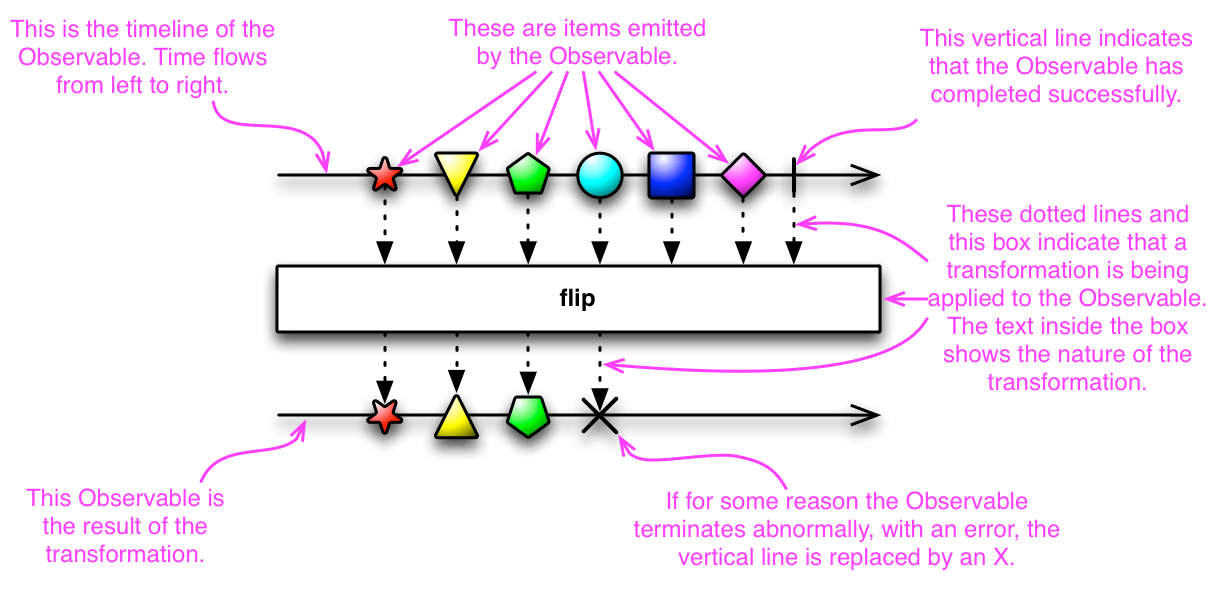
Marble Diagrams - Rxjava operators

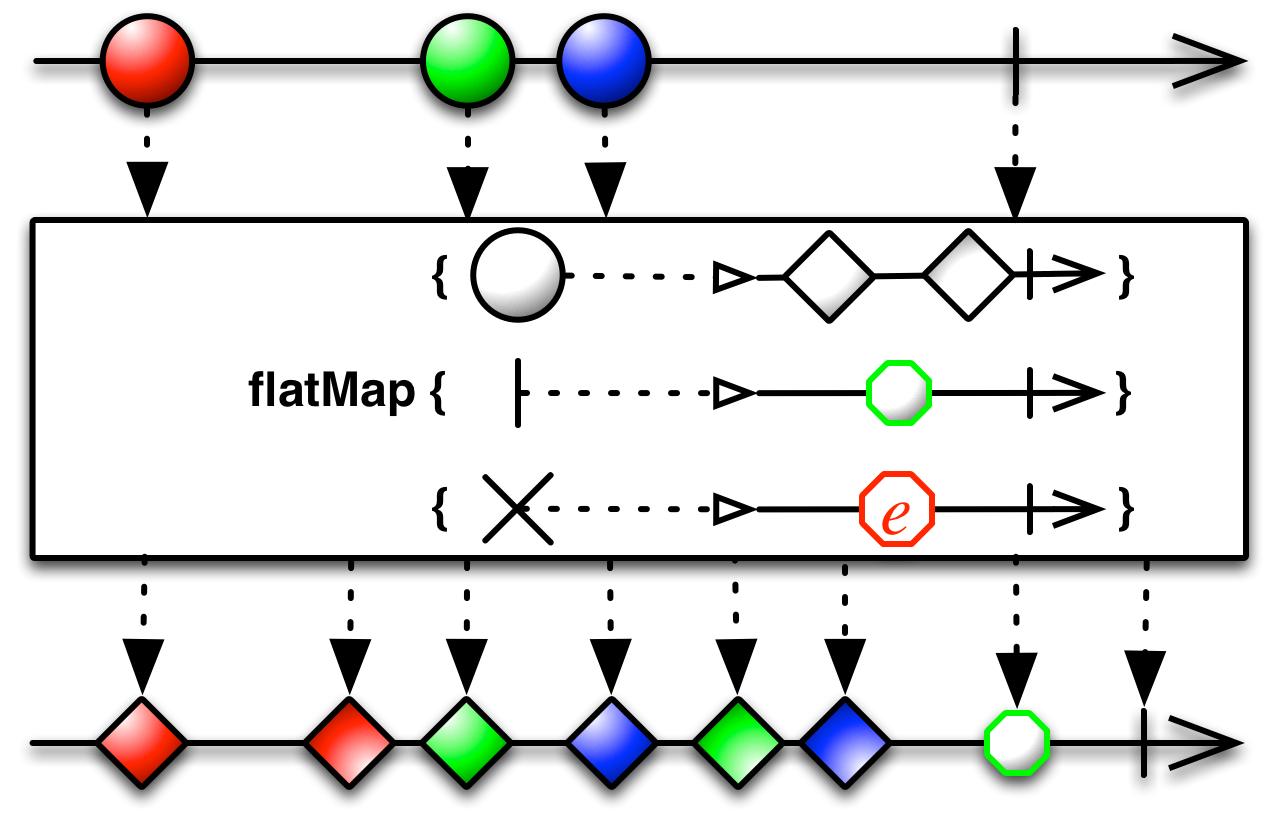
I love the use of Marble Diagrams for representing the different ReactiveX operations. It really clarifies the behavior of some complex operations. RxJava uses these diagrams in its Javadocs and provides the following legend to explain Marble diagrams:


Keeping the marble diagrams in mind, here is a sample test for flatMap operation, written using the Rx-Scala library:

val colors = Observable.just("Red", "Green", "Blue")

val f: String => Observable[String]  = (x: String) => Observable.interval(x.length() seconds).map(_ => x).take(2)

val obs: Observable[String] = colors.flatMap(f)

assert(obs.toBlocking.toList == List("Red", "Blue", "Green", "Red", "Blue", "Green"))

and the marble diagram for the operation:


Given this, the flow in the test should become very clear - we start with an Observable which emits three values "Red", "Green", "Blue", the function transforms an element to another Observable, calling the flatMap now makes this mapping and flattens the result to an Observable.

Another a little more complex variation of the flatMap operation has the following signature in scala:

def flatMap[R](onNext: (T) ⇒ Observable[R], onError: (Throwable) ⇒ Observable[R], onCompleted: () ⇒ Observable[R]): Observable[R]

or the following in Java:
public final <R> Observable<R> flatMap(Func1<? super T,? extends Observable<? extends R>> onNext,
                        Func1<? super java.lang.Throwable,? extends Observable<? extends R>> onError,
                        Func0<? extends Observable<? extends R>> onCompleted)


again best explained using its Marble diagram:


Here is a test for this variation of flatMap:

val colors = Observable.just("Red", "Green", "Blue")

val f: String => Observable[String]  = (x: String) => Observable.just(x, x)

val d = () => Observable.just("done")

val e: Throwable => Observable[String] = e => Observable.just(e.getMessage)

val obs: Observable[String] = colors.flatMap(f, e, d)

assert(obs.toBlocking.toList == List("Red", "Red", "Green", "Green", "Blue", "Blue", "done"))


In conclusion, I really appreciate the effort that goes behind creating these marble diagrams by the authors of ReactiveX and feel that they clarify the purpose of the operations neatly.

Sunday, October 25, 2015

Gentle Introduction to Hystrix - Hello World

In a previous blog post I had covered the motivation for needing a library like Netflix Hystrix. Here I will jump into some of the very basic ways to start using Hystrix and follow it up with more complex use cases.


Hello World


A simple Hello World example of a "Hystrix Command" is the following:

import com.netflix.hystrix.HystrixCommand;
import com.netflix.hystrix.HystrixCommandGroupKey;
import org.slf4j.Logger;
import org.slf4j.LoggerFactory;

public class HelloWorldCommand extends HystrixCommand<String> {

    private static final Logger logger = LoggerFactory.getLogger(HelloWorldCommand.class);

    private final String name;

    public HelloWorldCommand(String name) {
        super(HystrixCommandGroupKey.Factory.asKey("default"));
        this.name = name;
    }

    @Override
    protected String run() throws Exception {
        logger.info("HelloWorld Command Invoked");
        return "Hello " + name;
    }
}


The run method holds any dependent activity that we want to be protected against, which ultimately returns the parameterized type - String in this specific instance. If you are fan of Netflix Rx-java library , then another way to create the Hystrix command is the following:

import com.netflix.hystrix.HystrixCommandGroupKey;
import com.netflix.hystrix.HystrixObservableCommand;
import rx.Observable;

public class HelloWorldObservableCommand extends HystrixObservableCommand<String> {

    private String name;

    public HelloWorldObservableCommand(String name) {
        super(HystrixCommandGroupKey.Factory.asKey("default"));
        this.name = name;
    }

    @Override
    protected Observable<String> resumeWithFallback() {
        return Observable.just("Returning a Fallback");
    }

    @Override
    protected Observable<String> construct() {
        return Observable.just("Hello " + this.name);
    }
}

Here "construct" method returns the Rx-java Observable.


Using a Hystrix Command

Now that we have a Hystrix command to wrap around our call, it can be used in whole lot of different ways, let us start with the simplest, in a synchronous call -

HelloWorldCommand helloWorldCommand = new HelloWorldCommand("World");
assertEquals("Hello World", helloWorldCommand.execute());

Or, it can be made to return a Future :

HelloWorldCommand helloWorldCommand = new HelloWorldCommand("World");
Future future = helloWorldCommand.queue();
assertEquals("Hello World", future.get());

Or, even better it can be made to return a Rx-Java observable:

HelloWorldCommand helloWorldCommand = new HelloWorldCommand("World");

CountDownLatch l = new CountDownLatch(1);

Observable<String> obs = helloWorldCommand.observe();
obs.subscribe(
        s -> logger.info("Received : " + s),
        t -> logger.error(t.getMessage(), t),
        () -> l.countDown()
);
l.await(5, TimeUnit.SECONDS);


The Observable variation of the command also works along the same lines, however we should contrast a small behavior difference:

HelloWorldObservableCommand helloWorldCommand = new HelloWorldObservableCommand("World");
logger.info("Completed executing HelloWorld Command");
Observable<String> obs = helloWorldCommand.observe();

There are two ways to obtain an Observable here, one is like the above by making an ".observe()" call, another is the following way:

HelloWorldObservableCommand helloWorldCommand = new HelloWorldObservableCommand("World");
Observable<String> obs = helloWorldCommand.toObservable();

another is the following using ".toObservable()" call :

HelloWorldObservableCommand helloWorldCommand = new HelloWorldObservableCommand("World");
Observable<String> obs = helloWorldCommand.toObservable();

The difference is that the ".observe()" method returns a Hot Observable which starts executing the "construct" method immediately, whereas the ".toObservable" variation returns a Cold Observable and would not call "construct" method unless it is subscribed to, say the following way:

CountDownLatch l = new CountDownLatch(1);
obs.subscribe(System.out::println, t -> l.countDown(), () -> l.countDown());
l.await();

I have more information here.

Note though that Hystrix Command is not a Singleton, the typical way to use Hystrix Command is to construct it where it is required and dispose it once done.

Fallback and Command Group Key

In the constructor of the HelloWorldCommand, I had called a super class constructor method with the following signature:

public HelloWorldCommand(String name) {
    super(HystrixCommandGroupKey.Factory.asKey(&quot;default&quot;));
    this.name = name;
}

This parameter specifies a Hystrix "Command group" Key, along with Command Key which by default is the simple name of the class, it controls a lot of the bells and whistles of Hystrix behavior, a sample of the properties is the following and I will come back to the specifics of these later:

hystrix.command.HelloWorldCommand.metrics.rollingStats.timeInMilliseconds=10000
hystrix.command.HelloWorldCommand.execution.isolation.strategy=THREAD
hystrix.command.HelloWorldCommand.execution.isolation.thread.timeoutInMilliseconds=1000
hystrix.command.HelloWorldCommand.execution.isolation.semaphore.maxConcurrentRequests=10
hystrix.command.HelloWorldCommand.circuitBreaker.errorThresholdPercentage=50
hystrix.command.HelloWorldCommand.circuitBreaker.requestVolumeThreshold=20
hystrix.command.HelloWorldCommand.circuitBreaker.sleepWindowInMilliseconds=5000

hystrix.threadpool.default.coreSize=10
hystrix.threadpool.default.queueSizeRejectionThreshold=5

Another behavior we may want to control is the response in case the call to the dependent service fails, a fallback method provides this behavior, so consider a case where the dependent service always fails:

import com.netflix.hystrix.HystrixCommand;
import com.netflix.hystrix.HystrixCommandGroupKey;
import org.slf4j.Logger;
import org.slf4j.LoggerFactory;

public class FallbackCommand extends HystrixCommand<String> {

    private static final String COMMAND_GROUP="default";
    private static final Logger logger = LoggerFactory.getLogger(FallbackCommand.class);


    public FallbackCommand() {
        super(HystrixCommandGroupKey.Factory.asKey(COMMAND_GROUP));
    }

    @Override
    protected String run() throws Exception {
        throw new RuntimeException("Always fail");
    }

    @Override
    protected String getFallback() {
        logger.info("About to fallback");
        return "Falling back";
    }
}

Here the dependent service call always fails and the response as shown in the following test will always be the response from the fallback method:

FallbackCommand fallbackCommand = new FallbackCommand();
assertEquals("Falling back", fallbackCommand.execute());


Monitoring

Before I wrap up the basics it is good to demonstrate an awesome feature that Hystrix packs in terms of Hystrix stream and Hystrix dashboard. Let us start with Hystrix streams, if enabled typically as a servlet in Java based webapplications, it provides a SSE stream of realtime statistics about the behavior of the Hystrix commands present in the web application.

Since my demo is based on a Karyon2 Rx-Netty based application, my configuration can be seen here. The information from the Hystrix stream is a little too raw though, this is where the awesome Hystrix dashboard fits in - It consumes the Hystrix stream and shows real-time aggregated information about how each of the Hystrix command and different underlying threadpools are performing. I have here a sample Hystrix dashboard project based on the awesome Spring-Cloud project. A sample dashboard is here:


Conclusion

This covers the Hystrix basics, there is a lot more to go, I will wrap this up in the next blog post with details on some of the advanced Hystrix features.

Friday, August 28, 2015

Couchbase Java SDK with Rx-Java

A neat thing about Couchbase Java SDK is that it is built on top of the excellent Rx-Java library, this enables a reactive way to interact with a Couchbase server instance which is very intuitive once you get the hang of it.

Consider a very simple json document that I intend to store in Couchbase:

{"key":"1","value":"one"}


and a Java class to hold this json:

public class KeyVal {
    private String key;
    private String value;

    ...
}

The following is the code to insert an instance of KeyVal to a Couchbase bucket:

JsonObject jsonObject = JsonObject.empty().put("key", keyVal.getKey()).put("value", keyVal.getValue());
JsonDocument doc = JsonDocument.create(keyVal.getKey(), jsonObject);
Observable<JsonDocument> obs = bucket
                .async()
                .insert(doc);

The return type of the insert is an Observable, so if I needed to map the return type back a KeyVal I can use the extensive mapping support provided by Observable class.

Observable<KeyVal> obs = bucket
                .async()
                .insert(doc)
                .map(jsonDoc -> 
                    new KeyVal(jsonDoc.id(), jsonDoc.content().getString("value"))
                );


Other API's follow a similar pattern, for eg. to retrieve the saved document:

bucket
                .async()
                .get(id)
                .map(doc ->
                        new KeyVal(doc.id(),
                                doc.content().getString("value")));

If you are interested in exploring this sample further, here is my github repo with a working example - https://github.com/bijukunjummen/sample-karyon2-couch


References:

Thursday, July 23, 2015

Scatter Gather - Using Java 8 CompletableFuture and Rx-Java Observable

I wanted to explore a simple scatter-gather scenario using Java 8 CompletableFuture and using Rx-Java Observable.


The scenario is simple - Spawn about 10 tasks, each returning a string, and ultimately collect the results into a list.

Sequential

A sequential version of this would be the following:

public void testSequentialScatterGather() throws Exception {
 List<String> list =
   IntStream.range(0, 10)
     .boxed()
     .map(this::generateTask)
     .collect(Collectors.toList());

 logger.info(list.toString());
}

private String generateTask(int i) {
 Util.delay(2000);
 return i + "-" + "test";
}

With CompletableFuture

A method can be made to return a CompletableFuture using a utility method called supplyAsync, I am using a variation of this method which accepts an explicit Executor to use, also I am deliberately throwing an exception for one of the inputs:

private CompletableFuture<String> generateTask(int i,
  ExecutorService executorService) {
 return CompletableFuture.supplyAsync(() -> {
  Util.delay(2000);
  if (i == 5) {
   throw new RuntimeException("Run, it is a 5!");
  }
  return i + "-" + "test";
 }, executorService);
}

Now to scatter the tasks:

List<CompletableFuture<String>> futures =
  IntStream.range(0, 10)
    .boxed()
    .map(i -> this.generateTask(i, executors).exceptionally(t -> t.getMessage()))
    .collect(Collectors.toList());

At the end of scattering the tasks the result is a list of CompletableFuture. Now, to obtain the list of String from this is a little tricky, here I am using one of the solutions suggested in Stackoverflow:

CompletableFuture<List<String>> result = CompletableFuture.allOf(futures.toArray(new CompletableFuture[futures.size()]))
  .thenApply(v -> futures.stream()
       .map(CompletableFuture::join)
       .collect(Collectors.toList()));

CompletableFuture.allOf method is being used here purely to compose the next action to take once all the scattered tasks are completed, once the tasks are completed the futures are again streamed and collected into a list of string.

The final result can then be presented asynchronously:
result.thenAccept(l -> {
 logger.info(l.toString());
});


With Rx-java Observable

Scatter gather with Rx-java is relatively cleaner than the CompletableFuture version as Rx-java provides better ways to compose the results together, again the method which performs the scattered task:

private Observable<String> generateTask(int i, ExecutorService executorService) {
    return Observable
            .<String>create(s -> {
                Util.delay(2000);
                if ( i == 5) {
                    throw new RuntimeException("Run, it is a 5!");
                }
                s.onNext( i + "-test");
                s.onCompleted();
            }).onErrorReturn(e -> e.getMessage()).subscribeOn(Schedulers.from(executorService));
}

and to scatter the tasks:

List<Observable<String>> obs =
        IntStream.range(0, 10)
            .boxed()
            .map(i -> generateTask(i, executors)).collect(Collectors.toList());

Once more I have a List of Observable's, and what I need is a List of results, Observable provides a merge method to do just that:

Observable<List<String>> merged = Observable.merge(obs).toList();

which can be subscribed to and the results printed when available:

merged.subscribe(
                l -> logger.info(l.toString()));

Friday, July 10, 2015

Rx-netty and Karyon2 based cloud ready microservice - Dependency Injection

I had previously written about using Rx-netty and Karyon2 for developing cloud ready microservices, there were a few issues with the sample though, partly reproduced here:

package org.bk.samplepong.app;

.....

public class RxNettyHandler implements RequestHandler<ByteBuf, ByteBuf> {

    private final String healthCheckUri;
    private final HealthCheckEndpoint healthCheckEndpoint;
    private final ObjectMapper objectMapper = new ObjectMapper();

    public RxNettyHandler(String healthCheckUri, HealthCheckEndpoint healthCheckEndpoint) {
        this.healthCheckUri = healthCheckUri;
        this.healthCheckEndpoint = healthCheckEndpoint;
    }

    @Override
    public Observable<Void> handle(HttpServerRequest<ByteBuf> request, HttpServerResponse<ByteBuf> response) {
        if (request.getUri().startsWith(healthCheckUri)) {
            return healthCheckEndpoint.handle(request, response);
        } else if (request.getUri().startsWith("/message") && request.getHttpMethod().equals(HttpMethod.POST)) {
            return request.getContent().map(byteBuf -> byteBuf.toString(Charset.forName("UTF-8")))
                    .map(s -> {
                        try {
                            Message m = objectMapper.readValue(s, Message.class);
                            return m;
                        } catch (IOException e) {
                            throw new RuntimeException(e);
                        }
                    })
                    .map(m -> new MessageAcknowledgement(m.getId(), m.getPayload(), "Pong"))
                    .flatMap(ack -> {
                                try {
                                    return response.writeStringAndFlush(objectMapper.writeValueAsString(ack));
                                } catch (Exception e) {
                                    response.setStatus(HttpResponseStatus.BAD_REQUEST);
                                    return response.close();
                                }
                            }
                    );
        } else {
            response.setStatus(HttpResponseStatus.NOT_FOUND);
            return response.close();
        }
    }
}

The issues are:

  1. The routing logic is not centralized, the request handler has both the routing logic and the processing logic
  2. The dependencies are not injected in cleanly.


Looking at the Karyon2 samples, both of these issues are actually very cleanly addressed now which I wanted to document here.

Routing

Routing can be centralized using a custom Rx-netty RequestHandler called the SimpleUriRouter
The routes can be registered the following way using SimpleRouter which is being created here using a Guice Provider:

import com.google.inject.Inject;
import com.google.inject.Provider;
import io.netty.buffer.ByteBuf;
import netflix.karyon.health.HealthCheckHandler;
import netflix.karyon.transport.http.SimpleUriRouter;
import netflix.karyon.transport.http.health.HealthCheckEndpoint;
import org.bk.samplepong.app.ApplicationMessageHandler;
import org.bk.samplepong.common.health.HealthCheck;

public class AppRouteProvider implements Provider<SimpleUriRouter<ByteBuf, ByteBuf>> {

    @Inject
    private HealthCheck healthCheck;

    @Inject
    private ApplicationMessageHandler applicationMessageHandler;

    @Override
    public SimpleUriRouter get() {
        SimpleUriRouter simpleUriRouter = new SimpleUriRouter();
        simpleUriRouter.addUri("/healthcheck", new HealthCheckEndpoint(healthCheck));
        simpleUriRouter.addUri("/message", applicationMessageHandler);
        return simpleUriRouter;
    }
}

This router can now be registered via a custom guice module the following way:

public class KaryonAppModule extends KaryonHttpModule<ByteBuf, ByteBuf> {

    public KaryonAppModule() {
        super("routerModule", ByteBuf.class, ByteBuf.class);
    }

    @Override
    protected void configureServer() {
        bindRouter().toProvider(new AppRouteProvider());

        interceptorSupport().forUri("/*").intercept(LoggingInterceptor.class);

        server().port(8888);
    }
}

This is essentially it, now the routing logic is cleanly separated from the processing logic.

Dependency Injection


Dependency injection is handled via custom guice modules. I have a service, call it the MessageHandlerService, which takes in a message and returns an Acknowledgement, this service is defined as follows:

public class MessageHandlerServiceImpl implements MessageHandlerService {
    private static final Logger logger = LoggerFactory.getLogger(MessageHandlerServiceImpl.class);

    public Observable<MessageAcknowledgement> handleMessage(Message message) {
        return Observable.<MessageAcknowledgement>create(s -> {
            s.onNext(new MessageAcknowledgement(message.getId(), message.getPayload(), "Pong"));
            s.onCompleted();
        });
    }


}

Now, I have a guice module which specifies the binding between MessageHandlerService interface and the concrete MessageHandlerServiceImpl:

public class AppModule extends AbstractModule {


    @Override
    protected void configure() {
        bind(MessageHandlerService.class).to(MessageHandlerServiceImpl.class).in(Scopes.SINGLETON);
    }
}


With this in place, the MessageHandlerService can be injected in:

public class ApplicationMessageHandler implements RequestHandler<ByteBuf, ByteBuf> {

    private final ObjectMapper objectMapper = new ObjectMapper();

    private final MessageHandlerService messageHandlerService;

    @Inject
    public ApplicationMessageHandler(MessageHandlerService messageHandlerService) {
        this.messageHandlerService = messageHandlerService;
    }

    @Override
    public Observable<Void> handle(HttpServerRequest<ByteBuf> request, HttpServerResponse<ByteBuf> response) {
        return request.getContent().map(byteBuf -> byteBuf.toString(Charset.forName("UTF-8")))
                .map(s -> {
                    try {
                        Message m = objectMapper.readValue(s, Message.class);
                        return m;
                    } catch (IOException e) {
                        throw new RuntimeException(e);
                    }
                })
                .flatMap(messageHandlerService::handleMessage)
                .flatMap(ack -> {
                            try {
                                return response.writeStringAndFlush(objectMapper.writeValueAsString(ack));
                            } catch (Exception e) {
                                response.setStatus(HttpResponseStatus.BAD_REQUEST);
                                return response.close();
                            }
                        }
                );
    }
}


With both these features implemented, the app using Karyon2 is also greatly simplified and I have the complete working app in my github repository here: https://github.com/bijukunjummen/sample-ping-pong-netflixoss/tree/master/sample-pong

Tuesday, June 23, 2015

Rx-java subscribeOn and observeOn

If you have been confused by Rx-java Observable subscribeOn and observeOn, one of the blog articles that helped me understand these operations is this one by Graham Lea. I wanted to recreate a very small part of the article here, so consider a service which emits values every 200 millseconds:


package obs.threads;

import obs.Util;
import org.slf4j.Logger;
import org.slf4j.LoggerFactory;
import rx.Observable;

public class GeneralService {
    private static final Logger logger = LoggerFactory.getLogger(GeneralService.class);
    public Observable<String> getData() {
        return Observable.<String>create(s -> {
            logger.info("Start: Executing a Service");
            for (int i = 1; i <= 3; i++) {
                Util.delay(200);
                logger.info("Emitting {}", "root " + i);
                s.onNext("root " + i);
            }
            logger.info("End: Executing a Service");
            s.onCompleted();
        });
    }
}

Now, if I were to subscribe to this service, this way:

@Test
public void testThreadedObservable1() throws Exception {
    Observable<String> ob1 = aService.getData();

    CountDownLatch latch = new CountDownLatch(1);

    ob1.subscribe(s -> {
        Util.delay(500);
        logger.info("Got {}", s);
    }, e -> logger.error(e.getMessage(), e), () -> latch.countDown());

    latch.await();
}

All of the emissions and subscriptions will act on the main thread and something along the following lines will be printed:

20:53:29.380 [main] INFO  o.t.GeneralService - Start: Executing a Service
20:53:29.587 [main] INFO  o.t.GeneralService - Emitting root 1
20:53:30.093 [main] INFO  o.t.ThreadedObsTest - Got root 1
20:53:30.298 [main] INFO  o.t.GeneralService - Emitting root 2
20:53:30.800 [main] INFO  o.t.ThreadedObsTest - Got root 2
20:53:31.002 [main] INFO  o.t.GeneralService - Emitting root 3
20:53:31.507 [main] INFO  o.t.ThreadedObsTest - Got root 3
20:53:31.507 [main] INFO  o.t.GeneralService - End: Executing a Service

By default the emissions are not asynchronous in nature. So now, what is the behavior if subscribeOn is used:

public class ThreadedObsTest {
    private GeneralService aService = new GeneralService();

    private static final Logger logger = LoggerFactory.getLogger(ThreadedObsTest.class);
    private ExecutorService executor1 = Executors.newFixedThreadPool(5, new ThreadFactoryBuilder().setNameFormat("SubscribeOn-%d").build());

 @Test
 public void testSubscribeOn() throws Exception {
        Observable<String> ob1 = aService.getData();

        CountDownLatch latch = new CountDownLatch(1);

        ob1.subscribeOn(Schedulers.from(executor1)).subscribe(s -> {
            Util.delay(500);
            logger.info("Got {}", s);
        }, e -> logger.error(e.getMessage(), e), () -> latch.countDown());

        latch.await();
    }
}

Here I am using Guava's ThreadFactoryBuilder to give each thread in the threadpool a unique name pattern, if I were to execute this code, the output will be along these lines:

20:56:47.117 [SubscribeOn-0] INFO  o.t.GeneralService - Start: Executing a Service
20:56:47.322 [SubscribeOn-0] INFO  o.t.GeneralService - Emitting root 1
20:56:47.828 [SubscribeOn-0] INFO  o.t.ThreadedObsTest - Got root 1
20:56:48.032 [SubscribeOn-0] INFO  o.t.GeneralService - Emitting root 2
20:56:48.535 [SubscribeOn-0] INFO  o.t.ThreadedObsTest - Got root 2
20:56:48.740 [SubscribeOn-0] INFO  o.t.GeneralService - Emitting root 3
20:56:49.245 [SubscribeOn-0] INFO  o.t.ThreadedObsTest - Got root 3
20:56:49.245 [SubscribeOn-0] INFO  o.t.GeneralService - End: Executing a Service

Now, the execution has moved away from the main thread and the emissions and the subscriptions are being processed in the threads borrowed from the threadpool.

And what happens if observeOn is used:
public class ThreadedObsTest {
    private GeneralService aService = new GeneralService();

    private static final Logger logger = LoggerFactory.getLogger(ThreadedObsTest.class);
    private ExecutorService executor1 = Executors.newFixedThreadPool(5, new ThreadFactoryBuilder().setNameFormat("SubscribeOn-%d").build());

 @Test
 public void testObserveOn() throws Exception {
        Observable<String> ob1 = aService.getData();

        CountDownLatch latch = new CountDownLatch(1);

        ob1.observeOn(Schedulers.from(executor2)).subscribe(s -> {
            Util.delay(500);
            logger.info("Got {}", s);
        }, e -> logger.error(e.getMessage(), e), () -> latch.countDown());

        latch.await();
    }
}

the output is along these lines:

21:03:08.655 [main] INFO  o.t.GeneralService - Start: Executing a Service
21:03:08.860 [main] INFO  o.t.GeneralService - Emitting root 1
21:03:09.067 [main] INFO  o.t.GeneralService - Emitting root 2
21:03:09.268 [main] INFO  o.t.GeneralService - Emitting root 3
21:03:09.269 [main] INFO  o.t.GeneralService - End: Executing a Service
21:03:09.366 [ObserveOn-1] INFO  o.t.ThreadedObsTest - Got root 1
21:03:09.872 [ObserveOn-1] INFO  o.t.ThreadedObsTest - Got root 2
21:03:10.376 [ObserveOn-1] INFO  o.t.ThreadedObsTest - Got root 3

The emissions are now back on the main thread but the subscriptions are being processed in a threadpool.

That is the difference, when subscribeOn is used the emissions are performed on the specified Scheduler, when observeOn is used the subscriptions are performed are on the specified scheduler!

And the output when both are specified is equally predictable. Now in all cases I had created a Scheduler using a ThreadPool with 5 threads but only 1 of the threads has really been used both for emitting values and for processing subscriptions, this is actually the normal behavior of Observables. If you want to make more efficient use of the Threadpool, one approach may be to create multiple Observable's, say for eg, if I have a service which returns pages of data this way:

public Observable<Integer> getPages(int totalPages) {
    return Observable.create(new Observable.OnSubscribe<Integer>() {
        @Override
        public void call(Subscriber<? super Integer> subscriber) {
            logger.info("Getting pages");
            for (int i = 1; i <= totalPages; i++) {
                subscriber.onNext(i);
            }
            subscriber.onCompleted();
        }
    });
}

and another service which acts on each page of the data:

public Observable<String> actOnAPage(int pageNum) {
    return Observable.<String>create(s -> {
        Util.delay(200);
        logger.info("Acting on page {}",  pageNum);
        s.onNext("Page " + pageNum);
        s.onCompleted();
    });
}

a way to use a Threadpool to process each page of data would be to chain it this way:

getPages(5).flatMap(  page -> aService.actOnAPage(page).subscribeOn(Schedulers.from(executor1)) )
                .subscribe(s -> {
                    logger.info("Completed Processing page: {}", s);
        });

see how the subscribeOn is on the each Observable acting on a page. With this change, the output would look like this:

21:15:45.572 [main] INFO  o.t.ThreadedObsTest - Getting pages
21:15:45.787 [SubscribeOn-1] INFO  o.t.GeneralService - Acting on page 2
21:15:45.787 [SubscribeOn-0] INFO  o.t.GeneralService - Acting on page 1
21:15:45.787 [SubscribeOn-4] INFO  o.t.GeneralService - Acting on page 5
21:15:45.787 [SubscribeOn-3] INFO  o.t.GeneralService - Acting on page 4
21:15:45.787 [SubscribeOn-2] INFO  o.t.GeneralService - Acting on page 3
21:15:45.789 [SubscribeOn-1] INFO  o.t.ThreadedObsTest - Completed Processing page: Page 2
21:15:45.790 [SubscribeOn-1] INFO  o.t.ThreadedObsTest - Completed Processing page: Page 1
21:15:45.790 [SubscribeOn-1] INFO  o.t.ThreadedObsTest - Completed Processing page: Page 3
21:15:45.790 [SubscribeOn-1] INFO  o.t.ThreadedObsTest - Completed Processing page: Page 4
21:15:45.791 [SubscribeOn-1] INFO  o.t.ThreadedObsTest - Completed Processing page: Page 5

Now the threads in the threadpool are being used uniformly.

Friday, March 27, 2015

Hot and cold rx-java Observable

My own understanding of Hot and Cold Observable is quite shaky, but here is what I have understood till now!

Cold Observable

Consider an API which returns an rx-java Observable:

import obs.Util;
import org.slf4j.Logger;
import org.slf4j.LoggerFactory;
import rx.Observable;
import rx.schedulers.Schedulers;

public class Service1 {
    private static final Logger logger = LoggerFactory.getLogger(Service1.class);
    public Observable<String> operation() {
        return Observable.<String>create(s -> {
            logger.info("Start: Executing slow task in Service 1");
            Util.delay(1000);
            s.onNext("data 1");
            logger.info("End: Executing slow task in Service 1");
            s.onCompleted();
        }).subscribeOn(Schedulers.computation());
    }
}

Now, the first thing to note is that the typical Observable does not do anything until it is subscribed to:

So essentially if I were to do this:

Observable<String> op1 = service1.operation();

Nothing would be printed or returned, unless there is a subscription on the Observable this way:

Observable<String> op1 = service1.operation();

CountDownLatch latch = new CountDownLatch(1);

op1.subscribe(s -> logger.info("From Subscriber 1: {}", s),
        e -> logger.error(e.getMessage(), e),
        () -> latch.countDown());

latch.await();

So now, what happens if there are multiple subscriptions on this Observable:

Observable<String> op1 = service1.operation();

CountDownLatch latch = new CountDownLatch(3);

op1.subscribe(s -> logger.info("From Subscriber 1: {}", s),
        e -> logger.error(e.getMessage(), e),
        () -> latch.countDown());

op1.subscribe(s -> logger.info("From Subscriber 2: {}", s),
        e -> logger.error(e.getMessage(), e),
        () -> latch.countDown());

op1.subscribe(s -> logger.info("From Subscriber 3: {}", s),
        e -> logger.error(e.getMessage(), e),
        () -> latch.countDown());

latch.await();

With a cold observable the code would get called once more and the items emitted again, I get this on my machine:

06:04:07.206 [RxComputationThreadPool-2] INFO  o.b.Service1 - Start: Executing slow task in Service 1
06:04:07.208 [RxComputationThreadPool-3] INFO  o.b.Service1 - Start: Executing slow task in Service 1
06:04:08.211 [RxComputationThreadPool-2] INFO  o.b.BasicObservablesTest - From Subscriber 2: data 1
06:04:08.211 [RxComputationThreadPool-1] INFO  o.b.BasicObservablesTest - From Subscriber 1: data 1
06:04:08.211 [RxComputationThreadPool-3] INFO  o.b.BasicObservablesTest - From Subscriber 3: data 1
06:04:08.213 [RxComputationThreadPool-2] INFO  o.b.Service1 - End: Executing slow task in Service 1
06:04:08.214 [RxComputationThreadPool-1] INFO  o.b.Service1 - End: Executing slow task in Service 1
06:04:08.214 [RxComputationThreadPool-3] INFO  o.b.Service1 - End: Executing slow task in Service 1

Hot Observable - using ConnectableObservable


Hot Observable on the other hand does not really need a subscription to start emitting items. A way to implement a Hot Observable is using a ConnectableObservable, which is a Observable which does not emit items until its connect method is called, however once it starts emitting items, any subscriber to it gets items only from the point of subscription. So again revisiting the previous example, but with a ConnectableObservable instead:

Observable<String> op1 = service1.operation();

ConnectableObservable<String> connectableObservable =  op1.publish();

CountDownLatch latch = new CountDownLatch(3);

connectableObservable.subscribe(s -> logger.info("From Subscriber 1: {}", s),
        e -> logger.error(e.getMessage(), e),
        () -> latch.countDown());

connectableObservable.subscribe(s -> logger.info("From Subscriber 2: {}", s),
        e -> logger.error(e.getMessage(), e),
        () -> latch.countDown());

connectableObservable.subscribe(s -> logger.info("From Subscriber 3: {}", s),
        e -> logger.error(e.getMessage(), e),
        () -> latch.countDown());

connectableObservable.connect();

latch.await();

and the following gets printed:
06:07:23.852 [RxComputationThreadPool-3] INFO  o.b.Service1 - Start: Executing slow task in Service 1
06:07:24.860 [RxComputationThreadPool-3] INFO  o.b.ConnectableObservablesTest - From Subscriber 1: data 1
06:07:24.862 [RxComputationThreadPool-3] INFO  o.b.ConnectableObservablesTest - From Subscriber 2: data 1
06:07:24.862 [RxComputationThreadPool-3] INFO  o.b.ConnectableObservablesTest - From Subscriber 3: data 1
06:07:24.862 [RxComputationThreadPool-3] INFO  o.b.Service1 - End: Executing slow task in Service 1

Hot Observable - using Subject

Another way to convert a cold Observable to a hot one is to use a Subject. Subjects behave both as an Observable and an Observer, there are different types of Subjects available with different behavior. Here I am using a Subject called a PublishSubject which has a Pub/Sub behavior - the items get emitted to all the subscribers listening on it. So with a PublishSubject introduced the code looks like this:

Observable<String> op1 = service1.operation();

PublishSubject<String> publishSubject = PublishSubject.create();

op1.subscribe(publishSubject);

CountDownLatch latch = new CountDownLatch(3);

publishSubject.subscribe(s -> logger.info("From Subscriber 1: {}", s),
        e -> logger.error(e.getMessage(), e),
        () -> latch.countDown());

publishSubject.subscribe(s -> logger.info("From Subscriber 2: {}", s),
        e -> logger.error(e.getMessage(), e),
        () -> latch.countDown());

publishSubject.subscribe(s -> logger.info("From Subscriber 3: {}", s),
        e -> logger.error(e.getMessage(), e),
        () -> latch.countDown());


latch.await();

See how the PublishSubject is introduced as a subscriber to the Observable and the other subscribers subscribe to the PublishSubject instead. The output will be similar to the one from ConnectableObservable.

This is essentially it, the extent of my understanding of Hot Observable. So to conclude, the difference between a Cold and a Hot Observable is about when the subscribers get the emitted items and when the items are emitted - with a Cold Observable they are emitted when they are subscribed to and typically get all the emitted items, with a Hot Observable the items are emitted without a Subscriber and subscribers get items emitted after the point of subscription typically.


Reference

1. http://www.introtorx.com/content/v1.0.10621.0/14_HotAndColdObservables.html
2. Excellent javadoc on rx-java - http://reactivex.io/RxJava/javadoc/index.html

Sunday, March 1, 2015

Java 8 Stream to Rx-Java Observable

I was recently looking at a way to convert a Java 8 Stream to Rx-Java Observable.

There is one api in Observable that appears to do this :

public static final <T> Observable<T> from(java.lang.Iterable<? extends T> iterable)

So now the question is how do we transform a Stream to an Iterable. Stream does not implement the Iterable interface, and there are good reasons for this. So to return an Iterable from a Stream, you can do the following:

Iterable iterable = new Iterable() {
    @Override
    public Iterator iterator() {
        return aStream.iterator();
    }
};

Observable.from(iterable);

Since Iterable is a Java 8 functional interface, this can be simplified to the following using Java 8 Lambda expressions!:

Observable.from(aStream::iterator);

First look it does appear cryptic, however if it is seen as a way to simplify the expanded form of Iterable then it slowly starts to make sense.

Reference:
This is entirely based on what I read on this Stackoverflow question.

Sunday, February 22, 2015

Async abstractions using rx-java

One of the big benefits in using Rx-java for me has been the way the code looks exactly the same whether the underlying calls are synchronous or asynchronous and hence the title of this entry.

Consider a very simple use case of a client code making three slow running calls and combines the results into a list:

String op1 = service1.operation();
String op2 = service2.operation();
String op3 = service3.operation();
Arrays.asList(op1, op2, op3)

Since the calls are synchronous the time taken to do this would be additive. To simulate a slow call the following is the type of implementation in each of method calls:

public String operation() {
    logger.info("Start: Executing slow task in Service 1");
    Util.delay(7000);
    logger.info("End: Executing slow task in Service 1");
    return "operation1"
}

So the first attempt at using rx-java with these implementations is to simply have these long running operations return the versatile type Observable, a bad implementation would look like this:

public Observable<string> operation() {
    logger.info("Start: Executing slow task in Service 1");
    Util.delay(7000);
    logger.info("End: Executing slow task in Service 1");
    return Observable.just("operation 1");
}

So with this the caller implementation changes to the following:

Observable<String> op1 = service1.operation();
Observable<String> op2 = service2.operation();
Observable<String> op3 = service3.operation();

Observable<List<String>> lst = Observable.merge(op1, op2, op3).toList();


See how the caller composes the results using the merge method.

However the calls to each of the service calls is still synchronous at this point, to make the call asynch the service calls can be made to use a Thread pool, the following way:

public class Service1 {
    private static final Logger logger = LoggerFactory.getLogger(Service1.class);
    public Observable<String> operation() {
        return Observable.<String>create(s -> {
            logger.info("Start: Executing slow task in Service 1");
            Util.delay(7000);
            s.onNext("operation 1");
            logger.info("End: Executing slow task in Service 1");
            s.onCompleted();
        }).subscribeOn(Schedulers.computation());
    }
}

subscribeOn uses the specified Scheduler to run the actual operation.

The beauty of the approach is that the calling code of this service is not changed at all, the implementation there remains exactly same as before whereas the service calls are now asynchronous. If you are interested in exploring this sample further, here is a github repo with working examples.